Product Core Brief
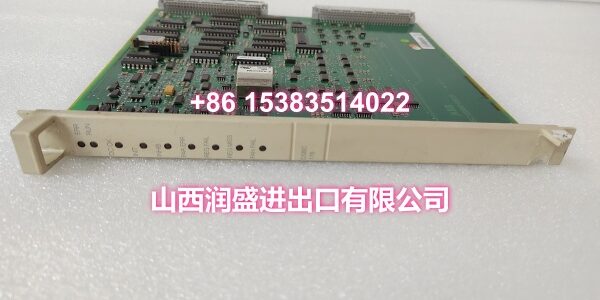
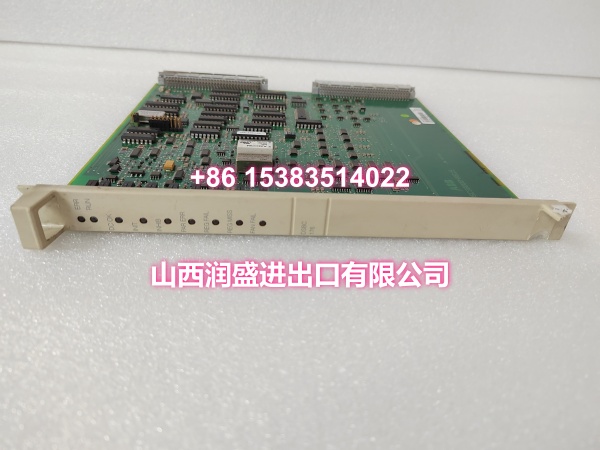
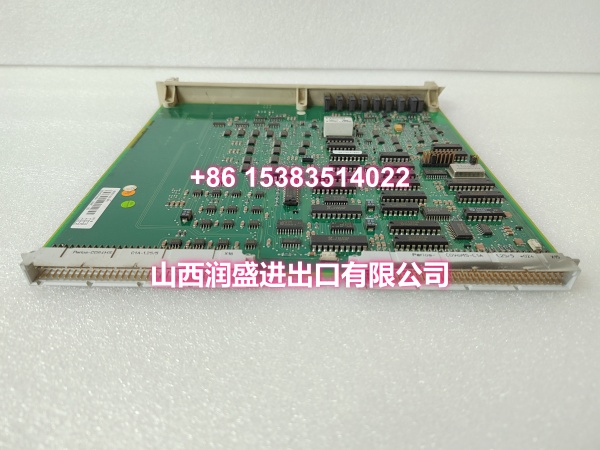
- Model: DSBC176 3BSE019216R1
- Brand: ABB
- Series: Advant Master / MasterPiece 200
- Core Function: Extends bus node capacity in ABB Advant Master / legacy DCS rack assemblies, enabling connection of additional field devices and I/O segments.
- Product Type: Bus Extension Module
- Key Specs: Rack plug-in format | Drop-in replacement | No software reconfiguration required | ~0.4 kg
- Condition: New Original / New Surplus
Key Technical Specifications
- Function: Bus extension / bus expansion for Advant Master DCS racks
- Part number: 3BSE019216R1
- Compatible systems: ABB Advant Master / MasterPiece 200 legacy DCS platforms
- Installation: Rack plug-in module, fits designated backplane slot
- Dimensions: approx. 324 × 234 × 22.5 mm
- Net weight: approx. 0.4 kg
- Operating temperature: typical industrial range (refer to specific rack manual)
- Origin: varies by production batch (Finland / Sweden reported)
Product Introduction (No Fluff)
This is a bus extension module for ABB Advant Master / MasterPiece 200 legacy DCS rack assemblies. It increases the available bus node capacity so the controller can connect and manage more field devices, remote I/O segments, or communication branches without reengineering the existing rack layout.
The practical value is capacity without migration. Instead of adding a new rack or upgrading the entire DCS, this module lets you expand within the existing Advant Master architecture. For plants maintaining mature installations, it is a straightforward way to keep the system functional while avoiding a full-scale migration project.
QA & Testing SOP (Dynamic & Transparent)
This is a bus-level expansion module, not a calibrated I/O channel. Testing focuses on mechanical, electrical, and continuity verification.
- Incoming inspection — Verify part number 3BSE019216R1 and model DSBC176. Check for cracked PCB, damaged edge connector, corrosion, and label consistency.
- Connector inspection — Examine backplane mating contacts for bent pins, oxidation, or burn marks from poor seating or arcing.
- Continuity check — Use a multimeter to verify continuity between the module’s ground reference points and the rack chassis ground. Confirm no open circuits or unexpected resistance.
- Visual fit check — Verify the module slides cleanly into the designated rack slot without forcing. Warped PCBs or damaged guides indicate prior mechanical stress.
- Packing — Place in anti-static packaging with rigid backing to protect the edge connector during transit.
Installation Pitfalls & Guide (Engineer to Engineer)
❗ Slot position is critical. Bus extension modules belong in specific slots defined by the rack configuration manual. Installing one in the wrong position may leave the bus improperly extended or block a slot needed for active modules.
❗ Verify bus topology before installation. Adding a bus extension changes the node count and may affect bus termination, addressing, or scan timing. Confirm the existing bus map before seating the module.
❗ Do not confuse with DSBC172 or other bus boards. DSBC176 is a bus extension module, while DSBC172 is a bus supervision board. They serve different functions and are not interchangeable.
❗ Check rack ground first. A bus extension module relies on a solid rack ground reference. A loose cabinet ground strap can cause intermittent bus faults regardless of the module condition.
Replacement steps
- Pre-install: Confirm the correct slot position from the rack manual. Back up controller configuration and document current bus topology.
- Removal: If the system supports hot-swap for this module type, follow the ABB procedure. Otherwise, schedule a controlled rack power-down. Release the retaining mechanism and withdraw the old module straight out.
- Install: Align the new DSBC176 with the slot guides and seat it firmly until it mates fully with the backplane.
- Verification: Confirm mechanical seating, check LED diagnostics, and monitor bus communication for at least 15 minutes after installation.
Technical FAQ
Is this an OEM genuine ABB part? We supply new original and new surplus stock depending on availability. If sealed original packaging is required, confirm before ordering.
Does DSBC176 need firmware or configuration? Typically no software reconfiguration is required for a drop-in replacement. However, adding a bus extension may require verifying node addressing and bus topology in the controller configuration.
Can DSBC176 replace DSBC172 or other bus boards? No. DSBC176 is a bus extension module, while DSBC172 is a bus supervision board. They have different functions and are not interchangeable. Always cross-check against your ABB hardware list.
What is the warranty? Warranty depends on condition and stock type. New surplus units typically carry shorter coverage than new original sealed stock. Confirm before purchase.
Is it in stock and ready to ship? Inventory changes daily. Send the required quantity and destination, and we will confirm availability, lead time, and shipping options.