Product Core Brief
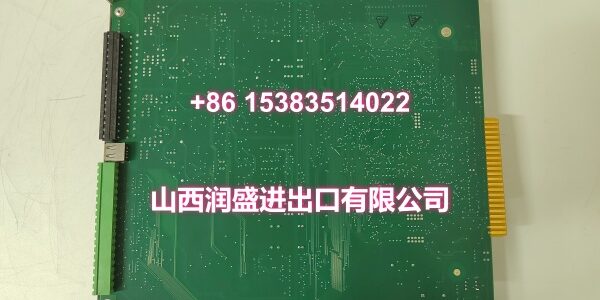
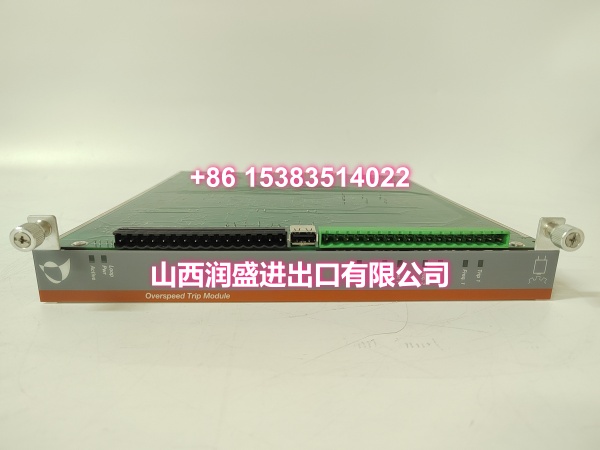
- Model: IOP365
- Brand: Metso
- Series: IOP300 Series I/O
- Core Function: Conditions and digitizes isolated analog process signals for DCS integration.
- Product Type: Isolated Analog Input Module
- Key Specs: 4-20mA / 0-10V | 16-bit Resolution | Galvanic Isolation
- Condition: New Original / New Surplus
Key Technical Specifications
- Module Type: Isolated Analog Input (AI)
- Product ID:
- Signal Types: 4-20mA, 0-10VDC, Thermocouple (selectable)
- Resolution: 16-bit ADC
- Channel Isolation: Galvanic isolation per channel
- Update Rate: 50ms typical
- Operating Temp: -20°C to +70°C
- Backplane: IOP300 Series compatible
- Diagnostics: Open wire / Short circuit detection
- Calibration: Factory calibrated, NIST traceable
Product Introduction
Sitting in the IOP300 series rack, this card bridges raw field signals and your control logic with full galvanic isolation. It handles the messy work of filtering, scaling, and isolating 4-20mA loops so your CPU sees clean data without ground loop interference.
Field engineers rely on the per-channel isolation to kill ground loops before they corrupt the entire backplane. The built-in diagnostics catch open wires at the terminal block, saving you hours of tracing cables in a live plant.
QA & Testing SOP (Dynamic & Transparent)
Every Metso IOP365 gets a full analog workout, not just a power-on check. We start with a visual inspection under magnification, looking for cold solder joints or flux residue that screams “field repair.” Then we run a 5-point calibration check using a Fluke 754 process calibrator, injecting 0%, 25%, 50%, 75%, and 100% of span to verify linearity within ±0.1%.
Next, we test the isolation barrier with a megohmmeter to ensure channel-to-channel and channel-to-ground resistance exceeds 100MΩ. Finally, we simulate an open-wire fault to confirm the diagnostic bit sets correctly in the status register. Units ship in anti-static foam with a calibration certificate showing actual vs. expected values.
Installation Pitfalls & Guide
❗ Shield Grounding: The biggest noise source isn’t the signal—it’s the shield. Ground the cable shield at the IOP365 terminal block only. Grounding at both ends creates a loop that injects 60Hz hum directly into your ADC. If you see wandering readings, check this first.
❗ Wire Size vs. Torque: These terminals are small. Over-torquing strips the threads; under-torquing causes intermittent connections that look like sensor drift. Use a calibrated inch-pound torque driver, not a standard screwdriver. 0.5 Nm is usually the spec—don’t guess.
❗ Backplane Power Draw: The IOP365 draws more 5VDC than older relay-output cards. If you’re populating a full rack, calculate the total backplane load. A sagging 5V rail causes random bit flips in neighboring modules.
Replacement SOP:
- Pre-Install: Tag every wire; photograph the terminal layout before pulling.
- Removal: Release the top and bottom latches simultaneously; pull straight out.
- Install: Verify the keying tab aligns; push until you hear the dual click.
- Power-On: Apply backplane power; wait for the “Module OK” LED before enabling the channel.
Technical FAQ
Q: Can I mix IOP365 and IOP303 modules in the same rack?
A: Yes, the IOP300 backplane supports mixed analog and digital cards. Just ensure your configuration software matches the slot assignment to the physical card type. The backplane doesn’t auto-detect; you have to tell it what’s where.
Q: Why is my reading noisy even with shielded cable?
A: Check your shield termination. If the shield is grounded at the sensor and the IOP365, you’ve created an antenna. Cut the shield at the sensor end, insulate it, and ground it only at the module. Also, verify you’re using twisted-pair cable, not parallel conductors.
Q: Is this module compatible with third-party DCS systems?
A: The IOP365 is designed for Metso DCS backplanes. While the analog signals are standard, the backplane communication protocol is proprietary. You can’t plug this into a Siemens or Allen-Bradley rack without a gateway. Stick to the OEM ecosystem for this card.
Q: What does the “Open Wire” diagnostic actually detect?
A: It monitors the loop current. If it drops below 3.5mA (with a 4-20mA range selected), the module flags an open circuit. Note: It won’t detect a shorted sensor—that just reads 0%. You need a separate short-circuit test for that.
Q: Do I need to recalibrate after installation?
A: No. The Metso IOP365 comes factory-calibrated with a certificate. Field calibration is only needed if you replace the internal fuse or after a major ESD event. For routine swaps, trust the factory trim and verify with a known good signal source.