Product Core Brief
- Model: XV-440-10TVB-1-50
- Brand: Eaton (Moeller)
- Series: XV-150 Series
- Core Function: 10-inch industrial Human-Machine Interface (HMI) and programmable display panel providing real-time data visualization, control logic, and machine monitoring.
- Product Type: HMI / Capacitive Touchscreen Display
- Key Specs: 10.4″ Display | ARM Cortex A9 800 MHz | Multi-Touch PCT | 24V DC
- Condition: New Surplus / OEM Original

Eaton XV-440-10TVB-1-50
Key Technical Specifications
- Display Size: 10.4 Inches
- Resolution: 800 x 600 (TFT LCD)
- Touch Technology: PCT (Projected Capacitive Touch) Multi-Touch
- Processor: ARM Cortex A9, 800 MHz
- Power Supply: 24V DC
- Communication Interfaces: Ethernet (1 or 2 ports), RS232/RS485, USB, Modbus
- Optional Interfaces: SmartWire-DT, Profibus-DP
- Mounting: Front panel installation
- Protection Rating: IP65 (Front)
- Screen Material: Anti-reflective tempered glass
Product Introduction
Engineered for demanding industrial environments, the Eaton XV-440-10TVB-1-50 serves as a versatile Human-Machine Interface (HMI) that can also function as a standalone PLC. Powered by an 800 MHz ARM Cortex A9 microprocessor, this 10.4-inch touchscreen provides high-resolution, real-time data visualization for SCADA systems, production lines, and complex machinery.
Unlike traditional resistive touch panels, this unit utilizes modern Projected Capacitive Touch (PCT) technology. It supports intuitive multi-touch gestures like pinch-to-zoom and two-finger scrolling, mimicking the user experience of modern smartphones. The anti-reflective tempered glass front ensures easy cleaning and glare reduction, while the rugged industrial build guarantees reliable operation in harsh conditions.
QA & Testing SOP
HMI panels require functional verification of both the display matrix and the touch digitizer. We ensure the unit is ready for deployment.
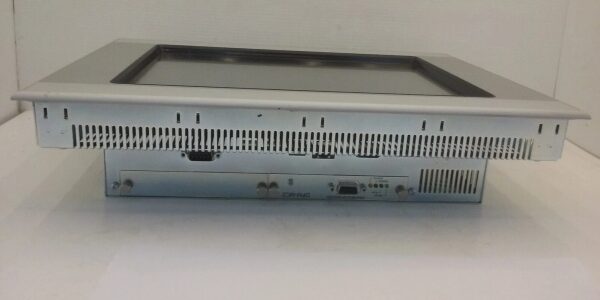
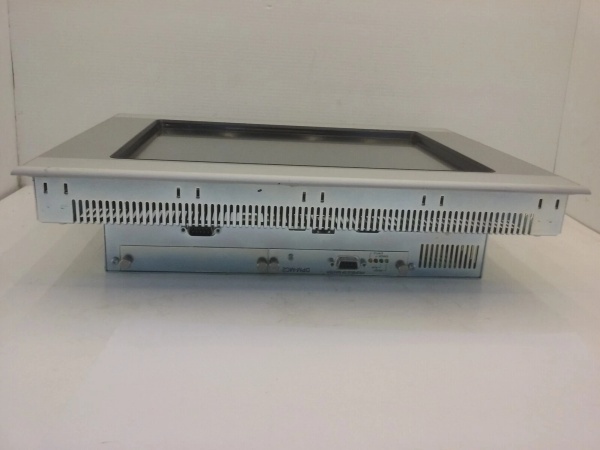
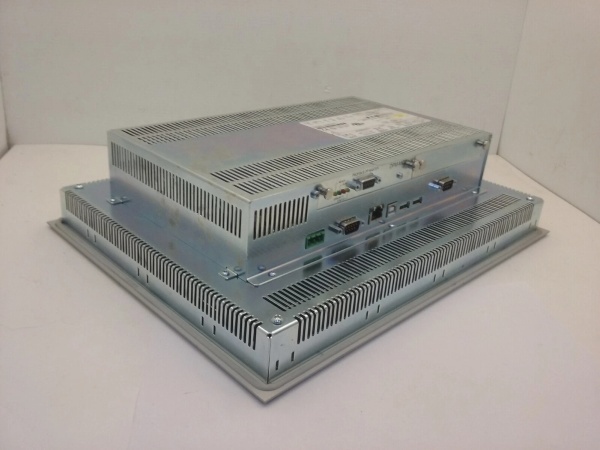
- Anti-Counterfeit & Visual Audit: We inspect the tempered glass front for scratches, verify the Eaton silkscreen, and check the rear I/O ports and mounting clips for physical damage.
- Display & Touch Validation: We power up the unit to verify pixel integrity (no dead pixels or discoloration) and test the PCT multi-touch sensors for accurate gesture recognition and zero dead zones.
- Communication Port Test: We verify the functionality of the Ethernet and serial ports to ensure seamless integration with external PLCs or SCADA networks.
- Boot & OS Check: We confirm the HMI boots correctly into its operating system without kernel panics or boot loops.
- ESD Safe Packaging: Touch digitizers and LCD controllers are highly ESD sensitive. We pack in anti-static shielding with rigid corner protection to prevent transit damage.
Eaton XV-440-10TVB-1-50
Installation Pitfalls & Guide
❗ Avoid Direct Sunlight: Do not install this HMI in direct sunlight. UV exposure can degrade the plastic components over time, and infrared interference from the sun can disrupt the capacitive touch sensors.
❗ Front Panel Sealing: To maintain the IP65 rating against dust and water jets, ensure the provided sealing gasket is correctly seated in the panel cutout before tightening the rear mounting clamps.
❗ Network Isolation: For cybersecurity and operational safety, always connect the HMI’s Ethernet ports to an isolated industrial network via a firewall or router, rather than directly to the public internet or unprotected corporate networks.
Replacement SOP:
- Pre-Install: Document the existing network IP addresses, serial baud rates, and application program; power down the 24VDC supply.
- Removal: Disconnect all communication and power cables; release the front mounting clamps and push the old HMI out from the rear.
- Install: Insert the new XV-440-10TVB-1-50 into the panel cutout; secure the mounting clamps evenly; reconnect field wiring.
- Power-On Test: Apply 24VDC; verify the HMI boots; load the application program via USB/Ethernet; and test communication with the connected PLC.
Technical FAQ
Can this HMI be used as a standalone PLC?
Yes. The XV-440-10TVB-1-50 features built-in programmable logic. It can be configured to operate as a standard HMI, or it can provide additional PLC functionality to execute control logic directly on the panel.
What programming software is required?
Eaton HMI panels are typically configured using Eaton’s Visual Designer software. This graphical interface allows users to design screens, set up alarms, and configure communication protocols without needing extensive coding experience.
Does it support industrial fieldbuses?
Yes. Out of the box, it supports standard protocols like Modbus and Ethernet. It also offers optional interfaces for SmartWire-DT and Profibus-DP, allowing seamless integration into broader Eaton automation ecosystems.
Is the screen resistant to industrial chemicals?
The front of the display is constructed from anti-reflective tempered glass, which is highly resistant to industrial cleaning agents, oils, and physical impacts, making it easy to wipe down and maintain.
Why is this sold as new surplus?
This unit was pulled from sealed OEM overstock or an unfulfilled project before installation. We test it electrically to verify display and touch functionality, but we aren’t replacing internal components. You are getting unused factory hardware with original manufacturing tolerances at a fraction of the active OEM list price.
Need the matching Eaton PLC controller, SmartWire-DT modules, or Visual Designer software support for this HMI? I can pull those up for you.