Field Engineer’s Notes (From the Trenches)
The “Gotcha” is LCNP-CPU Pairing, Drop Cable Termination & Port Identification.
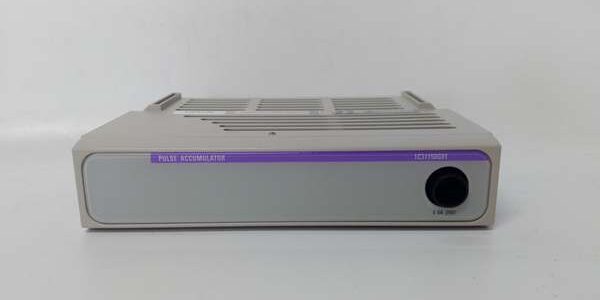
LCNP Must Pair with Correct CPU: The 1C31150G01 is designed for the 1C31110G01 (or 1C31107G01) Drop Controllers. It will notwork as a standalone or with non-Ovation CPUs. If you replace a Drop Controller, you typically replace/swap the LCNP with itas a set (unless the LCNP is known good and the same revision is compatible — safest to swap both as a matched pair from spares).
Drop Cable Termination (50Ω): The UCA/LCN coax daisy-chain must be terminated at both ends with a 50Ω BNC terminator (supplied with NC or drop kit). If this drop is the last physical deviceon the chain, ensure the BNC OUT (or the port you’re using as the terminal point) has the terminator plugged in. Forgetting it causes signal reflections → “LINK Flashing” or intermittent “Drop Offline” especially when adding a new drop to an existing chain.
- Exception:If the drop is mid-chain(rare in Ovation — usually it’s end-of-line or home-run to NC), do NOT terminate — the signal passes through to the next device. Most Ovation installs have each drop home-run or daisy-chained with the lastdrop terminated.
Port A vs B: Usually Port A connects to the Primary NC’s Drop Cable; Port B to the Redundant NC’s cable. If you only have one NC, land the cable on Port A and leave B empty — the “LINK B” LED will be dark (normal). Only concerning if LINK A is also dark with a good cable landed.
Seating with CPU: The LCNP and CPU interlock via the backplane. If you reseat/replace the CPU, you mustalso ensure the LCNP is fully seated in the adjacent slot and its thumb-screws are snug. A partially seated LCNP → “FAIL” LED Red on LCNP, CPU may show “LCNP Not Found” and not go RUN.
Real-World Applications
- Turbine Protection Drop (Redundant LCNP + Redundant CPU): A 1C31110G01 + 1C31150G01 (primary) and identical standby pair in a Redundant Drop rack. LCNP Port A → Primary NC Drop Cable A; Port B → Redundant NC Drop Cable B. The redundant LCNP mirrors the active one’s link state. On primary CPU/LCNP failure, standby takes over; turbine trip logic remains online with no ops-notice except status change on the HMI “R-Drop: Standby Active.”
- BOP Satellite Drop (Fiber LCNP): A small I/O drop 800m from the MCC in a lightning-prone area uses a 1C31150G01 with ST fiber ports (instead of coax) to connect back to the Station Controller via multimode fiber. Eliminates induced surges that previously caused coax UCA links to drop during thunderstorms. The LCNP’s LINK LEDs confirm physical layer health separately from the CPU RUN status.
High-Frequency Troubleshooting FAQ
Q: Drop Controller (1C31110G01) “RUN” LED OFF, LCNP “FAIL” LED RED (or both dark). LCNP “LINK A/B” LEDs dark.
A: LCNP Not Seated / Drop Cable Not Landed / CPU Mismatch.
- Check physical seating: Power down drop (or plan for brief outage). Loosen LCNP thumb-screws, pull, re-insert firmly into Slot 1 (adjacent to CPU in Slot 0), tighten evenly. Ensure CPU (Slot 0) is also fully seated. Power up.
- Verify Drop Cable is landed on LCNP Port A (BNC or Fiber). Is the coax center conductor making contact? Is the BNC finger-tight? For fiber — is the Tx/Rx polarity correct (try swapping TX/RX at one end if no link)?
- Check the Network Controller (NC) end: Is the Drop Cable terminated (50Ω) at the last device? If this drop is the last in the chain → ensure the terminator is on the LCNP port you’re using (usually A if B unused) afterconfirming link is stable.
Note:Some sites terminate at the NC itself if the drop is the only device on that port — in that case the LCNP port does NOT get a terminator (NC provides it). Know your plant’s UCA topology.
- If FAIL stays Red after reseating → verify CPU and LCNP are a matched pair (same vintage/generation). A very old 1C31150G01 may not be compatible with a much newer 1C31110G01 (or vice versa — firmware handshake fails). Swap both as a set from known-good spare if uncertain.
Q: CPU “RUN” Green, but LCNP “LINK A” LED OFF (Dark) while cable is landed and NC shows the port Active.
A: Cable / Terminator / Media Mismatch.
- Swap the BNC cable with a known-good patch (or move to Port B temporarily to test — if LINK B lights, Port A BNC jack may be damaged).
- Verify the Drop Cable characteristic impedance = 50Ω. Using 75Ω CATV coax (RG-59) → no link / high BER.
- If using fiber LCNP: Ensure wavelength matches (usually 1300nm MMF). Try looping back a known-good fiber patch from another drop to confirm port lights LINK. Check TX/RX orientation — multimode ST/SC often needs TX of one end to RX the other.
- Confirm the NC’s Drop Cable port is Enabled and the chain is properly terminated at the far end. An unterminated far end can cause marginal link that won’t establish.
Q: CPU in RUN, LCNP LINK A Green, but Ovation WS shows “Drop Not Responding” or “Timeouts.”
A: Drop ID Mismatch, Firmware Rev Mismatch, or NC Port Assignment.
- Verify the Drop ID (rotary switches on CPU or soft-config in database) matches the Drop Definition in the Ovation Engineering Workstation (Drop → Properties → Drop Number). Mismatch → NC ignores the drop’s tokens.
- Check Firmware Compatibility: Is the LCNP/CPU firmware rev compatible with the Station Controller / NC Ovation version? Very old LCNP may need a firmware update (via WS → Update Module Firmware) to talk to a newer NC O/S.
- On the NC: Verify the Drop is assigned to the correct Drop Cable Port (A or B) and that the NC’s Drop Cable is configured/active. A Drop assigned to Port 2 when you landed the cable on Port 1 → no comms.
- Check for Excessive CRC Errors on the NC’s Drop Statistics page — high CRCs suggest a bad BNC connector, damaged coax, or missing terminator causing reflections.
Please note: The listed price is not the actual final price. It is for reference only and is subject to appropriate negotiation based on current market conditions, quantity, and availability.