Field Engineer’s Notes (From the Trenches)
The “Gotcha” is Common (C) = AC Neutral & Filter Delay.
Common (C) Terminal: There is ONE Common for all 16 points. It is notinternally tied to anything. You must land a wire from your 120V AC Neutral (or Return leg of a 120V control transformer secondary) to the “C” terminal on the IC693TBB003. If you land Hot (Line) to Common, the inputs will never see a potential difference (0V across the input circuit) → all points stay Off. If you leave Common floating, the circuit is open → no turn-on.
Filter = 20ms: This is a hardwarefilter, not software-programmable like the 24V DC cards. It means the module needs the AC signal to be present for ~2 full cycles (at 60Hz) to recognize it. This rejects bounce from dirty contacts but also means:
- You cannot use this module for high-speed pulse counting (encoder Z-ref at 1ms won’t register).
- On a momentarycontact closure (<15ms), the input may not register. For typical machine/process aux contacts (closed for >100ms), this is a non-issue.
Phase Consideration: Although the module is AC and L/N polarity doesn’t matter for detection, ensure your 120V AC sense supply is a separate fused circuit or the same phase as the control power. Mixing Line from Phase A and Neutral from Phase B (in a 3-phase system) gives you 208V Line-Line → overvoltage on the input (may damage or read erroneously). Always use the pairedHot+Neutral from the same 120V control xfmr secondary.
Wire Gauge & Torque: Uses IC693TBB003 screw terminals. Accept #14-#22 AWG. Torque to 7 lb-in (0.8 Nm). Loose Common is the #1 cause of “intermittent AC inputs.”
Real-World Applications
- Water Treatment Pump House (MCC Status): A 90-30 rack with reading 16 x 120V AC aux contacts: Pump Run (52a), Trip (86), High Vibration, Local/Remote, Hand/Off/Auto. The 120V AC comes from the same control xfmr that powers the MCC lighting. No interposing relays needed. The Common (C) terminal lands to the xfmr neutral bus. Easy verification via point LEDs during SAT.
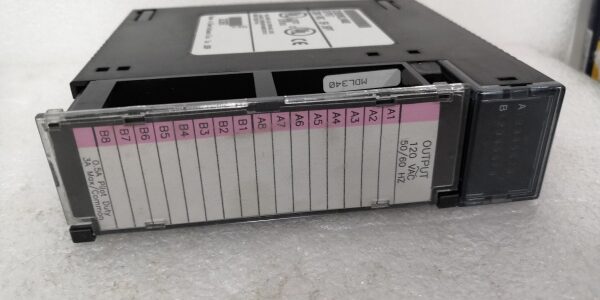
- Automated Palletizer (Guard Door & E-Stop): 120V AC N.C. guard door contacts and E-Stop pushbuttons (N.C. contacts) wired in series per group (8 doors per group). The MDL340 sinks the return to Neutral; a single door open breaks the circuit, input goes Off, and the safety logic faults the line. The AC voltage provides better noise immunity than 24V DC in the high-inductive-switching environment of the palletizer drives.
High-Frequency Troubleshooting FAQ
Q: Point LED is OFF, but I measure ~120V AC between the Input terminal and a known good Neutral bus (not the module Common terminal).
A: Common (C) Not Landed or Open Circuit on Return.
- Check the “C” (Common) terminal on the TBB003. Is a wire landed from your 120V AC Neutral / Control Xfmr Secondary Return? Is it tight (7 lb-in)?
- Measure voltage between the Input terminal (where you see 120V AC) and the “C” terminal on the block. If it reads 0V AC there but 120V AC to the panel Neutral bus, the Common wire is open or floating. The input circuit needs the return at the module’s Common, not just a Neutral somewhere else in the panel.
- If Common is landed and tight but still 0V at C-to-Input, check the 120V AC sense supply fuse (often a 2-5A slow-blow in the control xfmr output).
Q: LED is ON, but the CPU Input (%I address) reads “0” or doesn’t change with the switch.
A: Address Mismatch or Rack/Slot Error.
- In Proficy Machine Edition (or LM90), check the Hardware Configuration. Is the MDL340 assigned to the correct Rack Number and Slot Number? (e.g., Rack 0, Slot 3). If the physical slot is 3 but config says Slot 4, the CPU reads the wrong image.
- Check the Input Address in your logic (e.g.,
%I0001for Slot 3, Point 1 usually maps to%I:slot_base + 0). Verify the base address in the I/O Mapping table. - If addressing is correct, check the Backplane Seating: Loosen the two module screws, press the module firmly into the backplane (ensure ejector levers click), and re-tighten. A partially mated P1 connector can pass power (OK LED on) but not data.
A: Yes. The is fully supported in the RX3i Universal Backplane.
- It requires the IC693TBB003 Terminal Block — notthe RX3i IC694TBB032 (different keying/pinout).
- Configure it in PME as “” under the appropriate slot.
- The RX3i CPU treats it identically to a 90-30 CPU. Ensure the universal backplane firmware is reasonably current to avoid rare detection issues with very old 90-30 module revisions.
Please note: The listed price is not the actual final price. It is for reference only and is subject to appropriate negotiation based on current market conditions, quantity, and availability.