Customer Value & Operational Benefits
Sinking Input for PNP (Source) Sensors & Dry Contacts
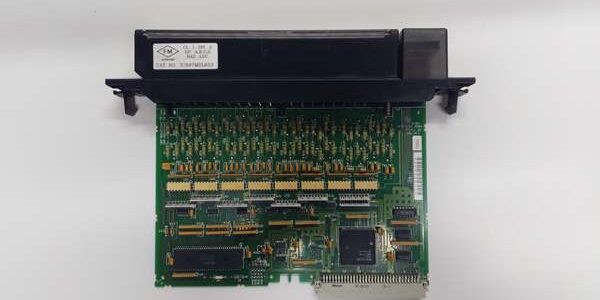
The MDL653 is the standard for PNP (Source) Sensors common in North American industrial automation — the sensor outputs +24V when made; you land that directly to the MDL653 input terminal. It also works with Dry Contacts where you land +24V (from a fused distributor) on one side of the contact and the other side to the Input Terminal; the Common (0V) is landed at the TBB007. This avoids needing interposing relays that would be required if using a Sourcing Input card (MDL654) with PNP sensors. It’s the natural pair to the IC697MDL753 (Sourcing Outputs) in the same rack — one +24V distribution to the output V+ terminals, one 0V return to the input C terminals.
High Density (32 Points)
You get maximum density — 32 inputs in one slot. For large MCC Status Panels (Pump Run/Stop/Alarm/Trip/Aux contacts) or Process Skids (valve position switches, pressure switches, temp switch contacts), this density saves slots for additional analog or specialty modules, reducing chassis cost and panel footprint.
Visible Point Diagnostics
Each of the 32 inputs has a tiny Green LED adjacent to the terminal number. If a guard door limit switch is closed but the input reads “0” in the PLC, you check the LED: Lit = +24V present at terminal & Common good; Unlit = Open circuit, wrong polarity, or missing Common. This separates field wiring faults from logic errors in <30 seconds on the floor.
Field Engineer’s Notes (From the Trenches)
The “Gotcha” is Common (C) Terminal Landing & Sourcing vs Sinking.
Commons (C1-C4): There are 4 Commons, one per group of 8. They are notinternally tied. You must land a 0V DC (DC Return) wire from your 24V DC supply to eachCommon terminal (C1, C2, C3, C4) on the IC697TBB007, or jumper them externally if you want a single-point return. Forgetting to land C3 causes “Inputs 17-24 dead despite LED being Off when open” (the LED won’t light because no return path exists for the opto-isolator current).
Sinking (This Card) vs Sourcing:
- MDL653 (Sinking): Field device (PNP Sensor or +24V-fed dry contact) applies +24V to Input Terminal. Module sinks current to Common (0V). Use with PNP (Source) Sensors or Dry Contacts with +24V on one side.
- MDL654 (Sourcing — IC697MDL654 is the sourcing version): Module sources +24V onto the input terminal; field device (NPN sensor or dry contact to 0V) completes to 0V. Use with NPN (Sink) Sensors.
- Mistake: Wiring an NPN sensor (outputs 0V/switched ground) to the MDL653 (expects +24V). Result: No turn-on (open circuit). Match: PNP Sensor → Sinking Input (MDL653); NPN Sensor → Sourcing Input (MDL654).
Wire Gauge & Torque: Uses IC697TBB007 screw terminals. Accept #14-#22 AWG. Torque to 7 lb-in (0.8 Nm). Loose Common connection is the #1 cause of “intermittent inputs” on 90-70 racks. Give the Common terminal an extra tug-test after tightening all wires.
Real-World Applications
- Combined Cycle GT Aux Skid (Valve Position Switches): A 90-70 rack with reading 32 x dry contacts: GCV Full Open/Closed, SRV Closed, Drain Valve Closed, Fire Protection Trip Confirm. +24V is distributed from a fused power supply; the switch common side lands to the MDL653 input terminals. The 0V returns (C1-C4) all land to a single DIN-rail mounted 0V bus. Easy verification via point LEDs during SAT.
- Automated Stamping Press (Safety Gates & E-Stops): 32 x Normally Closed safety gate contacts and E-Stop segments wired in series per group (8 gates per group). The sinks the return; a single gate open breaks the circuit, input goes Off, and the safety logic faults the press. Individual LEDs help identify which groupis open during reset attempts.
High-Frequency Troubleshooting FAQ
Q: Point LED is OFF, but the sensor is active (DMM shows ~24V between Input terminal and the 0V bus).
A: Common (C) Not Landed or Open Circuit on Return.
- Check the “C” (Common) terminal for that point group on the TBB007. Is a wire landed from your 24V DC Supply 0V/Return? Is it tight (7 lb-in)?
- Measure voltage between the Input terminal (where you see +24V from sensor/supply) and the “C” terminal for that group. If it reads 0V (or <5V) there but 24V to the supply 0V, the Common wire is open or floating. The input circuit needs the return at the module’s Common, not just anywhere in the panel.
- If Common is good, verify polarity/wiring: Ensure you didn’t land a switched 0V(NPN sensor output) to this card — it needs +24V applied to the input terminal.
Q: LED is ON, but the CPU Input (%I address) reads “0” or doesn’t change with the switch.
A: Address Mismatch or Rack/Slot Error.
- In Proficy Machine Edition, check the Hardware Configuration. Is the assigned to the correct Rack Number and Slot Number? (e.g., Rack 0, Slot 3). If the physical slot is 3 but config says Slot 4, the CPU reads the wrong image.
- Check the Input Address in your logic (e.g.,
%I0001for Slot 3, Point 1 usually maps to%I:slot_base + 0). Verify the base address in the I/O Mapping table. - If addressing is correct, check the Backplane Seating: Loosen the two module screws, press the module firmly into the backplane (ensure ejector levers click), and re-tighten. A partially mated P1 connector can pass power (OK LED on) but not data.
A: Yes, with the correct Terminal Block.
- The is mechanically/electrically compatible with the RX7i backplane (VME64/PCI hybrid).
- It requires the IC697TBB007 Terminal Block (Series 90-70 style), notthe RX3i IC694TBB032 (different keying/pinout).
- Configure it in Proficy Machine Edition as “” in the appropriate slot.
- Ensure total backplane current draw (CPU + I/O) is within the PWR710/711/PSA100 capacity.
Please note: The listed price is not the actual final price. It is for reference only and is subject to appropriate negotiation based on current market conditions, quantity, and availability.