Product Core Brief
- Model: DSMB127
- Brand: ABB
- Order Code: 57360001-HG
- Series: ABB SPC700 Controller Series
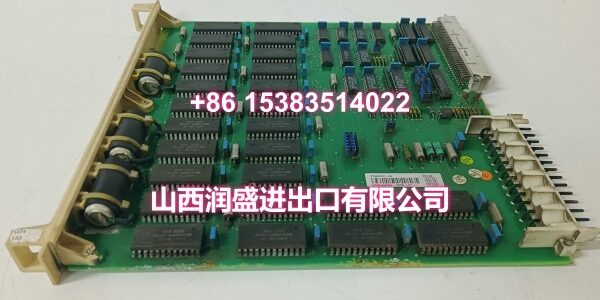
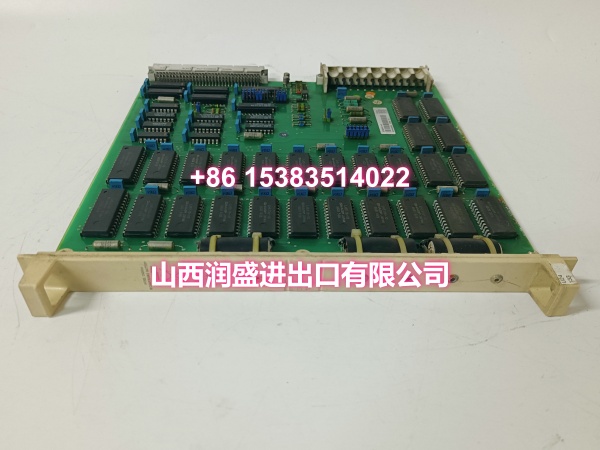
- Core Function: Memory board with battery-backed RWM for ABB SPC700 controller systems, providing reliable program and data storage for distributed control systems.
- Product Type: Memory Board / Control System Memory Module
- Key Specs: Battery-Backed RWM | SPC700 Compatible | Plug-In Connection | High Reliability | Industrial-Grade Design
- Note: Condition: New Original (New Surplus). Origin: Sweden.
Key Technical Specifications
| Parameter | Value |
|---|---|
| Manufacturer Part Number | 57360001-HG |
| Device Model | |
| Device Type | Memory Board (RWM with Battery) |
| Series | ABB SPC700 Controller Series |
| Function | Program and data storage for SPC700 controllers |
| Memory Type | RWM (Random Write Memory) with battery backup |
| Connection Type | Plug-in module |
| Output Type | DC |
| Operating Temperature | Industrial-grade (typically 0°C to +60°C) |
| Storage Temperature | -40°C to +85°C |
| Humidity Range | 5% to 95% RH, non-condensing |
| Mounting | Plug-in card slot (SPC700 controller chassis) |
| Dimensions | Approx. 2 x 25.5 x 24.5 cm |
| Weight | Approx. 0.46 kg |
| Typical Applications | DCS program storage, process data retention, controller configuration backup |
| Origin | Sweden |
| Condition | New Original (New Surplus) |
Product Introduction
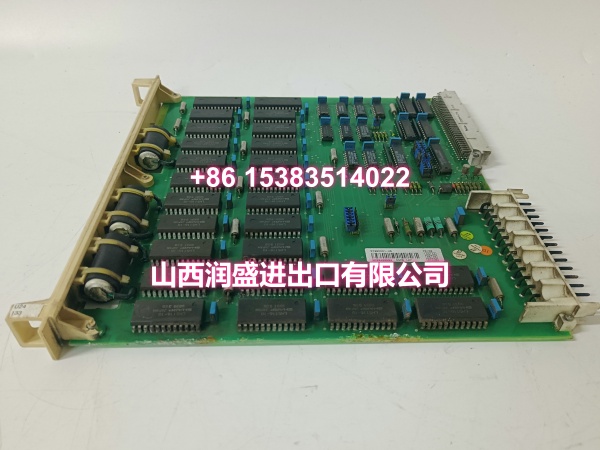
The ABB DSMB127 (order code 57360001-HG) is a memory board with battery-backed RWM designed for ABB’s SPC700 controller series. It serves as a critical storage component for distributed control systems, providing reliable program and data retention for SPC700-based DCS installations.
In industrial control environments where data integrity directly impacts production continuity, the DSMB127 delivers battery-backed memory storage that preserves controller programs, configuration parameters, and process data even during power outages. The onboard battery ensures that critical information is retained when the controller loses main power, preventing program loss and eliminating the need for time-consuming re-downloads after power restoration.
The DSMB127 is specifically designed for the SPC700 controller architecture, a distributed control system platform used in process industries including power generation, chemical processing, oil and gas, and manufacturing. The memory board plugs directly into the SPC700 controller chassis, providing expandable storage capacity for complex control programs and large-scale process data logging requirements.
The module features a plug-in connection design for easy installation and replacement. Its compact form factor (approximately 2 x 25.5 x 24.5 cm, weighing about 0.46 kg) allows it to be installed directly into the SPC700 controller’s memory slot without requiring additional mounting hardware or wiring modifications.
The DSMB127’s high-reliability design incorporates quality components and materials tested for industrial environments, ensuring stable operation under demanding conditions including temperature variations, humidity, and electromagnetic interference. The battery-backed memory architecture provides peace of mind for critical process control applications where data loss could result in costly production downtime.
For maintenance teams supporting SPC700 DCS installations, the DSMB127 is a direct drop-in replacement for failed or degraded memory boards. Its standardized plug-in form factor ensures compatibility with existing SPC700 controller configurations, avoiding the need for mechanical modifications or rewiring. When replacing a DSMB127, always verify that the order code (57360001-HG) matches the original board to ensure full compatibility with the controller’s hardware configuration.
QA & Testing SOP
Every unit goes through a structured verification process before shipment:
- Visual Inspection: Check the PCB for cracks, burnt components, corrosion on connector pins, and physical damage to the board. Verify that the battery holder is intact and the battery is properly seated. Check for any signs of battery leakage, which can corrode the PCB and damage surrounding components.
- Connector Pin Verification: Inspect the plug-in connector pins for straightness, corrosion, or bending. Bent pins cause poor contact with the SPC700 controller’s memory slot, leading to intermittent communication failures or complete board malfunction.
- Battery Voltage Test: Measure the backup battery voltage to verify it is within the specified range. A weak or depleted battery will not retain memory during power outages, defeating the purpose of the battery-backed RWM. Replace the battery if the voltage is below the minimum threshold.
- Memory Read/Write Test: Where test infrastructure allows, perform read/write tests on the RWM to verify that the memory cells are functioning correctly. Write test patterns to the memory and read them back to confirm data integrity across the full memory address range.
- Power-On Self-Test: Install the board into a compatible SPC700 controller chassis and verify that the controller recognizes the memory board without errors. Check for any fault codes or memory-related alarms in the controller’s diagnostic screen.
- Anti-Counterfeit & Packaging: Verify authenticity markings on the PCB and components. Each unit is shipped in anti-static protective packaging with desiccant to prevent moisture absorption and connector oxidation during transit.
Installation Pitfalls & Guide
Installing or replacing a memory board requires careful attention to safety procedures and proper handling.
❗ Power-Down Before Installation: Always disconnect power to the SPC700 controller chassis before removing or inserting the DSMB127 board. Memory boards should be replaced with power off to prevent electrical damage to the board or the controller’s backplane connector.
❗ Anti-Static Protection: Always wear an anti-static wrist strap when handling the DSMB127 board. The PCB contains sensitive electronic components that can be damaged by electrostatic discharge (ESD). Handle the board by its edges only, avoiding contact with components or connector pins.
❗ Battery Orientation: When replacing the backup battery, verify that the battery is installed with the correct polarity. Reversing the battery polarity can damage the battery holder circuit and potentially damage the memory board’s power regulation circuitry.
❗ Correct Board Orientation: The DSMB127 must be inserted into the SPC700 controller’s memory slot with the correct orientation. Forcing the board into the wrong orientation can damage the connector pins and the controller’s backplane. Align the board’s connector with the slot guides and push firmly and evenly until fully seated.
❗ Board Seating Verification: After inserting the DSMB127, verify that the board is fully seated in the memory slot. A partially seated board can cause intermittent memory errors, data corruption, or controller faults. Gently press on the board’s edge to confirm it is securely locked in place.
4-Step Replacement Guide:
- Pre-install: Document the existing controller configuration, including controller type, firmware version, and any custom parameters. Back up the controller’s program and configuration data to an external storage device. Verify the replacement board’s order code (57360001-HG) matches the original. Prepare anti-static protection, tools, and a multimeter for battery voltage verification.
- Removal: Disconnect power to the SPC700 controller chassis. Wear an anti-static wrist strap. If the board has a retention clip or screw, loosen it before removal. Gently pull the board straight out of the memory slot. Inspect the controller’s memory slot connector for damage or debris.
- Install: Align the new DSMB127’s connector with the memory slot guides. Push firmly and evenly until fully seated. Secure the board with the retention clip or screw if applicable. Verify that the board is fully seated and locked in place.
- Power-on Test: Apply power to the SPC700 controller chassis. Enter the controller’s diagnostic screen and verify that the memory board is recognized with no fault codes. Check the memory status to confirm that the board is functioning correctly and that the battery backup is operational. Monitor the controller for several minutes to confirm stable operation.
Technical FAQ
1. What does “RWM with Battery” mean for the DSMB127? RWM stands for Random Write Memory, which is a type of volatile memory that requires power to retain data. The onboard battery provides backup power to the RWM when the controller loses main power, ensuring that program data and configuration parameters are preserved. Without the battery backup, the memory would lose all stored data during a power outage, requiring the controller program to be re-downloaded from an external source.
2. How often should the backup battery on the DSMB127 be replaced? The backup battery lifespan depends on usage conditions and the specific battery type installed. As a general guideline, batteries should be checked annually and replaced every 3-5 years as a preventive measure. If the controller reports a low battery warning or if memory data is being lost during power outages, the battery should be replaced immediately. Always use the correct battery type specified by ABB for the DSMB127.
3. Can the DSMB127 be used with ABB’s AC 800M or 800xA systems? The DSMB127 is designed for ABB’s SPC700 controller series. It is not directly compatible with newer platforms like AC 800M or 800xA, which use different memory module form factors and architectures. If you’re migrating to a newer system, you’ll need to use the corresponding memory modules designed for that platform.
4. What are common symptoms of a failing DSMB127 memory board? Common symptoms include controller memory errors, program corruption, loss of configuration data after power cycles, low battery warnings, intermittent controller faults related to memory access, and the controller failing to recognize the memory board during startup. If you’re experiencing any of these symptoms, check the controller’s diagnostic screen for specific memory-related error codes.
5. What’s the difference between New Surplus and Refurbished for memory boards? We supply this unit as New Original (New Surplus)—unused, original factory stock. This comes with a standard 12-month warranty. Refurbished memory boards carry risks including degraded memory cells from prior use, weakened battery backup circuits, and latent failures that may only manifest after extended operation. For a board that directly affects data integrity and controller reliability, new surplus is the safer choice.