Product Core Brief
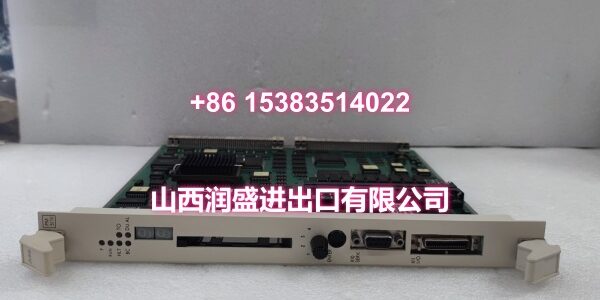
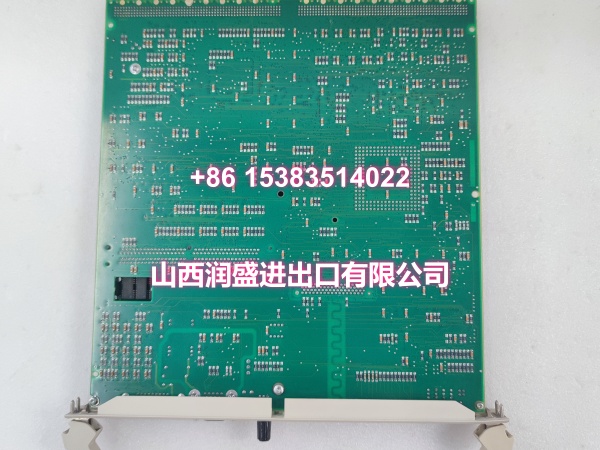
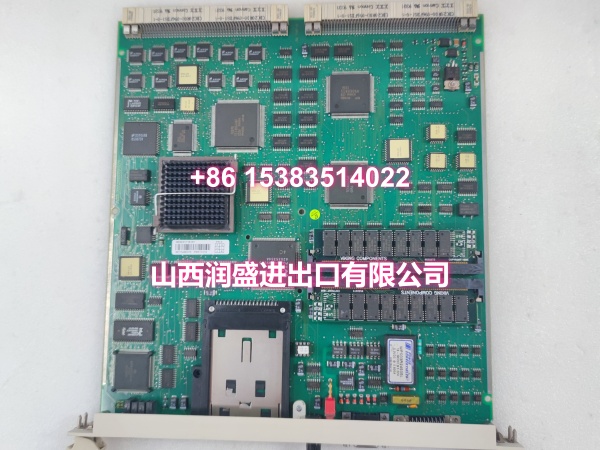
- Model: PM511V16
- Order Number: 3BSE011181R1
- Brand: ABB
- Series: AC 500 (V2 platform)
- Core Function: Executes the PLC application program and coordinates communication with local and remote I/O as the central CPU of an AC 500 control system.
- Product Type: PLC CPU module
- Key Specs: AC 500 V2 CPU | Redundancy-capable | Ethernet and serial communication interfaces
- Condition: New Original / New Surplus (condition stated per line item on quotation)
Transparency note: The order number 3BSE011181R1 identifies the hardware article and revision. Functional behavior is defined by the firmware and the AC 500 project file, not by the part number alone. Confirm the nameplate of the unit being replaced.
Key Technical Specifications
| Category | Parameter | Value |
|---|---|---|
| Identification | Full Model | PM511V16, order number 3BSE011181R1 |
| Identification | Platform | ABB AC 500, V2 hardware generation |
| Function | Module Type | PLC CPU / controller |
| Function | Role in Topology | Central processing unit; owns application execution and I/O coordination |
| Architecture | Redundancy | Supports redundant CPU pairing with automatic failover |
| Compatibility | Replacement Rule | Order number, revision, firmware, and project file must match the original |
| Mounting | Installation | DIN rail or AC 500 baseplate slot |
| Communication | Interfaces | Ethernet, serial ports; fieldbus per configuration |
| Maintenance | Hot Swap | Only where the redundant configuration and OEM procedure explicitly permit it |
| Electrical | Supply | 24 V DC, per AC 500 specification |
| Environment | Operating Condition | Control cabinet interior; temperature and ventilation limits apply |
| Failure Signature | Common Symptoms | CPU fault, I/O communication timeout, redundant pair mismatch |
| Supply | Lead Time | In-stock models ship within 48 hours |
Product Introduction
The PM511V16 (3BSE011181R1) is an ABB AC 500 V2 CPU used in process, power, and industrial automation applications. It runs the PLC application and manages communication with local and remote I/O.
The replacement risk is programmatic, not mechanical. A CPU that powers up and communicates can still be wrong if the firmware revision or the loaded application does not match the original. Verify the nameplate, the firmware version, and the project backup before ordering.
QA & Testing SOP
Identical for new original and surplus. No shortcuts.
- Inbound verification. Order number, revision, serial number, and firmware label photographed and matched against the customer’s AC 500 project documentation. Mismatched revisions are quarantined.
- Physical inspection. Connector, pins, and housing examined under magnification for rework, oxidation, or bent-pin damage.
- Bench power-up. Powered through a current-limited 24 V DC supply; startup sequence, status LEDs, and self-diagnostics logged.
- Functional exercise. Where the platform permits, CPU exercised with a loaded project; communication and I/O coordination verified against the OEM configuration.
- Anti-static packaging. Moisture-barrier bag, desiccant, ESD label. Signed test record packed with the unit.
Installation Pitfalls & Guide
❗ Firmware and project mismatch. A replacement CPU with a different firmware revision or an unloaded application will power up, communicate, and then fail to execute the correct logic. Load the validated project from the OEM backup and confirm the revision.
❗ Redundancy not re-established. Replacing one CPU of a redundant pair without completing the synchronization procedure leaves the system running without protection against a second failure.
❗ 24 V DC supply quality. Marginal or noisy DC supply voltage is a frequent cause of repeated CPU faults after replacement. Measure the supply at the terminal, not at the power supply output.
❗ Cabinet environment. Dust, humidity, or degraded ventilation will destroy the replacement on the same timeline as the original. Correct the enclosure condition during the outage.
Replacement sequence:
- Pre-install — Confirm safe process state, apply lockout/tagout, photograph nameplate and mounting position.
- Removal — De-energize the 24 V DC supply, release retention, extract without stressing connectors.
- Install — Mount to rail or baseplate, torque fasteners to OEM specification, reconnect wiring against the photographed reference.
- Power-on test — Verify startup and communication, download the correct firmware and project, confirm redundancy synchronization, then return to service.
Technical FAQ
Can I substitute a different AC 500 CPU if the exact one is unavailable? Only after engineering review. Model and revision differences can change firmware behavior or project compatibility, and a mismatch may pass power-up yet fail during operation.
Is hot swap supported? It depends on the redundant configuration. Where redundancy exists and the OEM procedure permits it, a single CPU can be replaced without stopping the controller — but skipping synchronization silently drops redundancy.
Why does the replacement CPU show a fault after install? Most often it is not the CPU. Check connector seating, firmware revision, project load status, DC supply quality, and the redundant partner’s state before condemning the part.
What warranty applies? New original units carry standard coverage as stated on the quotation. Surplus units carry a shorter, disclosed term confirmed before payment.
Is the PM511V16 still supported by ABB? The AC 500 platform remains in the portfolio, but individual order numbers move toward channel inventory over time. That makes revision, firmware, and lead-time confirmation more decisive than unit price on this part.