Product Core Brief
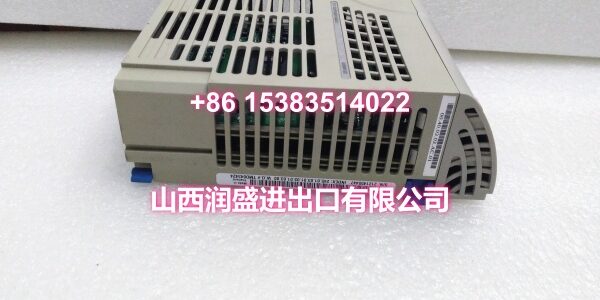
- Model: 5X00846G01
- Brand: EMERSON (Ovation / Westinghouse)
- Series: Ovation DCS — V6 Platform
- Core Function: High-speed communication module for the Ovation V6 platform, responsible for fiber-optic ring network data synchronization between the controller and I/O substations, with strict latency jitter requirements (≤15μs).
- Product Type: High-Speed Communication Module / Fiber-Optic Ring Network Communication Card
- Key Specs: Ovation V6 Platform | Fiber-Optic Ring Network | ≤15μs Latency Jitter | Hot-Swappable | Not Cross-Compatible with V5/V5.5
- Condition: New Original / New Surplus
Key Technical Specifications
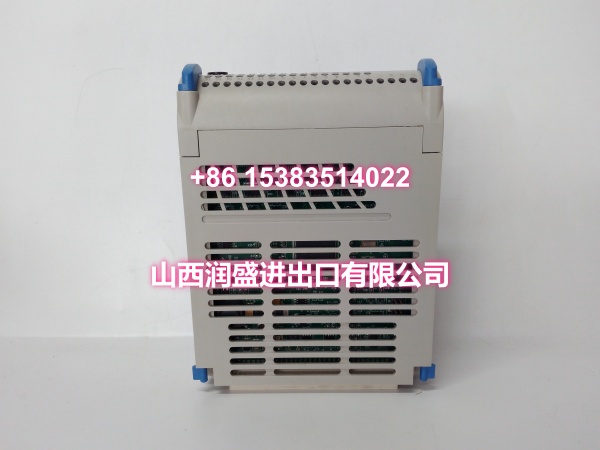
- Module Type: High-Speed Communication Module (Ovation V6 Platform)
- Compatibility: Emerson Ovation V6 Platform only (OVN-6000 chassis); not compatible with Ovation V5/V5.5
- Communication Function: Fiber-optic ring network data synchronization between controller and I/O substations
- Latency Jitter: ≤15μs (critical for real-time control loop stability)
- Communication Protocol: Ovation V6 proprietary high-speed communication protocol
- Optical Interface: Fiber-optic transceiver (SFP-based, model-specific; verify optical module compatibility per system documentation)
- Redundancy: Supports redundant communication paths for fault-tolerant operation
- Power Supply: 24V DC (supplied via Ovation V6 backplane)
- Operating Temperature: Industrial-grade (-40°C to +70°C typical)
- Installation: Plug-in module for Ovation V6 I/O base; hot-swappable
- Diagnostics: Real-time communication status LEDs; diagnostic reporting via Ovation HMI including link quality, error counters, and optical module health monitoring
- Certifications: UL Listed, IEC 61000-4 series (EMC), CE
Product Introduction
The 5X00846G01 is a high-speed communication module for the Emerson Ovation V6 distributed control system, serving as the critical link for fiber-optic ring network data synchronization between the controller and I/O substations. Unlike standard I/O modules that handle field signals directly, this module operates at the communication infrastructure layer, ensuring real-time, deterministic data exchange across the Ovation V6 architecture.
The Ovation V6 platform represents a significant hardware generation upgrade over the earlier V5/V5.5 systems. The 5X00846G01 is a V6-specific component—its backplane connector depth and gold-finger spacing have micron-level differences compared to V5 modules, making cross-version installation physically incompatible and potentially damaging to the backplane bus. This module is commonly deployed in power generation (fossil fuel, nuclear conventional island), petrochemical, and water treatment facilities running Ovation V6 systems where deterministic communication timing is essential for control loop integrity.
A defining characteristic of the 5X00846G01 is its stringent latency jitter requirement of ≤15μs. In distributed control systems, communication timing variability directly impacts control loop stability—excessive jitter can cause oscillations in PID loops, delayed trip responses, or synchronization failures between redundant controllers. The 5X00846G01 is engineered to maintain sub-15μs jitter under full load, ensuring the Ovation V6 system meets its real-time performance specifications.
The module supports fiber-optic ring network topology, providing inherent redundancy—if one fiber path is interrupted, communication automatically reroutes through the alternate path without controller faulting. This is critical for mission-critical applications like turbine control, boiler protection, and reactor monitoring where communication loss could trigger unnecessary trips or, worse, loss of control.
The 5X00846G01 integrates with the Ovation V6 engineering tools for configuration and diagnostics. Front-panel LEDs provide at-a-glance link status (link up/down, activity, errors), while detailed diagnostic information—including optical module transmit/receive power levels, bit error rate counters, and communication latency measurements—is accessible through the Ovation HMI. This enables proactive maintenance: engineers can identify degrading optical links or failing SFP modules before they cause communication failures.
Like all Ovation V6 modules, the 5X00846G01 supports hot-swap replacement, minimizing downtime during maintenance. However, proper procedure must be followed to avoid disrupting the fiber ring and causing a communication fault on the entire branch.
In typical applications, the 5X00846G01 is used for:
- Controller-to-I/O substation communication: Linking the Ovation V6 controller to remote I/O racks via fiber-optic ring
- Redundant communication paths: Providing fault-tolerant communication for safety-critical control loops
- Nuclear conventional island upgrades: Deployed in Ovation V6 platform upgrades where deterministic timing and radiation-tolerant fiber communication are required
- Large-scale power plant DCS: Connecting distributed I/O islands across the plant via fiber backbone
QA & Testing SOP
Communication modules are the backbone of the DCS—if they fail, entire I/O branches go offline. Here’s our verification procedure:
- Visual & Anti-Counterfeit Inspection: We inspect the PCB for cold solder joints around the FPGA, optical transceiver interface, and backplane connector. We verify the OEM holographic label and cross-check the silkscreen part number against the Ovation V6 master parts list. Counterfeit communication modules in the surplus market may have degraded FPGAs or substandard optical components that cause intermittent link drops, excessive jitter, or complete communication failure under load.
- Backplane & Connector Verification: The module is seated into a dedicated Ovation V6 test rack. We inspect the backplane connector pins for bends or corrosion—bent pins on the communication side cause link failures; bent pins on the power side prevent the module from powering up. We verify the connector depth matches Ovation V6 specifications (micron-level difference from V5).
- Controller Recognition Test: We install the module in a complete Ovation V6 controller assembly and verify the controller recognizes the module without fault codes. We confirm the module appears in the Ovation V6 diagnostic screen with the correct module type and communication status.
- Fiber Link Establishment Test: We connect the module to a fiber-optic ring network test setup using compatible SFP optical modules. We verify the module establishes link on both fiber paths (primary and redundant) and that the link status LEDs indicate normal operation. We verify the module negotiates the correct communication speed and protocol version with the Ovation V6 controller.
- Latency Jitter Measurement: Using a precision communication analyzer, we measure the module’s latency jitter under various load conditions (idle, 50% load, full load). We verify the jitter remains ≤15μs across all test conditions. Modules exceeding this threshold are rejected, as they can destabilize control loops in production systems.
- Redundancy Failover Test: We simulate a fiber path interruption by disconnecting one fiber and verify the module seamlessly switches to the redundant path without causing a communication fault or controller trip. We verify the failover time meets Ovation V6 specifications.
- Optical Module Health Monitoring: We verify the module correctly reports optical module transmit/receive power levels and bit error rate counters to the Ovation HMI. This is critical for proactive maintenance—degrading optical links can be identified before they cause failures.
- Extended Burn-In Test: The module is operated under full communication load for 24 hours to identify any intermittent faults or thermal issues. We monitor jitter, error counters, and link stability throughout the test.
- Anti-Static Packaging: Passed units are sealed in static-shielded bags with desiccant and optical port caps, then double-boxed for transit.
Installation Pitfalls & Guide
Communication modules are the most sensitive components in the DCS—improper installation can take down entire I/O branches. Here’s what to watch for:
- ❗ V6 Platform Only — Do Not Mix with V5/V5.5: The 5X00846G01 is an Ovation V6-specific module. Ovation V5 and V6 modules have micron-level differences in backplane slot depth and gold-finger spacing. Forcing a V6 module into a V5 chassis (or vice versa) can cause backplane bus shorts and permanent damage. Always verify your chassis model (OVN-5000 for V5, OVN-6000 for V6) before installation.
- ❗ Firmware Compatibility: The 5X00846G01’s firmware revision must match your Ovation V6 controller OS version. A firmware mismatch can cause the module to fail to register, cause intermittent communication errors, or produce excessive jitter. Verify firmware compatibility in your Ovation V6 system documentation before installation. All V6 modules should have firmware version 6.x—V5.x firmware is incompatible.
- ❗ Optical Module Compatibility: The 5X00846G01 requires compatible SFP optical modules for fiber connectivity. Using non-compatible or counterfeit SFPs can cause link failures, excessive bit error rates, or damage to the optical transceiver. Verify the optical module part number against the Ovation V6 approved components list. Check optical transmit/receive power levels after installation—values outside specification indicate a compatibility issue or fiber path problem.
- ❗ Fiber Ring Topology: The 5X00846G01 operates in a fiber-optic ring topology. When installing or replacing a module, ensure the fiber connections are made in the correct order to maintain ring integrity. Breaking the ring during installation will cause a communication fault on the entire branch. Follow the Ovation V6 fiber ring installation procedure: connect the primary path first, verify link establishment, then connect the redundant path.
- ❗ Hot-Swap Procedure: While the module is hot-swappable, replacing a communication module in a live fiber ring requires careful procedure to avoid disrupting the ring. In Ovation V6, set the communication path to maintenance mode before removing the module. If the module is part of a redundant pair, verify the redundant path is active before removing the primary. Never remove both communication modules in a redundant pair simultaneously.
- ❗ ESD Protection: Communication modules contain sensitive FPGAs and optical transceivers. Always wear a grounded ESD wrist strap when handling modules. Store modules in anti-static bags when not installed. ESD damage to the FPGA or optical interface may not be immediately visible but can cause premature failure or intermittent communication errors.
- ❗ Fiber Optic Handling: Fiber optic cables and connectors are extremely sensitive to contamination and physical damage. Always use optical port caps when connectors are not mated. Clean fiber connectors with approved fiber optic cleaning tools before mating. Never look directly into a live fiber connector—optical transmit power can damage eyesight.
4-Step Replacement Guide:
- Pre-Install: In the Ovation V6 engineering station, navigate to the I/O configuration. Identify the slot containing the faulty communication module. If the module is part of a redundant pair, verify the redundant path is active and carrying communication. Set the primary communication path to maintenance mode. Backup the current I/O configuration and communication settings. Document the current optical module part numbers and fiber connections.
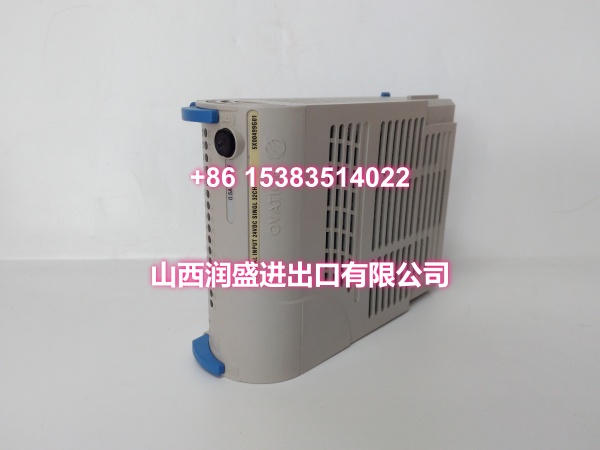
- Removal: If the rack is powered, follow the Ovation V6 hot-swap procedure for communication modules. Disconnect the fiber optic cables from the module—cap both the fiber connectors and the module’s optical ports immediately to prevent contamination. Open the blue locking lever on the front of the module. Pull the module straight out of the V6 base. Inspect the base connector for debris or damaged pins before installing the replacement.
- Install: Verify the replacement module is an Ovation V6-compatible 5X00846G01 (check silkscreen and holographic label). Insert the compatible SFP optical modules into the new module if not pre-installed. Slide the new module into the V6 base until it seats fully. Close the blue locking lever to secure the module. Reconnect the fiber optic cables to the correct ports (primary and redundant) per your documentation. Remove optical port caps immediately before mating.
- Power-on Test: In the Ovation V6 engineering station, take the communication path out of maintenance mode. Monitor the Ovation diagnostic screen for module recognition and link establishment. Verify both primary and redundant fiber paths show link up status. Verify all front-panel LEDs indicate normal operation (link up, activity, no errors). Perform a communication validation test: verify the module appears in the engineer station without faults, check optical transmit/receive power levels are within specification, and verify latency jitter measurements are ≤15μs. If the module fails to establish link, recheck fiber connections, optical module compatibility, and firmware version.
Technical FAQ
Q: What is the difference between 5X00846G01 and other Ovation communication modules? A: The 5X00846G01 is a high-speed communication module specifically for the Ovation V6 platform, handling fiber-optic ring network data synchronization between the controller and I/O substations with ≤15μs latency jitter. Ovation V5/V5.5 systems use different communication modules (e.g., 1C31169G02 Serial Link Controller) that are not compatible with V6. The 5X00846G01 is a V6-only component with different physical dimensions and communication protocol.
Q: Can I use the 5X00846G01 in an Ovation V5 system? A: No. The 5X00846G01 is an Ovation V6-specific module. Ovation V5 and V6 chassis have micron-level differences in backplane slot depth and gold-finger spacing. Installing a V6 module in a V5 chassis can cause backplane bus shorts and permanent damage. Always verify your chassis model (OVN-5000 for V5, OVN-6000 for V6) before ordering.
Q: What optical modules are compatible with the 5X00846G01? A: The 5X00846G01 requires SFP optical modules compatible with the Ovation V6 platform. The specific SFP part number depends on your fiber type (single-mode vs. multi-mode) and distance requirements. Verify the optical module part number against the Ovation V6 approved components list for your system. Using non-compatible SFPs can cause link failures or excessive bit error rates.
Q: Why is my 5X00846G01 not establishing link? A: The most common causes of link failure are: (1) incompatible optical modules, (2) contaminated or damaged fiber connectors, (3) incorrect fiber connections (primary/reversed), (4) firmware mismatch with the Ovation V6 controller, or (5) the module being installed in a V5 chassis. First, verify the optical module part number is on the Ovation V6 approved list. Clean all fiber connectors with approved cleaning tools. Verify fiber connections match your documentation. Check the module’s firmware version against your controller OS version. Finally, confirm your chassis is an OVN-6000 (V6) model.
Q: What is the warranty on surplus units? A: We provide a 12-month warranty from the date of delivery on both new original and new surplus stock. This covers manufacturing defects, DOA failures, and any communication or integration issues discovered during commissioning. It does not cover damage from improper installation—such as installing in a V5 chassis, using incompatible optical modules, firmware mismatch issues, ESD damage from handling without proper grounding, or fiber connector contamination.
Need help verifying your Ovation chassis version or identifying the correct SFP optical module for your fiber run? Share your chassis model number and fiber type/distance, and I can help you confirm compatibility.