Product Core Brief
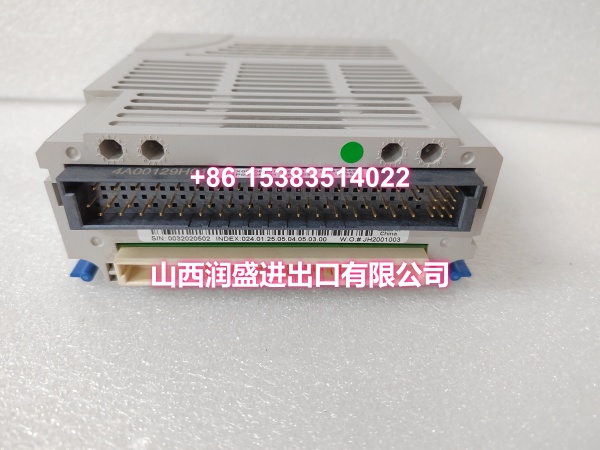
- Model: 8750-CA-NS
- Brand: GE (now part of Emerson’s Intelligent Platforms portfolio)
- Series: PACSystems RX7i
- Core Function: High-performance CPU controller module for the PACSystems RX7i platform, providing centralized control, data processing, and communication for industrial automation systems.
- Product Type: CPU Controller Module / PLC Processor
- Key Specs: 10MB Battery-Backed + 10MB Non-Volatile Flash Memory | 3 Isolated Serial Ports | Embedded Ethernet | Supports 90-70 Series I/O | Ladder/C/Structured Text/FBD Programming
- Condition: New Original / New Surplus
Key Technical Specifications
- Module Type: CPU Controller (PACSystems RX7i Platform)
- User Memory: 10MB battery-backed SRAM + 10MB non-volatile flash memory (configurable between data and program storage)
- Programming Languages: Ladder Logic, C, Structured Text, Function Block Diagram
- Reference Table Capacity:
- Discrete %I and %Q: 32K bits each
- Analog %AI and %AQ: 32K words each
- Serial Ports: 3 isolated serial ports — one RS-485, one RS-232, and one RS-232 Ethernet Station Manager port
- Embedded Ethernet Interface:
- Two full-duplex 10BaseT/100BaseTX ports (RJ-45) with internal switch
- Auto-negotiation for network speed, duplex mode, and crossover detection
- Ethernet Global Data (EGD) for peer-to-peer data exchange
- TCP/IP communication via SRTP
- Modbus/TCP server and client support
- Up to 16 simultaneous web server and FTP connections
- User-configurable redundant IP addresses
- SNTP time synchronization (with CPU firmware 5.00 or higher)
- I/O Compatibility: Supports all 90-70 Series discrete, analog, communication, and specialty modules; supports all VME modules supported by the 90-70 Series
- Program Blocks: Up to 512 program blocks, maximum block size 128KB
- Calendar Clock: Battery-backed real-time clock
- Firmware: Field-upgradable firmware
- Test Edit Mode: Allows testing modifications to running programs without stopping execution
- Symbol Variables: Supports auto-located symbolic variables using any amount of user memory
- Power Supply: 5V DC / 3.3V DC (supplied via RX7i backplane)
- Operating Temperature: 0°C to 60°C (32°F to 140°F)
- Storage Temperature: -40°C to 85°C (-40°F to 185°F)
- Certifications: UL Listed, CE, CSA
Product Introduction
The 8750-CA-NS is a high-performance CPU controller module for the GE PACSystems RX7i programmable automation controller platform. Now part of Emerson’s Intelligent Platforms portfolio following GE’s acquisition, the RX7i platform remains one of the most widely deployed PLC systems in power generation, oil & gas, chemical processing, and manufacturing facilities worldwide.
The 8750-CA-NS serves as the brain of the RX7i system, executing control logic, managing I/O data, and handling communication with HMIs, SCADA systems, and peer controllers. Its 10MB of battery-backed SRAM combined with 10MB of non-volatile flash memory provides ample space for complex control programs and large data tables—significantly more capacity than earlier RX3i or Series 90-70 CPUs. The memory is configurable, allowing engineers to allocate space between program storage and data registers based on application needs.
One of the module’s standout features is its communication versatility. The three isolated serial ports (RS-485, RS-232, and RS-232 for Ethernet Station Manager) enable connection to legacy serial devices, barcode readers, weigh scales, and serial HMIs without requiring additional communication modules. The embedded Ethernet interface is equally capable, supporting Ethernet Global Data (EGD) for high-speed peer-to-peer data exchange between RX7i controllers, Modbus/TCP for integration with third-party devices, and up to 16 simultaneous web server/FTP connections for remote monitoring and file transfer.
The 8750-CA-NS supports all four IEC 61131-3 programming languages—Ladder Logic, C, Structured Text, and Function Block Diagram—giving engineers flexibility to choose the best language for each task. C language support is particularly valuable for complex mathematical computations, data manipulation, and algorithmic control that would be cumbersome in ladder logic. The Test Edit Mode allows engineers to modify and test logic changes on a running controller without stopping the process, minimizing production downtime during debugging and optimization.
The module is fully compatible with the extensive 90-70 Series I/O ecosystem, including discrete, analog, communication, and specialty modules. This backward compatibility means existing 90-70 I/O installations can be upgraded to the RX7i platform by simply replacing the CPU—no I/O rewiring required. The 8750-CA-NS also supports all VME modules compatible with the 90-70 Series, extending its capability for high-speed motion control, process control, and specialized applications.
In typical applications, the 8750-CA-NS is used for:
- Power plant control: Boiler control, turbine protection, balance-of-plant automation
- Oil & gas processing: Compressor control, pipeline monitoring, wellhead automation
- Chemical processing: Batch control, reactor temperature/pressure control, safety interlocks
- Manufacturing: Assembly line control, packaging machinery, material handling systems
- Water/wastewater: Pump station control, filtration process automation, chemical dosing
The battery-backed calendar clock enables time-stamped event logging and time-based control sequences. Firmware is field-upgradable via the Ethernet or serial ports, ensuring the module can receive bug fixes and feature updates without removal from the rack.
QA & Testing SOP
CPU modules are the most critical component in any PLC system—if the CPU fails, the entire control system goes down. Here’s our verification procedure:
- Visual & Anti-Counterfeit Inspection: We inspect the PCB for cold solder joints around the CPU IC, memory chips, Ethernet PHY, and serial port transceivers. We verify the OEM holographic label and cross-check the silkscreen part number against the RX7i master parts list. Counterfeit CPU modules in the surplus market may have degraded processors or substandard memory that cause intermittent faults, memory corruption, or complete failure under load.
- Backplane & Connector Verification: The module is seated into a dedicated RX7i test rack. We inspect the backplane connector pins for bends or corrosion—bent pins on the data bus side cause communication failures with I/O modules; bent pins on the power side prevent the module from powering up.
- Power-On & Self-Test: We apply backplane power and verify the module completes its power-on self-test (POST) without fault codes. We confirm the OK LED is solid green and the fault LED is off. We verify the module’s firmware version via the serial port or Ethernet.
- Memory Verification: We run a memory test to verify both the 10MB battery-backed SRAM and 10MB flash memory are fully functional. We write test patterns to various memory addresses and read them back to confirm data integrity. We verify the battery-backed clock maintains time after power cycling.
- Programming & Download Test: We connect to the module via Ethernet using GE’s Machine Edition software and download a test program containing ladder logic, C code, structured text, and function block elements. We verify the program downloads successfully and executes without errors. We test the Test Edit Mode by modifying a running program and confirming the changes take effect.
- Serial Port Test: We connect to each of the three serial ports and verify data transmission and reception. We test the RS-485 port in both 2-wire and 4-wire modes. We verify the RS-232 Ethernet Station Manager port functions correctly.
- Ethernet Communication Test: We verify the embedded Ethernet interface establishes link at both 10Mbps and 100Mbps. We test EGD data exchange with a second RX7i controller. We test Modbus/TCP server and client functionality. We verify web server access and FTP file transfer. We test redundant IP address configuration.
- I/O Communication Test: We install 90-70 Series discrete and analog I/O modules in the same rack and verify the CPU correctly reads inputs and writes outputs. We verify the CPU’s reference table correctly maps I/O data.
- Extended Burn-In Test: The module is operated under load for 24 hours with a test program running continuously. We monitor for any fault codes, memory errors, or communication dropouts throughout the test.
- Anti-Static Packaging: Passed units are sealed in static-shielded bags with desiccant, then double-boxed for transit.
Installation Pitfalls & Guide
CPU modules are the most sensitive and critical components in the PLC rack—improper installation can cause system-wide failures. Here’s what to watch for:
- ❗ Battery Installation: The 8750-CA-NS requires a battery to maintain the SRAM contents and calendar clock when backplane power is removed. If the battery is dead or missing, the module will lose its program and data on power-down. Always verify the battery is installed and has adequate voltage before commissioning. Replace the battery during scheduled maintenance before it fails—the module provides a low-battery warning via the fault LED.
- ❗ Firmware Compatibility: The 8750-CA-NS’s firmware version must be compatible with your Machine Edition programming software version and any other RX7i CPUs in the system. A firmware mismatch can cause download failures, communication errors, or unexpected behavior. Verify firmware compatibility in the RX7i documentation before installation. All CPUs in a redundant or EGD network should run the same firmware version.
- ❗ Ethernet Configuration: The embedded Ethernet ports have an internal switch, meaning both RJ-45 ports share the same MAC address and IP address. Do not connect both ports to the same Ethernet switch without proper configuration—this can create a network loop. If connecting to a single switch, use only one port, or configure the second port for a separate network segment.
- ❗ Serial Port Isolation: The three serial ports are isolated from each other and from the backplane. However, they share a common ground reference within the isolated group. When connecting to devices with different ground potentials, use isolated RS-485 converters to prevent ground loop issues.
- ❗ Memory Allocation: The 10MB SRAM and 10MB flash are configurable between program and data storage. If your application requires large data tables (e.g., recipe storage, historical logging), ensure sufficient memory is allocated to the data area. Insufficient data memory will cause program download failures. Plan your memory allocation during the design phase.
- ❗ Hot-Swap Limitation: The 8750-CA-NS is NOT hot-swappable. The CPU module must only be inserted or removed when backplane power is off. Removing or inserting the CPU while powered can damage the module, the backplane, or other modules in the rack. Always power down the rack before servicing the CPU.
- ❗ Program Backup: Before replacing a CPU module, always download and backup the existing program from the running controller if possible. If the battery has failed and the program is lost, you will need to reload from a backup. Maintain off-site backups of all CPU programs.
- ❗ ESD Protection: CPU modules contain sensitive processors and memory chips. Always wear a grounded ESD wrist strap when handling modules. Store modules in anti-static bags when not installed. ESD damage to the CPU or memory may not be immediately visible but can cause premature failure or intermittent faults.
4-Step Replacement Guide:
- Pre-Install: If the existing CPU is still operational, connect via Ethernet or serial port and download a full backup of the program and configuration. Document the firmware version, IP address, serial port settings, and memory allocation. Power down the RX7i rack completely—remove all power sources including any redundant power supplies. Verify power is off using a multimeter on the backplane power terminals.
- Removal: Remove the front cover of the CPU module if present. Disconnect any serial cables or Ethernet cables from the front ports. Loosen the mounting screws or release the locking mechanism securing the module to the rack. Pull the CPU module straight out of the backplane connector. Inspect the backplane connector for debris or damaged pins before installing the replacement.
- Install: Verify the replacement module is the correct part number (8750-CA-NS). Check that the battery is installed and has adequate voltage. Insert the new CPU module into the backplane connector, ensuring it seats fully and evenly. Secure the module with the mounting screws or locking mechanism. Reconnect Ethernet and serial cables to the correct ports.
- Power-on Test: Apply backplane power. Verify the module completes POST without fault codes—the OK LED should be solid green. Connect via Ethernet or serial port and verify the firmware version matches your documentation. If the module has no program (new unit), download the backed-up program and configuration. If the module retains a program from previous use, verify the program matches your backup. Test I/O communication by forcing discrete outputs and reading analog inputs. Verify Ethernet communication (EGD, Modbus/TCP, web server) and serial port functionality. Run the process through a complete operational cycle to verify correct control behavior.
Technical FAQ
Q: What’s the difference between 8750-CA-NS and other RX7i CPU models? A: The 8750-CA-NS is a specific CPU model in the RX7i lineup. RX7i offers several CPU variants with different memory sizes, communication options, and performance levels. The 8750-CA-NS features 10MB SRAM + 10MB flash, 3 isolated serial ports, and embedded Ethernet. Other models may have more memory, additional Ethernet ports, or different serial port configurations. Verify the exact specifications of your existing CPU before ordering a replacement.
Q: Can I use the 8750-CA-NS in a Series 90-70 rack? A: No. The 8750-CA-NS is designed for the RX7i platform, which uses a different backplane architecture than the Series 90-70. While the RX7i supports 90-70 Series I/O modules, the CPU itself must be installed in an RX7i rack. Series 90-70 racks use different CPU modules (e.g., CPU864, CPU865).
Q: What battery does the 8750-CA-NS use? A: The 8750-CA-NS uses a standard lithium battery (typically a 3V CR2032 or equivalent) to maintain the SRAM contents and calendar clock when backplane power is removed. The specific battery type is documented in the RX7i hardware manual. Battery life is typically 5-10 years depending on operating conditions. The module provides a low-battery warning via the fault LED.
Q: Why is my 8750-CA-NS not downloading programs? A: The most common causes of download failures are: (1) firmware version mismatch between the CPU and the Machine Edition software, (2) incorrect Ethernet or serial communication settings, (3) insufficient memory for the program, or (4) the CPU is in RUN mode (some operations require STOP mode). First, verify the firmware version compatibility. Check your communication settings (IP address, baud rate). Verify the program size does not exceed available memory. Try switching the CPU to STOP mode before downloading.
Q: What is the warranty on surplus units? A: We provide a 12-month warranty from the date of delivery on both new original and new surplus stock. This covers manufacturing defects, DOA failures, and any integration issues discovered during commissioning. It does not cover damage from improper installation—such as hot-swapping the CPU, ESD damage from handling without proper grounding, battery failure due to age, or firmware compatibility issues.
Need help verifying firmware compatibility or identifying the correct battery replacement for your RX7i CPU? Share your current firmware version and Machine Edition software version, and I can help you confirm compatibility.