Product Core Brief
- Model: 5X00605G01
- Brand: Emerson (Ovation System)
- Series: Ovation DCS Fieldbus/Communication Subsystem
- Core Function: Redundant communication bridge between Ovation I/O modules and the central controller — aggregates data from multiple I/O modules and routes it to the controller via high-speed Ethernet, with automatic failover to eliminate single points of failure in critical process loops.
- Product Type: Ovation DCS Redundant I/O Communication Module (Fieldbus Module)
- Key Specs: 1+1 Hot Standby Redundancy | ≤50ms Automatic Failover | 4× Gigabit Ethernet Ports | Supports Ovation Proprietary, Modbus TCP/IP, Ethernet/IP | 24V DC Redundant Power | Hot-Swappable | -40°C to +70°C Operating Range
- Condition: New Original / New Surplus
Key Technical Specifications
- Module Model: 5X00605G01 (Redundant I/O Communication Module / Fieldbus Module)
- Primary Function: Redundant communication bridge that aggregates data from multiple Ovation I/O modules (up to 32 modules per network) and transmits to the Ovation controller at up to 1Gbps full-duplex, minimizing latency in critical control loops
- Redundancy Architecture: 1+1 hot standby (primary/secondary pair) with automatic failover — if the primary module fails, the secondary takes over within 50ms without data loss, ensuring uninterrupted communication
- Communication Protocols:
- Ovation proprietary protocol (native DCS integration)
- Modbus TCP/IP (third-party device connectivity)
- Ethernet/IP (third-party device connectivity)
- Protocols are configurable per application requirements
- Connection Ports: 4× 10/100/1000BASE-T Ethernet ports — 2 ports for controller link, 2 ports for I/O network, providing redundant Ethernet paths
- I/O Module Compatibility: Supports the full range of Ovation analog (e.g., 5X00115G01), digital (e.g., 5X00225G01), and specialty I/O modules
- Data Transfer Rate: Up to 1Gbps full-duplex Ethernet, with priority-based data transmission that ensures time-sensitive signals (e.g., safety alarms, trip signals) are prioritized over non-critical data
- Power Supply: 24V DC with redundant inputs (19.2–28.8V range) — module continues operating on either power feed if one supply fails; power consumption ~12W per unit
- Operating Temperature: -40°C to +70°C — wide range supports harsh industrial environments including outdoor remote I/O cabinets and unheated control rooms
- Storage Temperature: -40°C to +85°C
- Humidity: 5%–95% non-condensing
- MTBF: >1,000,000 hours (per industry standards)
- Physical Dimensions: 140mm (W) × 180mm (H) × 70mm (D)
- Weight: ~0.8kg
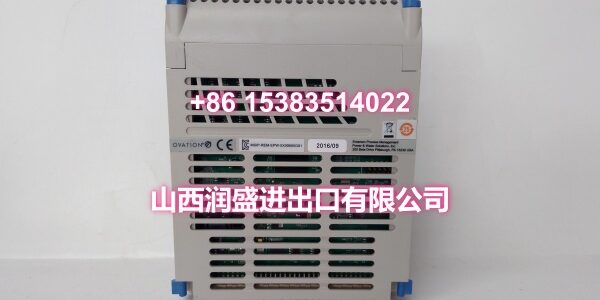
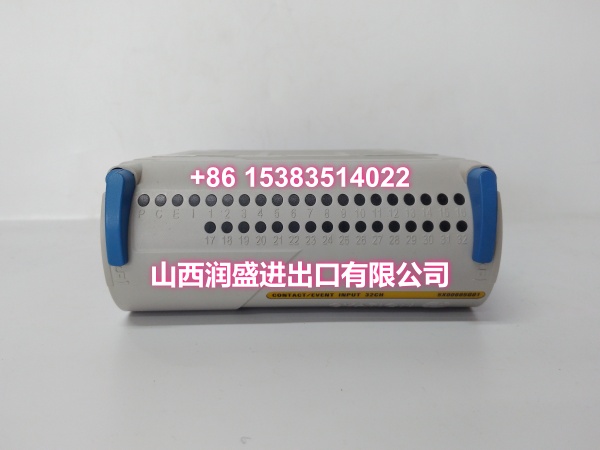
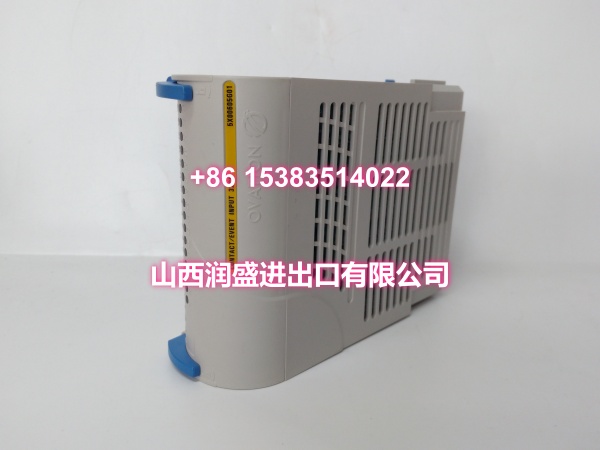
- Mechanical: Standard Ovation 5X-series form factor with blue locking lever; plugs into Ovation I/O rack slots; hot-swappable without disturbing adjacent modules
- Standards Compliance: CE certified; part of the Emerson Ovation DCS communication subsystem
Product Introduction
The 5X00605G01 is Emerson’s redundant I/O communication module (fieldbus module) for the Ovation distributed control system. If the I/O modules are the hands and eyes of the DCS — reading sensors and driving actuators — the 5X00605G01 is the nervous system that carries those signals back to the brain (the controller).
In a typical Ovation DCS architecture, I/O modules don’t communicate directly with the controller. Instead, they send their data to a communication module like the 5X00605G01, which aggregates the data from up to 32 I/O modules on its network segment and routes it to the controller over high-speed Ethernet. This architecture keeps the controller from being overwhelmed by direct connections to hundreds of individual I/O points, and it allows I/O to be distributed physically across the plant — remote I/O drops can be located close to the field devices they monitor, with only an Ethernet cable running back to the control room.
What sets the 5X00605G01 apart from a standard communication module is its redundancy. It’s designed to operate in a primary/secondary pair. Under normal conditions, the primary module handles all communication while the secondary sits in hot standby, continuously synchronized. If the primary module fails — due to a hardware fault, power loss, or Ethernet link failure — the secondary takes over within 50ms, and the controller never sees a gap in data. For a power plant running a turbine at full load or a chemical reactor managing an exothermic process, that 50ms failover window is the difference between a seamless transition and a process upset.
The module supports multiple communication protocols natively. The Ovation proprietary protocol provides seamless integration with the DCS for standard I/O traffic. Built-in Modbus TCP/IP and Ethernet/IP support let you connect third-party field devices — sensors, actuators, or subsystems from other manufacturers — without requiring external gateways. This multi-protocol capability makes the 5X00605G01 a consolidation point: instead of running separate communication paths for Ovation I/O and third-party devices, you can route everything through a single redundant module.
With four Gigabit Ethernet ports (two for the controller link, two for the I/O network), the 5X00605G01 provides fully redundant Ethernet paths. Combined with its redundant 24V DC power inputs, the module eliminates single points of failure at every level — power, communication, and hardware. The priority-based data transmission feature ensures that time-critical signals like safety alarms and trip commands jump to the front of the queue, while less urgent data (trend logging, diagnostic updates) waits its turn.
For system integrators and plant maintenance teams, the 5X00605G01 is a critical spare. A failed communication module can take down an entire branch of I/O — potentially dozens of points — so having a tested spare on the shelf is essential for minimizing unplanned downtime. The module’s hot-swappable design means you can replace a failed unit without powering down the rack or disturbing adjacent modules.
Bottom line: if you’re building a redundant Ovation I/O network, integrating third-party devices via Modbus or Ethernet/IP, or stocking critical spares for an existing Ovation DCS installation, the 5X00605G01 is the communication module you spec.
QA & Testing SOP
Communication modules are the backbone of the I/O subsystem — a failed comm module can take down an entire branch of I/O, so our validation protocol tests both standalone functionality and redundant failover behavior:
- Physical & Anti-Counterfeit Inspection: We verify the OEM chassis integrity, check for authentic Emerson labeling and correct part number (5X00605G01), and inspect all four Ethernet ports and the backplane connector pins for bent pins, corrosion, or wear.
- Power-On Self-Test (POST): The module is seated in an OEM Ovation rack and powered with 24V DC. We verify that the POST completes successfully, with no hardware fault LEDs illuminated (P LED green, C/E/I LEDs normal).
- Redundant Power Test: We verify that the module operates correctly on each of its two redundant 24V DC power feeds independently — confirming that a single power supply failure will not take the module offline.
- Ethernet Port Verification: We connect each of the four Gigabit Ethernet ports to a test network and verify link establishment at 10/100/1000Mbps speeds — confirming that all ports are functional and negotiate correctly.
- Protocol Communication Test: We configure the module for each supported protocol (Ovation proprietary, Modbus TCP/IP, Ethernet/IP) and verify successful data exchange with a test controller and third-party devices — confirming that protocol switching works as expected.
- Data Throughput Test: We simulate a full load of 32 I/O modules sending data through the module and verify that throughput reaches the expected 1Gbps full-duplex rate with no packet loss or excessive latency.
- Priority Traffic Test: We inject mixed-priority traffic (safety alarms + routine trend data) and verify that high-priority packets are transmitted with lower latency than low-priority packets — confirming that the priority-based queuing system functions correctly.
- Redundant Failover Test (Primary Role): We install the module as the primary in a redundant pair, then simulate a failure (power cut, Ethernet link disconnect) and measure the failover time — verifying that the secondary takes over within the 50ms specification with zero data loss.
- Redundant Failover Test (Secondary Role): We install the module as the secondary in a redundant pair, verify that it stays synchronized with the primary, then force a primary failure and confirm that this module takes over correctly as the new primary.
- Hot-Swap Verification: We remove and reinsert the module while the rack is powered and verify that adjacent modules remain unaffected and that the module re-registers with the controller correctly after reinsertion.
- Anti-Static Packaging: After validation, the module is sealed in industrial-grade ESD shielding bags with port protectors installed for transit.
Installation Pitfalls & Guide
Communication module installation mistakes can cause I/O communication failures, redundant pair desynchronization, or even a complete loss of an I/O branch. These are the critical traps to avoid:
- ❗ Redundant Pair Configuration: The 5X00605G01 must be configured as part of a primary/secondary pair to achieve redundancy. Installing a single module without a redundant partner eliminates the failover capability — if that single module fails, the entire I/O branch goes down. Always install in pairs for critical applications.
- ❗ Firmware Version Matching: The 5X00605G01 firmware must be compatible with your Ovation controller’s OS version. A firmware mismatch can prevent the module from registering with the controller or cause communication failures. Before installation, verify that the module’s firmware version matches the controller’s requirements — Emerson provides firmware compatibility matrices for each Ovation release.
- ❗ Ethernet Port Assignment: The module has four Ethernet ports — two designated for the controller link and two for the I/O network. Connecting the controller link ports to the I/O network (or vice versa) will cause communication failures. Label your Ethernet cables clearly and verify port assignments before connecting.
- ❗ Redundant Power Wiring: The module accepts redundant 24V DC power inputs. Both power feeds should be wired to independent power sources (e.g., two separate 24V DC supplies or two branches of a redundant power system). Wiring both feeds to the same power source defeats the redundancy and creates a single point of failure.
- ❗ Primary/Secondary Synchronization: When installing a redundant pair, the primary and secondary modules must be synchronized before they can provide seamless failover. After installing both modules, verify in the Ovation configuration software that the pair shows as “synchronized” — an unsynchronized pair will not fail over correctly.
- ❗ I/O Branch Addressing: Each I/O branch connected through the 5X00605G01 must have a unique branch number in the Ovation configuration. Duplicate branch numbers will cause communication conflicts and I/O point failures. Verify branch addressing in the I/O Builder before downloading the configuration to the controller.
- ❗ Hot-Swap During Active Communication: While the module supports hot-swapping, removing a primary communication module from a live rack will trigger a failover to the secondary. If the secondary is not present or not synchronized, the entire I/O branch will go offline. For critical applications, verify that the redundant pair is synchronized before performing any hot-swap operation.
- ❗ Third-Party Protocol Configuration: When using Modbus TCP/IP or Ethernet/IP to connect third-party devices, verify that the device’s IP address, subnet mask, and gateway settings are compatible with the Ovation network configuration. IP conflicts or subnet mismatches will prevent communication.
Replacement Procedure:
- Pre-Install: Back up the Ovation controller’s I/O configuration. Verify that the replacement module has compatible firmware. If replacing a module in a redundant pair, verify that the surviving module is healthy and synchronized. Set all I/O points on the affected branch to “Out of Service” (Scan Off) if possible.
- Removal: Open the blue locking lever on the existing module and remove it from the rack slot. If this is the primary module in a redundant pair, the secondary should automatically take over — verify in the Ovation software that the failover occurred correctly.
- Install: Insert the new 5X00605G01 into the same rack slot, ensuring it mates correctly with the backplane connector. Close the blue locking lever. The module will power up and begin its POST sequence.
- Registration & Synchronization: Wait for the module to register with the Ovation controller (indicated by the status LEDs — P green, C green, E/I normal). If installing as part of a redundant pair, verify in the Ovation software that the new module synchronizes with its partner. Verify that all I/O points on the branch are communicating correctly.
- Restoration: Restore any points set to “Out of Service” to “In Service” (Scan On). Verify that the controller shows the module as healthy and that I/O communication is established. Perform a forced failover test (if in a redundant pair) to confirm that the new module can serve as both primary and secondary.
Technical FAQ
What’s the difference between the 5X00605G01 and a standard Ovation I/O module? The 5X00605G01 is a communication module — it doesn’t read sensors or drive actuators directly. Instead, it serves as the communication bridge between I/O modules and the controller, aggregating data from up to 32 I/O modules and routing it to the controller over Ethernet. Standard I/O modules (AI, AO, DI, DO, etc.) handle the actual signal conversion; the 5X00605G01 handles the data transport.
Can I use a single 5X00605G01 without a redundant partner? Yes, the module can operate as a standalone unit. However, you lose the redundancy benefit — if the single module fails, the entire I/O branch goes down. For critical process loops, always install in a primary/secondary pair to achieve the 50ms automatic failover capability.
What’s the maximum number of I/O modules the 5X00605G01 can support? Up to 32 I/O modules per network segment. If you need more I/O capacity, you can install multiple 5X00605G01 modules, each managing its own branch of up to 32 modules.
Can the 5X00605G01 connect to non-Emerson devices? Yes. The module natively supports Modbus TCP/IP and Ethernet/IP protocols, allowing you to connect third-party sensors, actuators, and subsystems from other manufacturers without requiring external gateways. This makes it a useful consolidation point for mixed-vendor installations.
Is the 5X00605G01 compatible with older Ovation racks? The 5X00605G01 uses the standard Ovation 5X-series form factor and is compatible with Ovation I/O racks. However, verify that your rack’s backplane version and controller firmware are compatible with the communication subsystem. Older WDPF racks may require adapter hardware or may not support this module.
How do I verify that a redundant pair is synchronized? In the Ovation configuration software (I/O Builder or Admin Tools), navigate to the communication module’s status page. A synchronized pair will show both modules as “Healthy” with a synchronization status of “In Sync.” If the status shows “Out of Sync” or “Initializing,” the pair is not ready for seamless failover — investigate the cause (firmware mismatch, communication error, or configuration issue) before relying on the redundancy.
Do you offer volume pricing for plant MRO stocking? Yes. Communication modules are critical spare parts for any Ovation DCS installation — a failed comm module can take down an entire branch of I/O, so having tested spares on hand is essential. We offer flexible pricing tiers for bulk MRO orders. Contact our sales team with your required quantity for a competitive quote.
Need the full 5X00605G01 configuration guide, the Ovation redundant communication architecture diagram, or the Modbus/Ethernet/IP integration manual for third-party devices? I can pull those up for you.