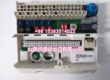
Product Core Brief
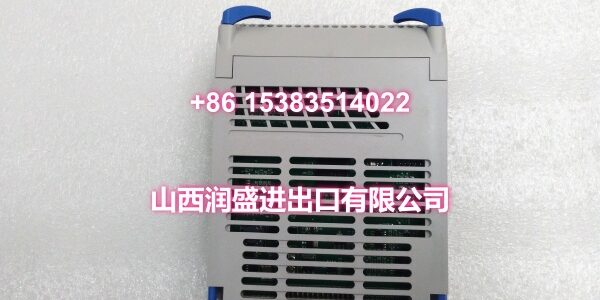
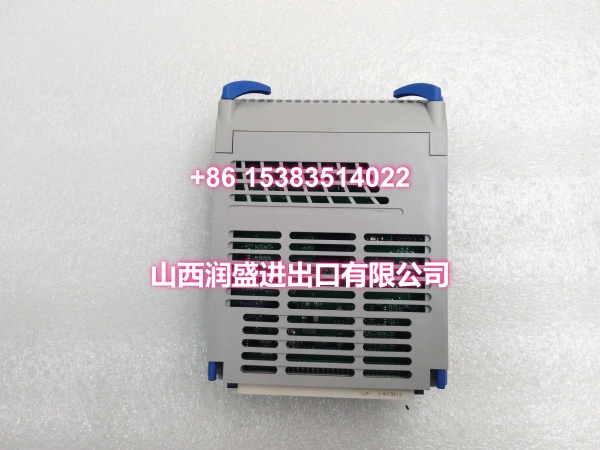
- Model: 5X00594G01
- Brand: EMERSON (Ovation / Westinghouse)
- Series: Ovation DCS
- Core Function: DCS system module for the Ovation distributed control system, used in power generation, water treatment, and industrial automation applications.
- Product Type: DCS System Module
- Key Specs: Ovation DCS Compatible | 24V DC Operating Voltage | Plug-in Module | Hot-Swappable
- Condition: New Original / New Surplus
Key Technical Specifications
- Module Type: DCS System Module
- Compatibility: Emerson Ovation DCS / Westinghouse Ovation System
- Operating Voltage: 24V DC
- Installation: Plug-in module for Ovation I/O base; hot-swappable
- Certification: UL Listed
- Operating Temperature: Industrial-grade (typical control room conditions)
- Diagnostics: Front-panel status LEDs and diagnostic reporting via Ovation HMI
Product Introduction
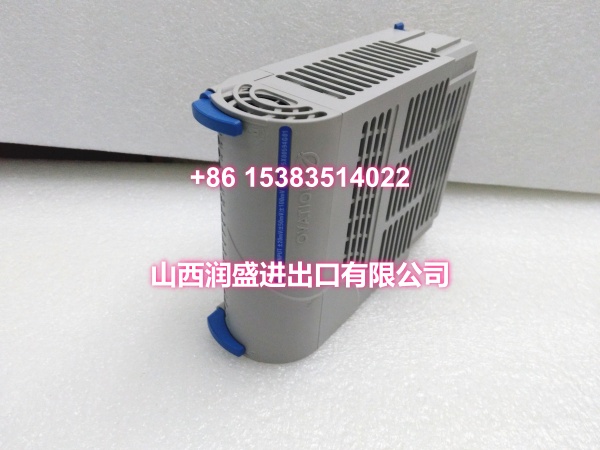
The 5X00594G01 is a DCS system module for the Emerson Ovation distributed control system, originally developed by Westinghouse. This module is part of the Ovation 5X series and is commonly deployed in power generation, water treatment, and industrial automation applications where reliable process control is critical.
The Ovation system is a Windows- and Solaris-platform DCS designed primarily for the power and water sectors, featuring a distributed architecture with 100Mbps fault-tolerant Ethernet communication, support for up to 1,000 nodes, and real-time data transmission capacity of 200,000 points per second. Modules in the 5X series—including the 5X00594G01—are integral components of this architecture, providing I/O processing, communication, and control functions within the Ovation rack system.
The 5X00594G01 operates on 24V DC and is designed as a plug-in module for the Ovation I/O base, supporting hot-swap replacement to minimize downtime during maintenance. It carries UL certification, confirming compliance with North American safety standards for industrial control equipment.
Like all Ovation modules, the 5X00594G01 integrates with the Ovation engineering tools (I/O Builder, ControlBuilder, PointBuilder) for configuration, commissioning, and diagnostics. Front-panel status LEDs provide at-a-glance operational status, while detailed diagnostic information is accessible through the Ovation HMI for proactive maintenance.
The 5X00594G01 is part of the broader Ovation ecosystem that includes OCR-series controllers, specialized I/O modules (analog input/output, digital input/output, thermocouple, RTD), communication modules, and power supplies—all designed to work together as a cohesive control platform for mission-critical processes.
QA & Testing SOP
DCS system modules are critical infrastructure components—failure can disrupt entire control loops. Here’s our verification procedure:
- Visual & Anti-Counterfeit Inspection: We inspect the PCB for cold solder joints, component damage, and verify the OEM holographic label. We cross-check the silkscreen part number against the Ovation master parts list. Counterfeit modules in the surplus market may have degraded components that cause intermittent faults or communication failures.
- Backplane & Connector Verification: The module is seated into a dedicated Ovation test rack. We inspect the backplane connector pins for bends or corrosion—bent pins prevent proper communication with the controller and can cause module recognition failures.
- Controller Recognition Test: We install the module in a complete Ovation controller assembly and verify the controller recognizes the module without fault codes. We confirm the module appears in the Ovation I/O diagnostic screen with the correct module type.
- Power-Up & Operational Test: We power up the rack and verify the module boots correctly. We check all front-panel LEDs for proper status indication (power OK, communication OK, no faults).
- Communication Validation: We verify the module communicates correctly with the Ovation controller and appears in the engineer station without errors. We test read/write operations to confirm bidirectional data flow.
- Hot-Swap Test (if applicable): We verify the module can be removed and reinserted without disrupting adjacent modules or causing controller faults.
- Anti-Static Packaging: Passed units are sealed in static-shielded bags with desiccant, then double-boxed for transit.
Installation Pitfalls & Guide
DCS modules require careful handling and proper installation to ensure reliable operation. Here’s what to watch for:
- ❗ Slot Configuration: The 5X00594G01 must be installed in the correct slot as defined in the Ovation I/O Builder configuration. Installing it in the wrong slot will cause the controller to fail to recognize the module or generate I/O faults. Always verify the slot assignment in your Ovation system documentation before installation.
- ❗ Backplane Connector Integrity: The module’s backplane connector carries critical communication and power signals. Even a single bent pin can cause communication failures or prevent the module from powering up. Handle the module by the edges only, and never force it into the slot. If you encounter resistance, remove the module and inspect the connector pins before retrying.
- ❗ Power Sequencing: When installing modules in a powered rack, follow the proper Ovation hot-swap procedure. Set all points associated with the module to Out of Service (Scan Off) in the I/O Builder before removal, then restore to In Service (Scan On) after installation. This prevents the controller from acting on invalid data during the swap.
- ❗ ESD Protection: DCS modules contain sensitive electronic components. Always wear a grounded ESD wrist strap when handling modules. Store modules in anti-static bags when not installed. ESD damage may not be immediately visible but can cause premature failure.
- ❗ Firmware Compatibility: The module’s firmware revision must be compatible with the Ovation system version and the controller it connects to. A firmware mismatch can cause the module to fail to initialize or cause intermittent communication errors. Verify firmware compatibility in your Ovation system documentation before installation.
- ❗ Configuration Backup: Before removing any module, always backup the current I/O configuration and point database from the Ovation engineer station. If the replacement module causes issues, you need to be able to restore the original configuration quickly.
4-Step Replacement Guide:
- Pre-Install: In the Ovation I/O Builder, select the slot containing the faulty module. Set all associated points to Out of Service (Scan Off). Apply the change. Verify that all readings from this module are flagged as bad quality in the HMI. Backup the current I/O configuration.
- Removal: If the rack is powered, follow the hot-swap procedure. Open the blue locking lever on the front of the module. Pull the module straight out of the base. Inspect the base connector for debris or damaged pins before installing the replacement.
- Install: Slide the new module into the base until it seats fully. Close the blue locking lever to secure the module. Verify the module is seated in the correct slot per the I/O configuration.
- Power-on Test: In the I/O Builder, restore all points to their original status (Scan On). Apply the change. Monitor the Ovation diagnostic screen for module recognition. Verify all front-panel LEDs indicate normal operation. Perform a communication test: verify the module appears in the engineer station without faults and that data flows correctly between the module and the controller.
Technical FAQ
Q: What type of module is the 5X00594G01? A: The 5X00594G01 is a DCS system module for the Emerson Ovation distributed control system. It is part of the Ovation 5X series and is used in power generation, water treatment, and industrial automation applications. For specific I/O functionality (analog input, digital output, etc.), refer to the dedicated I/O module part numbers in the Ovation product line.
Q: Is this module compatible with Ovation 4.0? A: The 5X00594G01 is supported on Ovation 4.0 as a legacy-compatible component for existing I/O racks. For brownfield replacements, it is a direct drop-in replacement. If you’re unsure, verify compatibility with your specific Ovation version and controller model in the system documentation.
Q: Can I hot-swap this module? A: Yes, the 5X00594G01 supports hot-swap replacement. However, always follow the proper Ovation hot-swap procedure: set all associated points to Out of Service (Scan Off) before removal, then restore to In Service (Scan On) after installation. This prevents the controller from acting on invalid data during the swap.
Q: What is the warranty on surplus units? A: We provide a 12-month warranty from the date of delivery on both new original and new surplus stock. This covers manufacturing defects, DOA failures, and any integration issues discovered during commissioning. It does not cover damage from improper installation—such as bent backplane pins, incorrect slot placement, firmware incompatibility issues, or ESD damage from handling without proper grounding.
Need help identifying the specific function of this module in your Ovation rack? Share your rack configuration or the adjacent module part numbers, and I can help you determine its role in the system.