Customer Value & Operational Benefits
Consolidated Legacy Integration
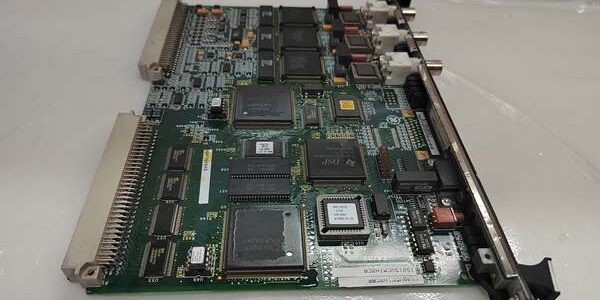
The eliminates the need for external protocol gateways. We use it to pull data from 1990s-vintage analyzers or local panel meters directly into the Mark VIe turbine controls via RS-485 Modbus RTU. The processing happens on the pack; the controller just sees a block of registers (e.g., ICBD_Zone1_Temp). This reduces panel clutter and single-source failure points (no extra gateway power supplies to fail).
Distributed I/O Without Extra Racks
If you need 8 extra DI points (like remote lube oil trip signals) near a specific terminal board but don’t want to populate a whole new I/O Pack slot with a dedicated IS200DFFDH, the covers you. Its integrated I/O handles the local signals, while the comm ports talk to the distant device. It’s a space-saver in crowded Balance-of-Plant (BOP) enclosures where you’re adding a small sensor set and a serial device simultaneously.
Deterministic Serial Polling
Generic PC-based gateways poll serial devices “when they can,” causing jitter in turbine protection data (e.g., reading a surge control setpoint from a Modbus flow computer). The runs a real-time task schedule. If you configure it to poll the RS-485 port every 100ms, it hits that mark regardless of controller loading. This ensures surge control or performance calculations in the IS215UCV use fresh, time-consistent data.
Field Engineer’s Notes (From The Trenches)
The “ABB” suffix matters for Terminal Board Wiring. Don’t assume a drops into the same terminal board as an “H1A”. The “B” in “ABB” often signifies a change in the I/O mix or connector gender (e.g., switching from a DB9 to a screw-terminal header on the pack itself, or changing which pins are Analog vs Digital).
If you swap an old ICBD for an and the DI points read backwards (Wet=0, Dry=1), check the sourcing vs sinking jumper on the terminal board—the “ABB” might default to the opposite of your old unit.
Also, RS-485 Termination: The has a DIP switch for 120Ω termination. In a daisy chain (e.g., Controller -> Device A -> -> Device B), onlythe two endpoints should have termination ON. If you turn it on in the middle (the ICBD pack), you split the differential voltage and get “ACK Errors” or corrupted data on the longer segment. Use a scope: you want ~2.2V differential (A-B) at the receiver. If it’s <1.5V, check termination and biasing resistors.
Real-World Applications
- Auxiliary Bearing Vibration Monitoring: The connects via RS-485 to a local Bently Nevada 3300/50 relay module in a gearbox skid. It pulls “Alarm” and “Danger” status via Modbus into the Mark VIe (for <XALARM> logic) and uses its integrated DIs to pick up dry contacts from local temperature switches (Overtemp) for voting in the TMR controller.
- Gas Metering Skid Interface: Mounted in a remote BOP cabinet, the uses its RS-232 port (COM1) to poll a Gas Chromatograph for BTU value every 5 minutes (via custom ASCII parse in ToolboxST). The integrated AOs send a 4-20mA “BTU Corrected Flow” to a local flow computer, while the Ethernet backplane feeds the main turbine <FSR> bias logic.
High-Frequency Troubleshooting FAQ
Check the DIP Switches for Node Address/Protocol. The “H1ABB” firmware expects a specific configuration. If the DIPs are set for “Modbus RTU Slave” but your device is a “Master” (or vice versa), the port will sit idle and timeout. Also, verify Handshaking (RTS/CTS). Many serial devices require hardware flow control; if the is set to “No Handshake” in ToolboxST but the device is driving CTS high, communication stalls. Set handshake to match the device manual.
No. The IS200AEBIH is a pure Ethernet Bridge (Network I/O Pack); it has no user-accessible I/O channels or serial ports. The is a functional peer in the IONet, but it occupies a different logical slot type (“ICBD” vs “EBI”). You must replace an EBI with an EBI. However, if you have an old IS200ICBDH1A, the “H1ABB” is a direct replacement ifyou map the I/O channels correctly in ToolboxST and verify the terminal board compatibility (see “ABB” BOM notes).
Bias Resistors. RS-485 needs the A/B lines biased to a known state when idle (typically A=5V, B=0V via 560Ω resistors to 5V/GND). If your is the master on a quiet bus, and you haven’t enabled “Bias” (sometimes a jumper on the terminal board, sometimes internal), the differential receiver sees “0V” (idle) as a valid “Mark” and garbles the start bit. Enable bias in the config if the device manual calls for “Failsafe Bias.”
Usually not, if the Controller’s I/O Pack image (in the packsfolder of your ToolboxST project) includes the “H1ABB” binary. When you insert the new , the controller compares its ID. If the firmware matches what’s in the controller’s memory, it runs. If it’s a newer rev than the controller expects, the controller will attempt to downloadthe firmware tothe pack automatically upon insertion (auto-flash). Ensure the rack has stable 5V power during this; interrupting a pack flash bricks it.
Please note: The listed price is not the actual final price. It is for reference only and is subject to appropriate negotiation based on current market conditions, quantity, and availability.