
Description
Hard-Numbers: Technical Specifications
- Part Number: 5417-1251
- Connectors: USB Type-A (PC Side) to RJ45 (Device Side)
- Protocol Support: UART / RS-485
- Baud/Data Rate: Supports standard UART baud rates up to 115.2 kbps
- Cable Length: 0.5 meters (1.6 feet)
- Rated Current: 1 A
- Isolation Rating: 1500V AC (Galvanic isolation barrier)
- Operating Temperature: –20°C to +70°C (–4°F to 158°F)
- Power Draw: < 2W (Bus-powered via USB)
- Compliance: CE, UL Certified
The Real-World Problem It Solves
Modern laptops lack the legacy RS-232 serial ports required to communicate with older and current industrial controllers. Trying to bridge this gap with cheap, unshielded USB adapters often results in fried laptop motherboards due to ground loops, or corrupted data packets during firmware uploads.
Where you’ll typically find it:
- Plugged into the service port of an easYgen 3000 series genset controller during initial parameter setup.
- In the troubleshooting kit of a turbine technician connecting to an LS-5 or GCP20 control panel.
- Routed internally to the RJ45 port of a Microprocessor-based actuator for real-time PID tuning.
This cable provides a reliable, electrically isolated bridge that lets you configure and diagnose equipment without risking your hardware or losing your logic due to communication errors.
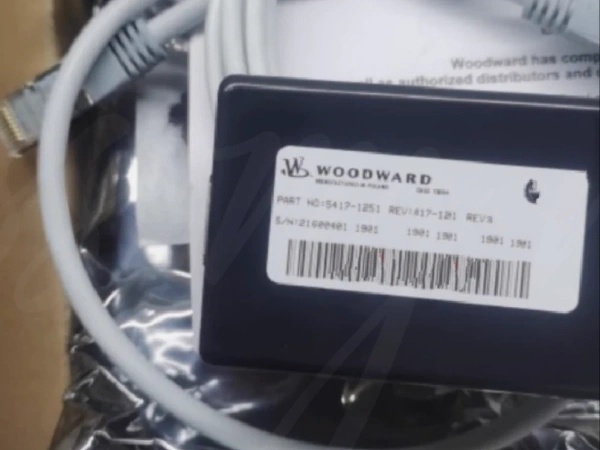
WOODWARD 5417-1251
Hardware Architecture & Under-the-Hood Logic
This isn’t just a pinout adapter; it’s an active signal translator designed to survive the electrical noise of a power plant control room. It bridges the 5V logic of a computer’s USB port to the distinct UART/RS-485 levels required by Woodward’s proprietary RJ45 service interface.
- USB-UART Bridge Controller: The molded housing contains a dedicated bridge chipset. It enumerates as a virtual COM port on the host PC, handling the low-level handshaking so the Woodward configuration software can communicate natively without third-party drivers.
- Signal Level Shifting: The cable actively converts the PC’s 3.3V/5V logic levels to the specific voltage swings the Woodward controller expects on its RJ45 pins, ensuring clean signal edges even in high EMI environments.
- Galvanic Isolation Barrier: A critical safety feature. Optocouplers and an isolated DC-DC converter create a physical break between the PC’s ground and the industrial device’s ground. If a high-voltage transient hits the controller’s chassis, the barrier absorbs it, keeping your laptop safe.
Field Service Pitfalls: What Rookies Get Wrong
The “Flat Ethernet Cable” Trap
Rookies see the RJ45 connector and assume this is a standard Cat5 Ethernet patch cable. They’ll grab a leftover flat cable from the IT department, plug it in, and wonder why the controller won’t link up—or worse, short out the port.
- Field Rule: Never substitute this cable. The 5417-1251 has a highly specific, non-standard pinout for the end tailored to Woodward’s UART service port. Using a standard Ethernet cable applies voltages to the wrong pins and can permanently damage the controller’s communication transceiver.
Phantom COM Port Lockouts
A technician plugs the cable into a USB 3.0 hub, Windows assigns it COM12, and suddenly the Woodward software throws a “Port Already In Use” or “Access Denied” error, preventing a critical firmware update.
- Field Rule: Always hard-assign the virtual COM port. Before connecting to the controller, open Device Manager > Ports (COM & LPT), right-click the Woodward USB Serial Port, hit Properties > Port Settings > Advanced, and manually force it to a low, unused number like COM3 or COM4. This bypasses Windows’ dynamic port allocation nonsense.
Commercial Availability & Pricing Note
Please note: The listed price is for reference only and is not binding. Final pricing and terms are subject to negotiation based on current market conditions and availability.



