Product Core Brief
- Model: DSRF182AK02
- Brand: ABB
- Series: ABB DCS System Expansion I/O Rack
- Order Code: 3BSE014078R1
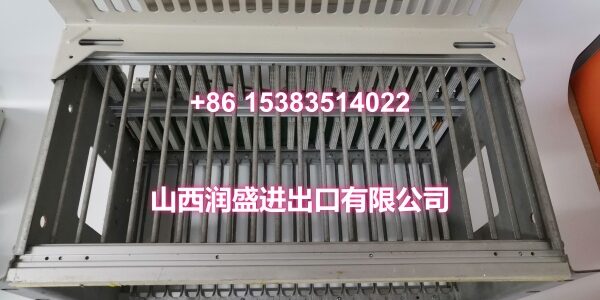
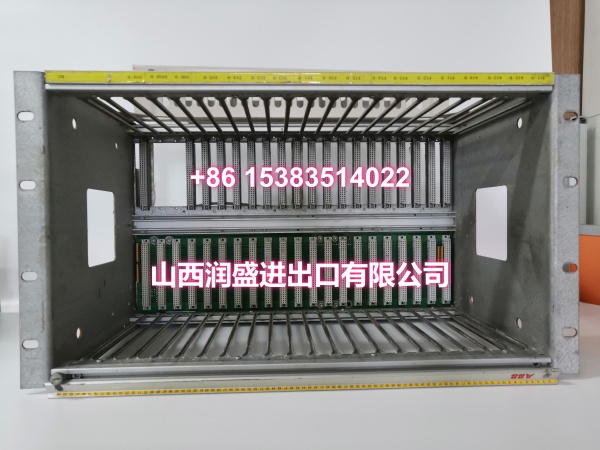
- Core Function: Expansion I/O rack for ABB DCS systems, providing modular signal expansion and equipment control in complex industrial environments. Enables system I/O capacity expansion without replacing the main controller, significantly reducing retrofit and upgrade costs.
- Product Type: Expansion I/O Rack
- Key Specs: Modular architecture | Hot-swap support | Intelligent self-diagnosis | High-speed data transmission | Wide-temperature design (-40°C ~ +70°C)
- Note: Condition: New Original (New Surplus). Compatible with ABB DCS system architectures.
Key Technical Specifications
| Parameter | Value |
|---|---|
| Device Model | DSRF182AK02 |
| Device Type | Expansion I/O Rack |
| Series | ABB DCS System I/O Expansion Rack |
| Standard Order Code | 3BSE014078R1 |
| Core Function | Signal expansion and equipment control in complex industrial environments |
| Architecture | Modular design supporting flexible I/O module configuration |
| Hot-Swap | Supported — modules can be replaced without system shutdown |
| Self-Diagnosis | Intelligent fault detection and logging |
| Data Transmission | High-speed internal bus communication |
| Operating Temperature | -40°C ~ +70°C |
| Storage Temperature | -40°C ~ +85°C |
| Relative Humidity | 5%–95% (non-condensing) |
| System Compatibility | ABB DCS systems (PM series, INFI 90, etc.) |
| Weight | Approx. 10 kg |
| Typical Applications | Power generation, petrochemical, manufacturing, water treatment, smart grid |
| Condition | New Original (New Surplus) |
Product Introduction
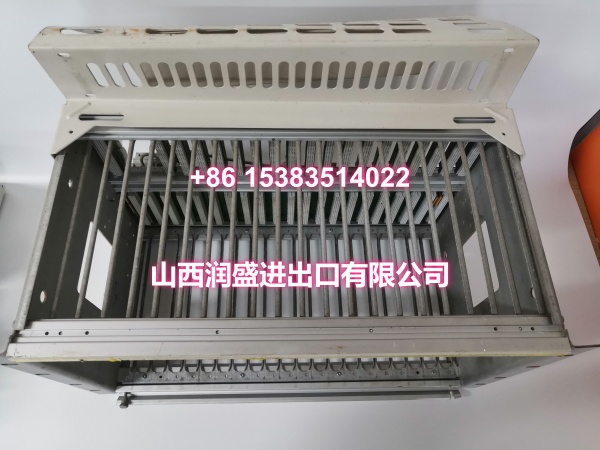
The ABB DSRF182AK02 (Order Code: 3BSE014078R1) is a high-performance expansion I/O rack designed specifically for signal expansion and equipment control in complex industrial environments. Its core function is to increase the I/O capacity of existing ABB DCS automation systems, enabling acquisition of more field signals and output of control commands — all without replacing the main controller, which greatly reduces retrofit and upgrade costs for brownfield installations.
The expansion I/O rack features a modular architecture that supports hot-swap operation and intelligent self-diagnosis functions, providing high-speed data transmission and strong system compatibility. It can flexibly adapt to various I/O modules to meet automation requirements across different industrial scenarios. With its wide-temperature design and reliable protection performance, it operates stably under harsh industrial conditions, making it a key component for resolving insufficient signal points, extending control range, and improving system flexibility.
In process control applications — such as power plant DCS, petrochemical plant control systems, and water treatment facility automation — the DSRF182AK02 serves as a critical backbone for connecting field instruments (pressure transmitters, temperature sensors, flow meters, control valves) to the central controller. Its modular design allows integrators to configure the exact I/O mix needed for each application, from analog input channels for sensor monitoring to digital output channels for valve actuation.
The hot-swap capability is particularly valuable in continuous-process industries where unplanned shutdowns are extremely costly. Maintenance teams can replace faulty I/O modules without interrupting the overall system operation, minimizing downtime and production losses. The intelligent self-diagnosis function continuously monitors module health and logs fault codes that can be accessed through the DCS engineering workstation, enabling predictive maintenance and rapid troubleshooting.
The DSRF182AK02 is designed for wide-temperature operation (-40°C to +70°C), making it suitable for deployment in challenging environments such as outdoor substations, unheated process buildings, and tropical climate installations. Its robust construction resists vibration, humidity, and electrical noise commonly found in industrial facilities.
Common applications include:
- Power generation: Expanding I/O capacity in DCS systems for boiler control, turbine monitoring, and auxiliary system automation.
- Petrochemical: Adding signal points for reactor monitoring, distillation column control, and safety instrumented systems.
- Water treatment: Connecting additional sensors and actuators for filtration, chemical dosing, and pump station control.
- Smart grid: Expanding monitoring and control points in substation automation and distributed energy resource management.
- Manufacturing: Scaling up I/O for production line automation, quality monitoring, and utility system control.
For system integrators and maintenance teams supporting ABB DCS installations, the DSRF182AK02 is a direct drop-in replacement for failed or capacity-limited expansion racks. When ordering, verify that the order code (3BSE014078R1) matches your system’s requirements and that the rack is compatible with your existing DCS controller version and I/O module types.
QA & Testing SOP
Every unit goes through a structured verification process before shipment:
- Visual Inspection: Check the rack housing for cracks, corrosion, physical damage to mounting rails, and damage to backplane connectors. Verify that all module slots are clean and free of debris. Inspect power connectors and communication bus connectors for straightness and corrosion.
- Backplane Continuity Test: Verify that the backplane bus connections between all module slots have proper continuity. Check for open circuits or short circuits on the backplane that could prevent I/O modules from communicating with the controller.
- Power Distribution Test: Apply power to the rack and verify that the internal power distribution system delivers correct voltage to each module slot. Measure voltage at multiple slot positions to confirm uniform power delivery across the rack.
- Hot-Swap Function Test: Insert and remove a test I/O module while the rack is powered to verify that the hot-swap mechanism operates correctly and that the system correctly detects module insertion/removal events without disruption to other modules.
- Self-Diagnosis Verification: Simulate a module fault and verify that the rack’s self-diagnosis function correctly detects and logs the fault. Confirm that fault information is accessible through the DCS engineering interface.
- Communication Test: Connect the rack to a compatible ABB DCS controller and verify that the controller correctly recognizes the rack and can communicate with installed I/O modules. Test data transmission in both directions (controller-to-module and module-to-controller).
- Environmental Stress Screening: Subject the rack to temperature cycling within its specified operating range (-40°C to +70°C) to verify stable operation under thermal stress. Monitor for any communication errors or power fluctuations during temperature transitions.
- Anti-Counterfeit & Packaging: Verify authenticity markings on the rack housing and internal components. Each unit is shipped in protective packaging with desiccant to prevent moisture absorption and connector oxidation during transit.
Installation Pitfalls & Guide
Installing or replacing an expansion I/O rack requires careful attention to power connections, backplane integrity, and proper module seating.
❗ Power-Down Before Installation: Always disconnect power to the DCS system before removing or inserting the DSRF182AK02 rack. Although individual I/O modules support hot-swap, the rack itself should be installed or replaced with power off to prevent electrical damage to the backplane connector or the controller’s communication bus.
❗ Anti-Static Protection: Always wear an anti-static wrist strap when handling the DSRF182AK02 rack and its I/O modules. The backplane and module connectors contain sensitive electronic components that can be damaged by electrostatic discharge (ESD). Handle modules by their edges only, avoiding contact with connector pins.
❗ Verify Backplane Connector Alignment: Before inserting the rack into the control cabinet, verify that the backplane connector aligns correctly with the controller’s communication bus connector. Misaligned connectors can cause bent pins and permanent communication failures.
❗ Document Module Configuration: Before removing the original rack, carefully document the position and type of each installed I/O module. Label each module slot with its function (e.g., “AI Slot 1 — PT-101 Pressure Transmitter,” “DO Slot 3 — XV-201 Control Valve”). Incorrect module placement after replacement can cause incorrect signal routing and process control errors.
❗ Verify Power Supply Compatibility: Confirm that the DCS system’s power supply can handle the additional load of the expansion rack and its installed modules. Overloading the power supply can cause voltage drops that affect the entire system’s stability.
4-Step Replacement Guide:
- Pre-install: Document all installed I/O module positions and types. Label each module slot with its function. Back up the DCS system configuration, including I/O point assignments and scaling parameters. Verify the replacement rack’s model (DSRF182AK02) and order code (3BSE014078R1) match the original. Prepare anti-static protection, tools, and a multimeter for verification.
- Removal: Disconnect power to the DCS system. Wear an anti-static wrist strap. Remove all I/O modules from the original rack, keeping the slot labels intact. Disconnect the backplane communication connector and power cables. Release the rack’s mounting hardware and carefully remove the rack from the control cabinet. Inspect the controller’s backplane connector for damage or debris.
- Install: Mount the new DSRF182AK02 rack in the control cabinet using the original mounting hardware. Connect the backplane communication connector to the controller, ensuring proper alignment and full seating. Connect power cables to the rack’s power input terminals. Reinstall all I/O modules into their correct slot positions according to the documented labels. Verify that each module is fully seated and locked in place.
- Power-on Test: Apply power to the DCS system. Verify that the rack powers up correctly and that the controller recognizes all installed I/O modules. Use the DCS engineering workstation to verify that all I/O points are reading and writing correctly — check analog input values against known field instrument readings, and test digital outputs by commanding valve positions. Monitor the rack for several minutes to confirm stable operation with no communication errors or fault codes.
Technical FAQ
1. What is the DSRF182AK02 used for in an ABB DCS system? The DSRF182AK02 is an expansion I/O rack that increases the I/O capacity of ABB DCS systems. It allows additional field instruments (sensors, transmitters, valves, actuators) to be connected to the control system without replacing the main controller, enabling cost-effective system expansion and retrofit projects.
2. Does the DSRF182AK02 support hot-swap? Yes, the DSRF182AK02 supports hot-swap operation for individual I/O modules. Modules can be inserted or removed while the rack is powered without disrupting the operation of other modules or the overall system. However, the rack itself should be installed or replaced with power off.
3. What is the operating temperature range of the DSRF182AK02? The DSRF182AK02 is designed for wide-temperature operation, with an operating range of -40°C to +70°C and a storage range of -40°C to +85°C. This makes it suitable for deployment in challenging industrial environments including outdoor installations and extreme climate conditions.
4. Which ABB DCS systems is the DSRF182AK02 compatible with? The DSRF182AK02 is compatible with ABB DCS system architectures, including the PM series and INFI 90 systems. Always verify your specific controller model and software version before ordering to ensure full compatibility with your existing system configuration.
5. What are common symptoms of a failing expansion I/O rack? Common symptoms include: I/O modules not being recognized by the controller; intermittent communication errors between the rack and controller; power distribution failures causing modules to lose power; backplane communication timeouts; and self-diagnosis fault codes logged in the DCS event log. If you’re experiencing any of these symptoms, check the backplane connector seating, verify power supply voltage, and use the DCS engineering workstation to read the specific fault codes.
6. What’s the difference between New Surplus and Refurbished for expansion I/O racks? We supply this unit as New Original (New Surplus) — unused, original factory stock. This comes with a standard 12-month warranty. Refurbished expansion racks carry risks including degraded backplane connectors, weakened power distribution circuits, and latent failures in communication ICs that may only manifest under full operational load. For a rack that is critical to system I/O capacity and reliability, new surplus is the safer choice.