Product Quick Summary
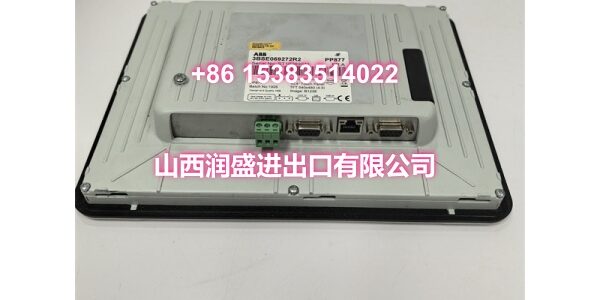
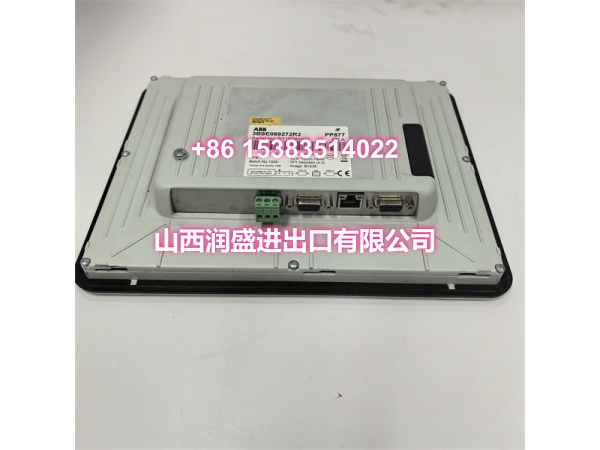
- Model: PP877
- Part Number: 3BSE069272R2
- Brand: ABB
- Core Function: Operator panel (HMI) for ABB System 800xA and industrial control systems
- Standout Specs: 10.4-inch TFT/LED display at 640×480 resolution; resistive touchscreen; ARM9 400 MHz processor; front IP66/IP65 protection rating
- Condition: New Surplus / Refurbished (Legacy / Discontinued part)
Core Technical Specifications
| Parameter | Detail |
|---|---|
| Brand | ABB |
| Model | |
| Part Number | 3BSE069272R2 |
| Product Type | Operator Panel / HMI Touchscreen |
| Controller Family | System 800xA / Panel 800 v6 series |
| Display | 10.4-inch TFT/LED, 640×480 pixels (4:3), 64k colors, 450 cd/m² brightness |
| Touchscreen | Resistive touch, rated for 1 million touch operations |
| Processor | ARM9, 400 MHz |
| Memory | 128 MB DDR2 main memory, 80 MB application memory |
| Communication | 1× 10/100Base-T Ethernet (shielded RJ45), 1× USB 2.0, 2× combined serial ports (RS232/RS422/485) |
| Storage | 1× SD card slot (SDHC supported with latest image) |
| Power Supply | 24 V DC (18–32 V DC range), 9.6 W power consumption |
| Protection Rating | Front IP66/IP65, rear IP20 |
| Operating Temperature | -10°C to +60°C |
| Storage Temperature | -20°C to +70°C |
| Frame Material | Die-cast, powder-coated aluminum |
| Mounting | Panel mount (VESA 75×75 compatible) |
| Net Weight | Approx. 1.5 kg |
| Origin | Sweden / Switzerland |
Engineer’s Perspective
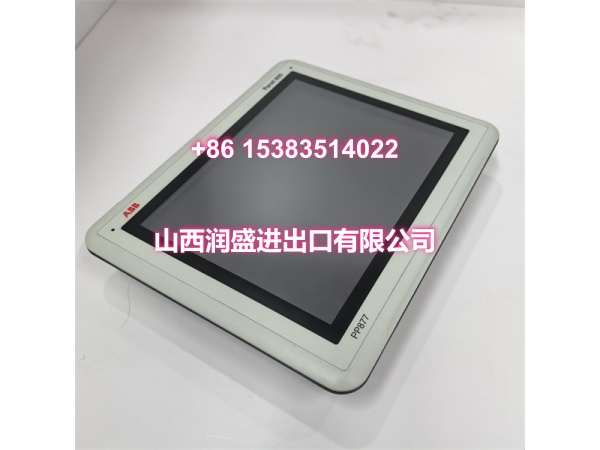
The ABB PP877 3BSE069272R2 is an operator panel (HMI) from ABB’s Panel 800 v6 series, designed for integration with the ABB Ability System 800xA DCS and various industrial automation platforms. If you’re maintaining a System 800xA installation in a power plant, petrochemical facility, water treatment site, or manufacturing operation, this panel is the face of your control system — it’s what operators use every day to monitor process variables, acknowledge alarms, and issue control commands. It’s not a new-release product, and finding a tested replacement quickly is critical when a panel fails and operators lose visibility into the process.
What makes the ABB PP877 3BSE069272R2 worth sourcing today is its role as the primary human-machine interface for System 800xA-based systems. When this panel goes down, operators lose their window into the process — they can’t see real-time data, can’t acknowledge alarms, and can’t make setpoint adjustments. The panel provides a 10.4-inch resistive touchscreen interface with a 4:3 aspect ratio at 640×480 resolution, driven by an ARM9 400 MHz processor with 128 MB DDR2 memory. It integrates directly with ABB controllers via Ethernet and supports communication with PLCs, drives, and other field devices across the control network. The front IP66/IP65 protection rating means it can handle wet, dusty, and demanding environments without degradation.
We’ve seen these units pulled from decommissioned systems and refurbished to full operational status. The key thing to watch is firmware compatibility — a mismatch between the replacement panel and your existing System 800xA controller configuration can cause communication failures or prevent the panel from loading the correct process graphics. Always verify your current firmware version before swapping in a replacement.
Installation, Compatibility & Risk Avoidance
Before you install the ABB PP877 3BSE069272R2 into a live control cabinet, there are a few common pitfalls that can cause headaches:
- Firmware match: Check the firmware version on your existing panel and confirm the replacement matches. A version mismatch can prevent the panel from communicating with the System 800xA controller or loading the correct application graphics.
- Communication cable integrity: The PP877 connects to the controller via a dedicated Ethernet cable. A damaged or loose cable is the most common cause of “panel dead” faults — always check the cable and connectors before assuming the panel itself has failed.
- Panel configuration backup: If your existing panel has custom process graphics or parameter settings, back up the configuration before removing it. A replacement panel will need the same configuration loaded to function correctly in your system.
- Power supply check: Verify the panel’s 24 V DC supply is stable before installation. Undervoltage or noisy power can cause intermittent display issues or communication dropouts that are hard to diagnose.
- Touchscreen calibration: After installation, the resistive touchscreen may need recalibration to ensure accurate touch response. An uncalibrated screen can lead to operator input errors.
- SD card image: If the panel fails to boot, the SD card image may be corrupted. Having a known-good image on a spare SD card can save hours of downtime.
Field Note: Before swapping an operator panel in a live System 800xA system, always note the communication port and cable type on the old unit. The PP877 uses specific cabling to talk to the controller — using the wrong cable type or pinout will result in a dead panel even if the hardware is good. Also note the station address and IP configuration before removing the old unit.
Our In-House Testing Process
Every ABB PP877 3BSE069272R2 unit goes through our internal inspection before it leaves our facility:
- Incoming visual inspection: Checking for physical damage, screen cracks, corrosion, or signs of improper handling.
- Anti-counterfeit verification: Cross-referencing serial numbers, PCB markings, and manufacturing labels against known ABB specifications.
- Power-on test: Applying 24 V DC and verifying the panel boots, displays the startup screen, and responds to touch input.
- Communication handshake test: Connecting the panel to a test System 800xA controller and verifying it establishes communication and loads process graphics.
- Touchscreen calibration check: Verifying touch accuracy across the full screen area.
- Static-proof packaging: Each unit is sealed in anti-static bags with protective foam before shipping.
Natural FAQ
Q: Can the ABB PP877 3BSE069272R2 replace a failed operator panel in my System 800xA system? A: In most cases, yes. The PP877 is designed as a direct replacement within the Panel 800 v6 series for System 800xA systems. However, you need to verify the firmware version matches your existing setup. If your system uses specific process graphics or custom configurations, those will need to be loaded onto the replacement panel after installation.
Q: The panel powers on but won’t communicate with the controller. What should I check first? A: Start with the Ethernet cable and port connections. A loose or damaged cable is the most common cause of communication failures. If the cable is good, check that the panel’s firmware version matches what the System 800xA controller expects. A firmware mismatch can prevent the panel from establishing a proper communication handshake with the controller.
Q: Do you test the ABB PP877 3BSE069272R2 before shipping, and is there a warranty? A: Yes. Every unit undergoes our in-house power-on test, communication handshake test, touchscreen calibration check, and anti-counterfeit verification before shipment. We stand behind our inventory with a standard one-year warranty on all operator panels. If a unit fails to perform as specified, we handle replacement directly.
Q: Is the PP877 3BSE069272R2 the same as the PP877K 3BSE069274R1? A: They are closely related variants within the same Panel 800 v6 family. The PP877 (3BSE069272R2) is the touchscreen version, while the PP877K (3BSE069274R1) is the keypad version with 22 function keys. Both share the same 10.4-inch display, ARM9 processor, and communication interfaces, but the input method differs. Confirm your existing panel’s exact part number before ordering a replacement.
Need me to pull up the communication cable pinout for the PP877? Comes in handy when you’re troubleshooting a panel that won’t talk to the controller.