Product Quick Summary
- Model: PP825A
- Part Number: 3BSE042240R3
- Brand: ABB
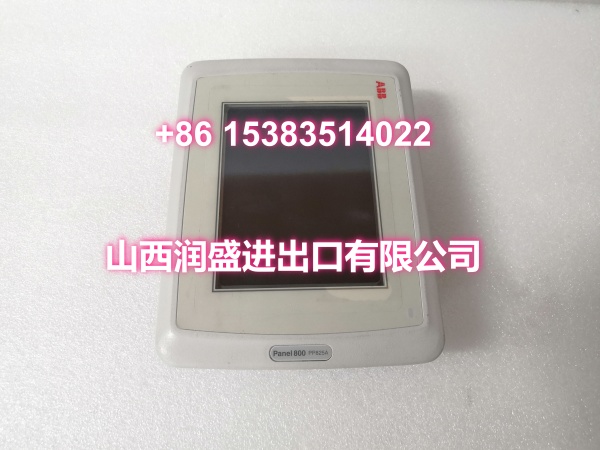
- Core Function: Human-machine interface (HMI) touch panel for the Panel 800 series
- Display: 5.7″ CSTN-LCD, 320 × 240 pixels, color, resistive touch
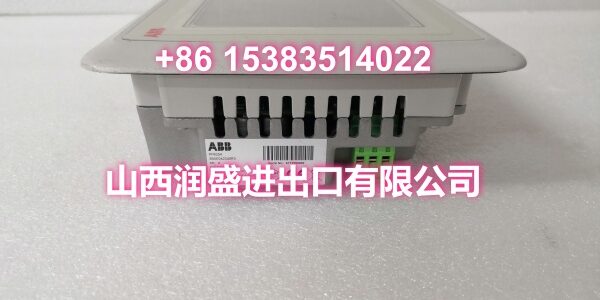
- Dimensions: 261 × 171 × 76.5 mm (D × W × H)
- Weight: Approx. 1.27 kg
- Condition: New surplus / legacy discontinued — ready to ship
- Origin: Sweden
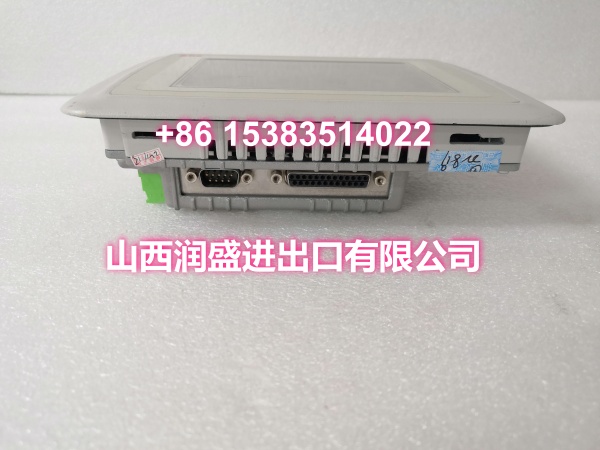
The PP825A is ABB’s 5.7-inch resistive touch panel in the Panel 800 family, providing operators with a graphical interface for process monitoring, control, and commissioning in industrial automation environments.
Core Technical Specifications
| Parameter | Detail |
|---|---|
| Product Type | Touch Panel / HMI (Human-Machine Interface) |
| Part Number | 3BSE042240R3 |
| Display Technology | CSTN-LCD (Color Super Twisted Nematic) |
| Screen Size | 5.7 inches |
| Resolution | 320 × 240 pixels |
| Touch Type | Resistive touch |
| Communication Interfaces | Multiple (serial, Ethernet — varies by configuration) |
| Dimensions | 261 × 171 × 76.5 mm (D × W × H) |
| Weight | Approx. 1.27 kg |
| Operating Environment | Industrial — suitable for harsh environments |
| Certifications | CE, UL, CSA |
| Condition | New surplus / legacy |
Engineer’s Perspective
The ABB PP825A 3BSE042240R3 is the 5.7-inch operator panel in ABB’s Panel 800 series. If you’re running a plant with ABB automation equipment — whether it’s a standalone drive, a PLC-based machine, or a distributed control system — and the operator interface has failed or needs replacement, this panel is the direct-fit component that keeps your HMI functional without re-engineering the application.
The PP825A uses a 5.7-inch CSTN-LCD display with a resolution of 320 × 240 pixels and a resistive touch interface. CSTN-LCD is a color display technology that offers decent readability in industrial lighting conditions, and the resistive touch layer means it can be operated with gloves on — a practical requirement in many plant environments where capacitive touch screens are impractical. The 320 × 240 resolution is modest by today’s standards, but it’s perfectly adequate for process visualization, alarm acknowledgment, setpoint entry, and basic trend display.
The panel is part of the broader Panel 800 family, which includes larger models like the PP845 and PP846. The PP825A sits at the compact end of that range, making it suitable for panel-mounted installations where space is limited or where a full-size operator station is unnecessary. It connects to ABB automation devices — controllers, drives, and other field equipment — via serial or Ethernet interfaces, depending on the configuration and the communication module installed.
Here’s the reality: the Panel 800 series is legacy. ABB has moved on to newer HMI platforms, which means sourcing a genuine, tested PP825A is the only way to keep your existing operator station running without migrating to a new HMI platform and redeveloping all your faceplates and graphics. The ABB PP825A 3BSE042240R3 is not a part you want to source from an unverified supplier — pulled panels with dead backlights, worn-out touch layers, or counterfeit units are a real risk in the aftermarket.
Installation, Compatibility & Risk Avoidance
Platform compatibility: The PP825A is designed for the Panel 800 series and communicates with ABB automation devices (controllers, drives, PLCs) via serial or Ethernet interfaces. Confirm your existing HMI model and communication configuration before ordering — the PP825A is not directly interchangeable with the PP845, PP846, or other Panel 800 variants without verifying the application project file compatibility.
Part number revision: The part number 3BSE042240R3 indicates revision 3 of the PP825A. Earlier revisions (R1, R2) may exist in the field. In most cases, a higher revision is backward-compatible, but if you’re replacing an older unit, verify with your engineering team that the application project file doesn’t reference revision-specific features.
Touch screen calibration: Resistive touch panels require periodic calibration. If the replacement panel exhibits touch inaccuracy (e.g., pressing one button activates a neighboring button), run the built-in calibration routine from the panel’s system menu. This is a common post-installation step that takes less than a minute.
Backlight life: CSTN-LCD backlights have a finite service life, typically rated for tens of thousands of hours. If you’re sourcing a used or surplus unit, request confirmation that the backlight has been tested and is within specification. A dim or flickering backlight is a sign of an aging unit that will need replacement again soon.
Application download: The PP825A ships without your application program. You’ll need to download the HMI project from your engineering station using ABB’s Panel Builder or the relevant configuration tool. Ensure your project file matches the target hardware (PP825A, not PP845 or PP846) and that the communication parameters (serial port settings, Ethernet IP address) match your controller’s configuration.
Panel cutout: The PP825A requires a specific panel cutout dimension for flush mounting. Before installing the replacement, verify the cutout in your control cabinet matches the PP825A’s mounting dimensions. The panel is secured from the rear with mounting clips — no tools are needed once the cutout is correct.
Field Note: Before pulling the failed panel, photograph the communication cable connections (which port is used, pinout if serial), the DIP switch or rotary switch settings on the rear, and the front-panel LED states. Also note the IP address or serial node address configured in the application. Five minutes of documentation saves hours of troubleshooting when the replacement doesn’t come up immediately.
Natural FAQ
Can I replace a PP825A with a PP845 or PP846? Not directly. The PP845 and PP846 are larger panels with different screen sizes, resolutions, and mounting dimensions. Your application project file is built for a specific panel model — a PP825A project will not run on a PP845 without modification. If you want to upgrade to a larger panel, you’ll need to redevelop the HMI application in Panel Builder and retest all graphics, alarms, and navigation.
The panel powers up but the touch response is inaccurate. What should I do? Run the built-in touch screen calibration routine from the panel’s system menu. Resistive touch panels drift over time and after replacement, and calibration typically resolves accuracy issues in under a minute. If calibration doesn’t help, the touch layer itself may be damaged — in that case, the panel needs replacement.
Is this module tested before shipping? Yes. Every unit goes through incoming visual inspection, anti-counterfeit verification, live functional testing (power-on, display, touch response, communication), and static-proof packaging before it leaves our facility. We don’t ship untested legacy parts.
What’s the difference between the PP825A and the PP825? The PP825A (3BSE042240R3) is a specific revision of the PP825 panel. The “A” suffix and the R3 revision indicate updated hardware or firmware compared to earlier versions (e.g., 3BSE042240R1). In most cases, the PP825A is backward-compatible with applications built for earlier PP825 revisions, but verify with your engineering team before deploying.
Do you offer warranty or return support? All modules are covered under our in-house warranty policy. If the ABB PP825A 3BSE042240R3 fails to operate correctly upon installation under normal conditions, contact our support team for replacement or refund options.