Product Core Brief
- Model: 95DSS2-1CEX
- Brand: Fireye (UTC Fire & Security)
- Series: InSight I Series Flame Scanner
- Core Function: Continuously monitors the presence and stability of industrial flames using dual solid-state UV and IR sensors, providing reliable combustion control and safety interlocks.
- Product Type: Microprocessor-Based Dual Sensor Flame Scanner
- Key Specs: UV & IR Sensors | 24 VDC | ATEX Exd IIC T6 | Built-in Relays
- Condition: New Surplus / Original OEM
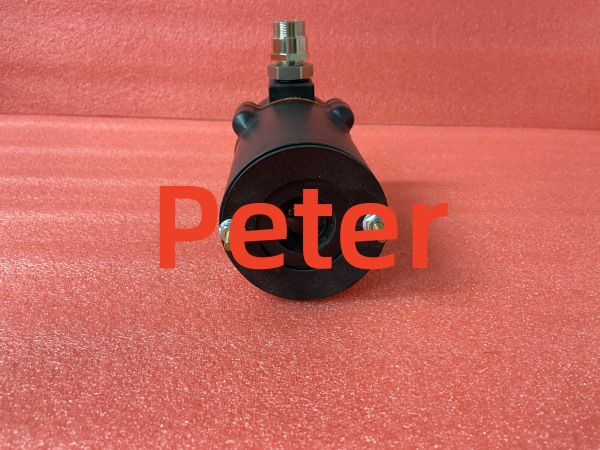
Fireye 85UVF1-1QDK3
Key Technical Specifications
- Manufacturer: Fireye (UTC Fire & Security)
- Part Number: 95DSS2-1CEX
- Product Category: Flame Scanner / Flame Detector
- Sensor Technology: Solid-State Dual (Ultraviolet + Infrared)
- Power Supply: 24 VDC
- Certification: ATEX Exd IIC T6 (Hazardous Area Approved)
- Relay Outputs: Internal Flame Relay with Adjustable ON/OFF Thresholds
- User Interface: 8-Character Alpha-Numeric LED Display & 4-Push-Button Keypad
- Connection: 12-Pin Electrical Quick Disconnect or 10 ft. Cable (“CG” models)
- Self-Diagnostics: Electronic Self-Checking (No Mechanical Shutter Required)
- Operating Temp Range: Standard Industrial Boiler/Burner Range
Product Introduction (No Fluff)
The Fireye 95DSS2-1CEX is a microprocessor-based InSight I Series flame scanner designed for demanding industrial combustion applications. By utilizing dual UV and IR sensors, it provides highly reliable flame detection, effectively filtering out false signals from background radiation or hot refractory materials.
This integrated unit eliminates the need for a remote flame amplifier by housing the internal flame relay directly within the scanner. The ATEX Exd IIC T6 certification ensures it can be safely deployed in hazardous gas environments. Sourcing this exact OEM replacement prevents burner lockouts and maintains critical safety interlocks on boilers, heaters, and turbines.
QA & Testing SOP (Dynamic & Transparent)
Flame scanners are critical safety devices and demand rigorous validation. Every 95DSS2-1CEX undergoes a strict inspection process:
- Anti-Counterfeit Inspection: Verify Fireye factory labels, ATEX certification markings, and housing build quality against OEM baselines.
- Power & Display Test: Apply 24 VDC to verify stable operation, LED display functionality, and keypad responsiveness.
- Sensor Responsiveness: Test UV and IR sensor channels using calibrated test sources to verify accurate signal gain and frequency detection.
- Relay Actuation Test: Simulate flame-on and flame-off conditions to confirm the internal flame relay actuates correctly at the programmed thresholds.
- Diagnostic Check: Verify the electronic self-checking circuit operates properly without requiring a mechanical shutter.
- Packaging: Shipped in protective packaging with a printed QA test report.
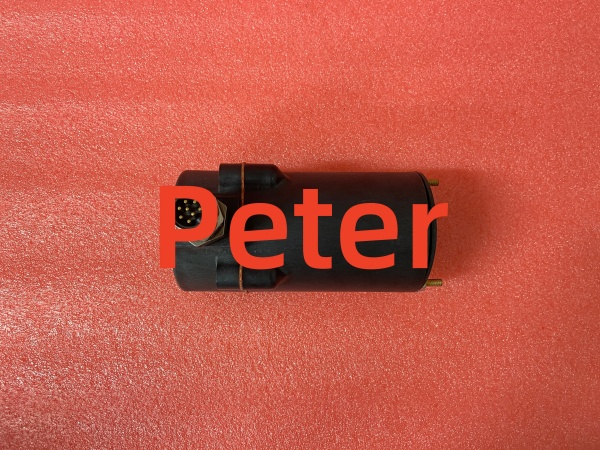
Fireye 85UVF1-1QDK3
Installation Pitfalls & Guide (Engineer to Engineer)
❗ Hazardous Area Compliance: The “CEX” suffix indicates ATEX Exd IIC T6 approval. Never compromise the flameproof enclosure. Ensure all cable glands are properly tightened and that the housing cover is fully seated to maintain the explosion-proof rating in hazardous environments.
❗ Optical Path Alignment: Dual-sensor scanners require a clear, unobstructed view of the flame. Ensure the scanner is mounted securely using the appropriate flange (e.g., Fireye 60-2692SS) and aligned precisely. Dust, oil mist, or misalignment will cause nuisance trips.
❗ Gain & Threshold Tuning: Utilize the built-in 8-character LED display and 4-button keypad to view operating parameters. Adjust the modulation rate, gain values, and ON/OFF thresholds to match the specific flicker characteristics of your burner. Poor tuning leads to false flame-loss trips.
❗ 24 VDC Power Quality: Ensure the 24 VDC supply is stable and properly fused. Voltage sags during burner startup (when large contactors or VFDs kick in) can cause the scanner to reset or fault.
Replacement Protocol:
- Pre-Install: Place the burner management system (BMS) in manual/test mode. Lock out the 24 VDC supply to the scanner. Verify 0 VDC.
- Removal: Disconnect the 12-pin quick disconnect (or cable). Unbolt the scanner from the mounting flange. Inspect the viewing port for carbon buildup or cracked glass.
- Install: Clean the viewing port. Mount the new 95DSS2-1CEX. Reconnect the 12-pin connector securely. Restore 24 VDC power.
- Power-on Test: Verify the scanner boots and displays normal status. Perform a functional test by simulating a flame signal or initiating a controlled burner light-off sequence to verify the relay actuates correctly.
Technical FAQ
Is this an exact drop-in replacement for my older Fireye scanner?
Yes, the 95DSS2-1CEX is a direct replacement for InSight I Series dual-sensor scanners with the same configuration. Note that Fireye has declared many older InSight I models obsolete as of February 2020. If replacing a legacy model (e.g., 95UVS2-1CEX or 95IRS2-1CEX), consult the Fireye cross-reference table, as newer 95xxS4 series models may be recommended.
Why is this listed as “New Surplus” instead of factory-new?
This is genuine Fireye stock that was never installed in a plant. It has been stored in climate-controlled inventory rather than exposed to extreme heat, vibration, and combustion byproducts. You receive the exact same performance and lifespan as a factory-fresh unit, typically at a significantly lower cost without extended OEM lead times.
Can I hot-swap this flame scanner while the burner is running?
No. Removing a flame scanner while the burner is firing will immediately drop the flame signal, causing the Burner Management System (BMS) to execute a safety shutdown/trip. Always schedule this replacement during a planned maintenance window or outage.
What is the warranty coverage on this part?
We provide a standard 12-month functional warranty. If the scanner fails to detect a valid flame signal, experiences relay failure, or exhibits internal electronic faults under normal operating conditions within that window, we replace it. Our QA testing proves the unit passed all functional tests before it left our bench.
The display is blank, but I have 24 VDC at the connector. Is it dead?
Likely yes, but first verify the polarity. The 12-pin connector requires correct positive/negative DC wiring. If polarity is correct and the display remains blank, the internal power supply or microprocessor has likely failed, and the unit requires replacement.