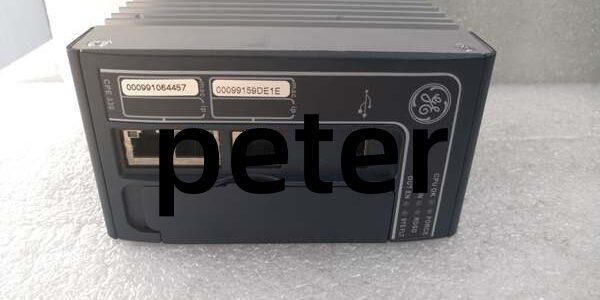
Product Core Brief
- Model:
- Brand: GE
- Series: PACSystem RX3i
- Core Function: Executes control logic and manages embedded Ethernet communications for RX3i rack systems.
- Product Type: PLC CPE Processor Module
- Key Specs: 64MB Memory | Dual Embedded Ethernet Ports | IEC 61131-3 Compliant Note: Active product line; factory new and tested surplus units are widely available in global supply chains.
Key Technical Specifications
- Boolean Instruction Speed: 0.08 μs per boolean
- Combined Program & Data Memory: 64 MB
- Programming Standards: Full IEC 61131-3 support
- Backplane Bus Speed: 10 Mbps
- Network Interfaces: Dual 10/100 Mbps Ethernet
- Supported Protocols: SRTP, Modbus TCP, SNP, EtherNet/IP client
- Operating Temperature: 0°C to 60°C horizontal cabinet mounting
- Storage Temperature: -40°C to 85°C
- Maximum Power Consumption: 5.2 W
- Form Factor: Single-width RX3i backplane module
- Isolation: Ethernet ports provide electrical isolation from backplane circuits
Product Introduction
This processor is a core control platform for PACSystem RX3i racks, built with dual Ethernet ports to separate programming traffic and plant network communications. It executes all standard IEC control languages for discrete and process automation applications.
The dual-port layout removes the need for external network switches in many small-to-medium racks, simplifying cabinet wiring and reducing single points of failure on the control network.
QA & Testing SOP (Transparency Building)
- Incoming Inspection: Confirm part labeling and serial number traceability. Inspect edge connectors for bent pins, PCB scratches or corrosion; cross-reference markings against OEM datasheets.
- Live Testing: Install into a validated RX3i rack, apply 24VDC nominal power. Complete Ethernet communications handshake and run continuous 24-hour logic load testing.
- Electrical Testing: Use Fluke 115 to monitor supply stability. Insulation resistance tests must exceed 10MΩ between signal circuits and protective ground.
- Firmware/Config Backup: Log exact firmware revision. Capture photos of DIP switch positions before clearing existing configuration.
- Final QC & Packaging: Place unit inside anti-static shielding. Attach dated QC test tag and seal packaging to prevent transit damage.
Installation Pitfalls & Guide (Engineer to Engineer)
❗ Firmware Rev Mismatch: Older backplane hardware cannot support latest firmware builds. Version mismatch triggers intermittent Ethernet dropouts and backplane scan faults. Validate compatibility before flashing updates. ❗ DIP Switch/Jumper Errors: Take clear photos of switch positions on the old unit before removal. Wrong settings alter default IP addressing and disable serial fallback programming. ❗ Network Port Confusion: The two Ethernet ports are not internally switched. Improper cable routing can create network loops and crash controller communications. ❗ ESD Dangers: Un-grounded handling causes latent internal damage. Static faults often appear weeks after installation with no visible physical damage. ❗ Rack Power Budget Oversight: This unit draws slightly more power than base CPU models. Recalculate total rack load to avoid overtaxing the power supply.
Replacement Guide:
- Pre-install: Perform lockout-tagout, photograph wiring and switch settings, back up the running controller program.
- Removal: Release module latches, slide the unit straight out; avoid twisting edge connectors to prevent pin deformation.
- Install: Align module with rack guides, seat fully and lock latches; replicate all documented switch settings.
- Power-on Test: Restore power, monitor status LEDs, download program and verify communications on both Ethernet channels.
FAQ (Frequently Asked Questions)
Q: Does this unit support hot-swapping? A: No. It occupies a primary backplane slot. Hot removal disrupts the rack bus and may damage neighboring modules. Full rack shutdown is required for replacement.
Q: Can the two Ethernet ports use separate IP subnets? A: Yes. Each port maintains independent IP configuration, allowing segregation of office programming networks and field device networks.
Q: Can I migrate programs from older RX3i CPUs directly to this unit? A: Most logic transfers without modification. Hardware configuration must be revalidated. Firmware differences can trigger minor runtime diagnostic faults requiring adjustment.
Q: What software is required for programming? A: Proficy Machine Edition is the official tool. Confirm your software version supports the installed firmware revision on the processor.
Q: Is extended temperature operation supported? A: Standard rated range is 0°C to 60°C. For locations outside this window, consult GE documentation for approved thermal accessories.
Q: What happens if power cuts out during firmware upgrade? A: The module can become unbootable. Always maintain stable power and keep a spare replacement on hand before initiating flash updates.
Q: Can this controller operate without Ethernet connections? A: Yes. Control logic runs autonomously. The Ethernet interfaces are only for programming, HMI and remote device communications. Serial fallback access remains available.