Product Core Brief
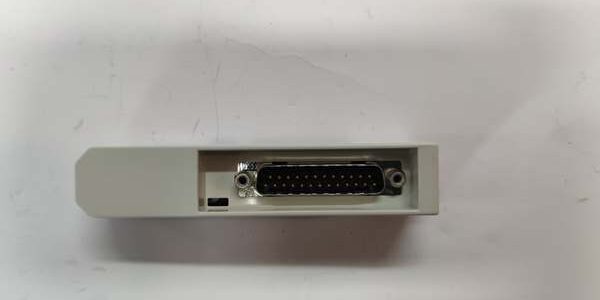
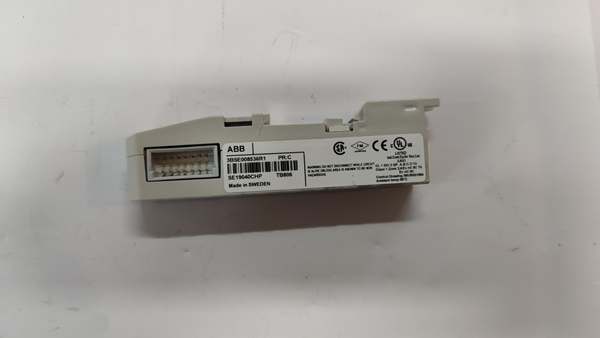
- Model: TB806 3BSE008536R1
- Brand: ABB
- Series: S800 I/O ModuleBus expansion hardware for AC800M / 800xA DCS
- Core Function: Acts as inlet bus adapter to connect TK801 ModuleBus extension cables to S800 I/O cluster termination units
- Product Type: Compact rack-slotted ModuleBus inlet adapter
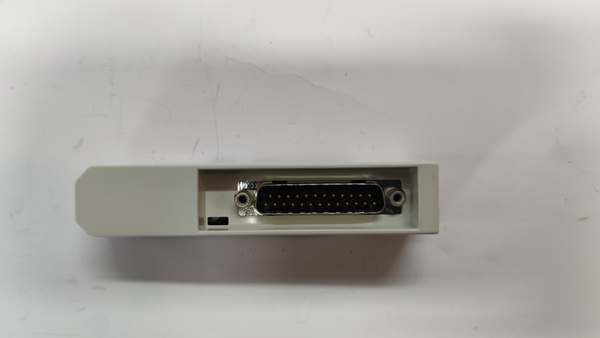
- Key Specs: Male D-Sub25 connector | Matches TK801 extension cable | IP20 enclosure rating
- Note: Active OEM spare lifecycle; factory sealed new units and bench-tested surplus available for plant S800 I/O cabinet expansion and maintenance
Key Technical Specifications
- Connector interface: 25-pin male D-Sub for TK801 ModuleBus extension cable
- Bus type: S800 proprietary ModuleBus parallel communication bus
- Mechanical dimensions: 109 mm H × 22 mm W × 25 mm D
- Net unit weight: 0.046 kg
- Enclosure protection: IP20 for interior control cabinet mounting
- Operating ambient temperature: -20°C to +55°C sealed cabinet
- Storage temperature range: -40°C to +70°C
- Humidity tolerance: ≤95% RH non-condensing below 55°C
- Compliance: EU RoHS 2011/65/EU, CE, IEC 61131-2
- Mounting: Standard rack slot clip-in design, mates with all TU8xx terminal bases
- Power feed: Draws logic power from rack backplane, no external wiring required
Product Introduction
This compact adapter provides a physical D-Sub25 port to extend ModuleBus communication beyond a single local I/O cluster, linking remote I/O sections back to the main CI8xx communication interface module. It maintains full bus signal integrity across extended cable runs, and the clip-in rack design eliminates custom wiring harnesses for multi-cluster distributed I/O layouts in power and chemical plant control rooms.
QA & Testing SOP
- Incoming Inspection: Cross-reference serial number against ABB spare asset database to filter counterfeit assemblies; inspect D-Sub25 pin contacts, rack clip housing and PCB traces with a 10x magnifier for bent pins or thermal discoloration; log serial numbers for full I/O system traceability records.
- Live Testing: Seat the unit on a TU810 terminal base paired with a CI810 communication module; connect a TK801 extension cable and remote I/O load bank; supply rated 24VDC rack power; run a continuous 24-hour cycle test including full ModuleBus signal scanning and cable fault injection to validate unbroken data transmission.
- Electrical Testing: Use a Fluke 115 insulation tester to verify ≥10MΩ isolation between ModuleBus signal pins and rack chassis ground; confirm cabinet PE continuity resistance below 0.5Ω.
- Firmware/Config Backup: Photograph D-Sub pinout labeling and rack clip installation orientation; record OEM cable length limits for TK801 extension wiring reference.
- Final QC & Packaging: Wipe plastic housing with static-dissipative microfiber cloth; cap D-Sub connector with insulating dust cover; seal the unit inside a shielding ESD bag, attach a printed QC tag with full 24-hour bus communication test timestamp, then pack into foam lined transit cartons.
Installation Pitfalls & Guide
❗ Mismatched extension cable type breaks bus synchronization: Only OEM cables work with this unit; generic D-Sub25 cables alter bus impedance and trigger continuous ModuleBus communication timeouts. ❗ Bent D-Sub pins create intermittent I/O dropout: Forceful angled cable insertion scratches internal pin contacts, leading to random loss of remote I/O data during cabinet thermal cycling. ❗ Underrated cable length creates signal attenuation: runs exceeding the OEM maximum length generate scan delays over 100ms, breaking closed-loop control scan timing windows. ❗ ESD discharge damages internal bus filter circuits: Bare finger contact with PCB signal traces can corrupt ModuleBus framing data, requiring full rack cold restart to restore communication. ❗ Hot-swap energized ModuleBus creates bus parity errors: Pulling the unit under live rack power disrupts bus clock signals and forces all attached I/O channels offline for 30+ seconds.
4-step replacement guide
- Pre-install: Lock out and tag rack 24VDC auxiliary power; wait 10 minutes for internal backplane capacitors to fully discharge; don ESD wrist strap; capture photos of cable D-Sub wiring and rack slot mounting orientation.
- Removal: Unplug the extension cable from the front D-Sub port; squeeze the side rack clip and slide the old unit straight out of the TU810 base slot without twisting the edge connector pins.
- Install: Align the new unit with the terminal base slot rails and seat fully until the retention clip clicks locked; re-plug the D-Sub cable straight into the front port to avoid pin bending.
- Power-on Test: Restore rack 24VDC power; confirm CI8xx module BUS LED shows steady green communication; trigger full I/O scan to verify all remote analog/digital channels upload process values without packet loss.
FAQ
Q: Can this unit operate without a extension cable attached? A: It will pass local ModuleBus signals to the adjacent rack slot, but no remote I/O cluster communication functions will activate. The adapter’s core purpose is cable extension, so a matched cable is required for distributed multi-cluster I/O layouts. Q: Is hot-swapping supported while rack 24VDC auxiliary power remains energized? A: It is not supported. The live ModuleBus backplane carries high-speed differential signals; unplugging the unit creates voltage transients that corrupt bus framing data and drop all connected I/O channels offline, disrupting plant control logic. Full power lockout and capacitor discharge wait time are mandatory. Q: What warranty coverage applies to stocked units? A: Factory-new original ModuleBus inlet adapters carry a 12-month OEM warranty covering D-Sub25 pin contacts, bus filter circuits and rack clip hardware. Bench-tested surplus units come with a 6-month functional warranty. Damage from mismatched non- cables, bent D-Sub pins or ungrounded ESD handling voids all coverage. Q: What hardware replaces this unit for long-distance fiber I/O expansion? A: ABB specifies TB810 optical ModuleBus adapters for runs over 10 meters. This unit remains the standard copper extension inlet for short-range cable layouts only. Q: Will existing remote I