Field Engineer’s Notes (From the Trenches)
The “Gotcha” is Termination & DP-V1 Expectations.
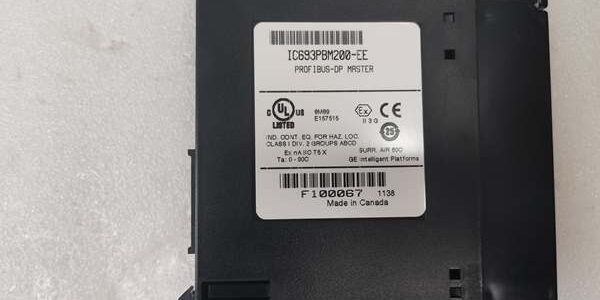
Termination: The PBM200 typically has a slide switch or DIP for bus termination. If this is the first or lastdevice on the copper daisy chain, it must be ON (150 Ohm). If it’s in the middle, OFF. Forgetting termination causes signal reflections; the “NET” LED will flicker erratically or slaves will drop intermittently, usually worse at 12Mbps than at lower speeds.
DP-V1 Limitation: The PBM200 is fundamentally a DP-V0 Master. If you buy a smart VFD (e.g., Siemens G120 CU240) expecting “Drive Alarms” via DP-V1 to show up automatically in the CPU, you’ll be disappointed. The PBM200 passes cyclic data fine, but acyclic alarms require custom CommReq blocks or may not be supported depending on firmware. For full DP-V1 (Alarm/Diagnosis read-back), you need the IC695PBM300 in an RX3i rack.
GSD Version: Always use the GSD file from the slave vendor’s websitematching the slave’s firmware. Using a “generic” or wrong version (e.g., GSD for FW 2.x on a FW 4.x drive) often causes “Configuration Error” (Slave LED flashes red). The is strict on PNO profile compliance.
Real-World Applications
- Food Packaging Line (90-30 Retrofit): An IC693CPU374 with controlling 18 x Siemens MM440 VFDs (Conveyor/Servos) and 6 x ET200S remote I/O heads for case packers. The 12Mbps bus keeps the VFD speed refs tight. The 90-30 program (LM90 converted) remained untouched except for adding %I/%Q mappings for the new drives.
- Water Treatment Pump Station: in a NEMA 4X enclosure (90-30 rack) talking to 8 x ABB ACS800 VFDs (PROFIBUS option) and a remote Siemens AS-i master for float switches. The “FAULT” LED on the quickly identified a VFD with a bad termination resistor (Slave 5 dropped, others OK), narrowing the troubleshooting to one cabinet.
High-Frequency Troubleshooting FAQ
Q: “RUN” LED is OFF, “FAULT” is ON (Solid Red). CPU shows “I/O Fault” or “Module Not Configured”.
A: Config Not Downloaded or Hardware Mismatch.
- Ensure the is configured in your PME/LM90 project. Right-click -> Properties -> Verify Baud Rate and Station Address (usually Station 2 for Master).
- Download the hardware configuration to the PLC (Target -> Download -> Hardware). The stores config in Flash; it needs the initial download.
- If you replaced a failed , the new module is blank. You mustre-download the config. The CPU cannot auto-push it unless “Auto-Config” is enabled and the module requests it on power-up (rare on 90-30).
Q: “NET” LED is OFF or Blinking Red, Slaves show “BF” (Bus Fault – Red) on their fronts.
A: Physical Layer / Termination / Address Issue.
- Termination: Is the ‘s termination switch ON if it’s first/last? Are the last slave’sterminators ON? (Many slaves have DIPs for termination).
- Baud Rate: Does the DIP switch or software setting on the match the slaves’ DIP settings? (e.g., PBM set to 1.5Mbps, VFDs set to 12Mbps = No Sync).
- Addresses: Verify Slave Station Numbers (DIP switches on VFD/Head). Does the config expect Slave 3 but the VFD is set to 5? Mismatch = Config Error.
- Cable Polarity: PROFIBUS is A/B (Pin 8/B, Pin 3/A on DB9). If reversed at the slave end, the signal inverts; link may come up intermittently but is unstable. Swap A/B at one end if all else checks out.
A: Yes. The is supported in the RX3i Universal Backplane (PCI-based).
- It occupies a standard I/O slot. The RX3i CPU (e.g., IC695CPE330) sees it as a 90-30 compatible module.
- Configure it in PME the same way (Hardware -> ).
- Limitation: It still only does DP-V0/V1 basics; it won’t use RX3i-specific features like EGD directly (that’s the CPU’s job). If you need full DP-V1 diagnostics natively, consider the IC695PBM300 instead, which is the RX3i-native equivalent.
Please note: The listed price is not the actual final price. It is for reference only and is subject to appropriate negotiation based on current market conditions, quantity, and availability.