Product Core Brief
- Model: D20 EME 10BASE-T
- Brand: GE Energy / GE Intelligent Platforms
- Series: GE D20 / D200 RTU Family
- Core Function: Modular Ethernet/Memory expansion board for the D20/D200 platform, adding 10BASE-T Ethernet connectivity and optional battery-backed SRAM.
- Product Type: VME Ethernet/Memory Expansion Board
- Condition: New Original / New Surplus (subject to available stock)
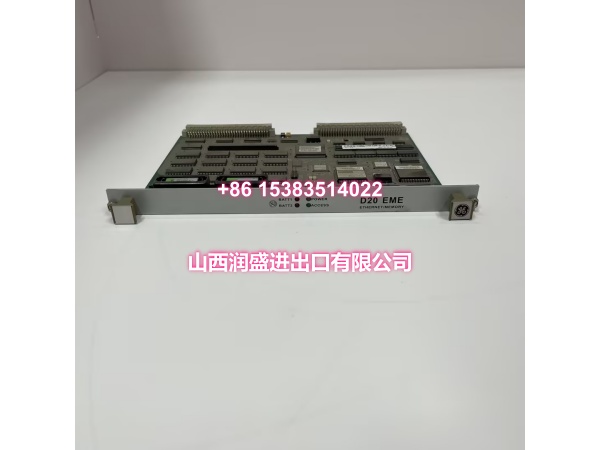
Key Technical Specifications
- Part Number: D20 EME 10BASE-T (commonly referenced with board number 820-0474)
- Platform: GE D20 / D200 Remote Terminal Unit (RTU)
- Ethernet Interface: 10BASE-T, RJ-45 twisted-pair, 10 Mbps, IEEE 802.3 compliant
- Bus Interface: VMEbus, installs in D20/D200 VME chassis
- Memory Options: 0 MB, 8 MB, or 16 MB battery-backed SRAM (varies by board variant)
- Configuration: Self-configuring for VME interrupts, Ethernet address, and memory parameters — no jumpers or switches required
- Status Indicators: LED indicators for LAN activity, link status, and fault diagnosis
- Operating Temperature: Approximately -20°C to +60°C (industrial-grade design)
- Typical Application: Substation automation, SCADA data concentration, protocol conversion, and distributed RTU deployments
Product Introduction (No Fluff)
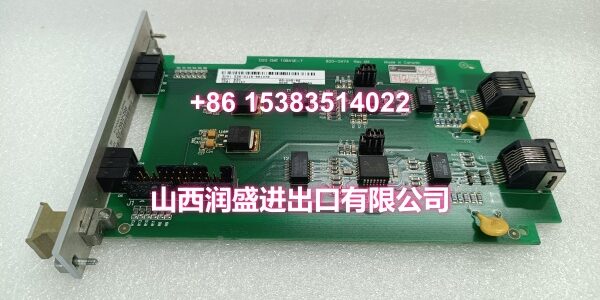
The D20 EME 10BASE-T is a modular Ethernet/Memory expansion board for the GE D20 and D200 RTU platforms. It adds 10 Mbps twisted-pair Ethernet connectivity and optional battery-backed SRAM to the D20/D200 system, enabling IP-based communication and expanded data storage for substation automation and SCADA applications.
The board installs directly into a VME-compatible D20 or D200 chassis. It is self-configuring — no jumpers or switches are needed to set VME interrupts, Ethernet address, or memory parameters. The 10BASE-T interface uses a standard RJ-45 connector, making it straightforward to integrate into existing Ethernet infrastructure.
Memory capacity varies by board variant, with options ranging from 0 MB to 16 MB of battery-backed SRAM. This additional memory supports larger configuration files, data logging, and application code storage. The board is commonly found in utility substations, industrial plants, and infrastructure projects requiring reliable Ethernet connectivity for D20/D200-based RTU systems.
QA & Testing SOP (Dynamic & Transparent)
Each surplus unit undergoes:
- Part Number Verification: Confirm the label reads D20 EME 10BASE-T. Check for GE markings and board number (e.g., 820-0474).
- Visual Inspection: Inspect the VME connector edge, RJ-45 port, PCB surface, and mounting hardware for corrosion, bent pins, or physical damage.
- VME Connector Check: Verify all VME bus connector pins are intact, straight, and free of oxidation.
- Ethernet Port Inspection: Check the RJ-45 port for physical damage, bent contacts, or debris.
- Mechanical Fit Check: Verify the board seats correctly into a compatible D20/D200 VME chassis slot.
- Power-Up Test: Install in a known-good D20/D200 chassis. Verify board recognition and LED status indicators.
- Ethernet Link Test: Where test infrastructure is available, verify Ethernet link establishment and communication at 10 Mbps.
- Memory Verification: Where possible, verify that the battery-backed SRAM is recognized by the D20/D200 system via Config Pro or WESMAINT.
- Packaging: Pack in anti-static bags with foam cushioning. Protect the VME connector edge and RJ-45 port during transit.
Installation Pitfalls & Guide (Engineer to Engineer)
Confirm chassis compatibility. The D20 EME 10BASE-T requires a VME-compatible D20 or D200 chassis. It will not fit in a non-VME D20 chassis.
Check backplane vintage. Older D20 backplanes (vintage 4A or older) may require upgrading to vintage 5A or newer for full compatibility with EME and other VME cards.
Verify memory variant. The board comes in different memory configurations (0 MB, 8 MB, or 16 MB). Confirm the memory capacity matches your application requirements before installation.
Do not exceed processor board limits. In systems with more than three processor boards, D20 M++ cards cannot be used with D20ME or D20 EME cards due to stability issues.
Configure memory in software. Although the board is self-configuring at the hardware level, global memory expansion parameters must be configured in Config Pro after installation.
Document slot assignment. Record which VME slot the EME board occupies. This simplifies troubleshooting and future replacements.
Verify redundant system compatibility. If used in a redundant D20/D200 configuration, confirm both CCUs have matching EME boards and configurations.
Installation Steps:
- Pre-install: Confirm part number D20 EME 10BASE-T and VME chassis compatibility. Back up the existing D20/D200 configuration.
- Power Down: De-energize the D20/D200 chassis before installing or removing VME boards.
- Insert Board: Seat the EME board into an available VME slot. Verify full mechanical engagement.
- Connect Network: Connect a standard Cat5/Cat5e Ethernet cable to the RJ-45 port.
- Commission: Power up the system. Configure global memory parameters in Config Pro. Verify Ethernet link and communication.

Technical FAQ
1. What is the D20 EME 10BASE-T? It is a modular Ethernet/Memory expansion board for the GE D20/D200 RTU platform, adding 10 Mbps twisted-pair Ethernet and optional battery-backed SRAM.
2. Is it a processor board? No. The EME is an expansion board. The main processor function is handled by the D20ME or D20ME II board. The EME adds Ethernet and memory expansion.
3. What Ethernet speed does it support? 10 Mbps, per the 10BASE-T standard (IEEE 802.3).
4. How much memory does it provide? Memory capacity varies by board variant: 0 MB, 8 MB, or 16 MB of battery-backed SRAM. Check the specific board label for the installed capacity.
5. Does it require jumpers or switches? No. The D20 EME is self-configuring with no jumpers or switches for VME interrupts, Ethernet address, or memory parameters.
6. Can it be used in a non-VME D20 chassis? No. The EME board requires a VME-compatible D20 or D200 chassis.
7. What software is used to configure it? Global memory parameters are configured through Config Pro. Ethernet communication is managed through the D20/D200 application configuration.
8. What warranty do you offer on surplus stock? Terms vary by condition and availability. For surplus industrial modules, we typically provide a short functional guarantee. Confirm details at time of order.