Product Core Brief
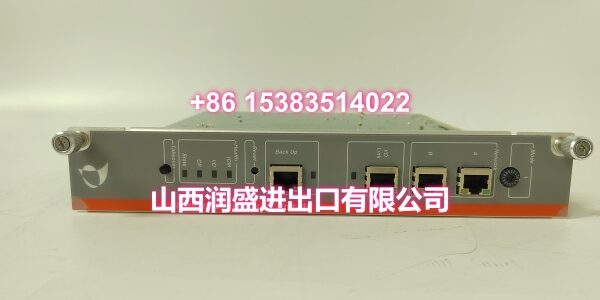
- Model: PDP603
- Brand: Metso
- Series: Distributed Processing Unit
- Core Function: Serves as the central processing node for executing real-time control logic and managing distributed I/O networks.
- Product Type: Distributed Processing Unit
- Key Specs: Rev E4/E7 Compatible | High-Speed Data Handling | Redundant Comm Links
- Condition: New Original / New Surplus
Key Technical Specifications
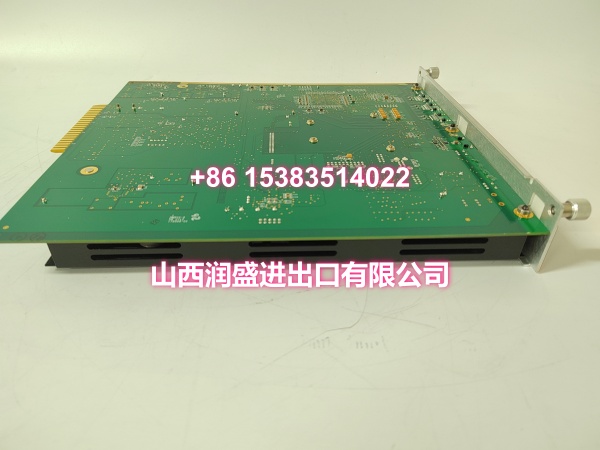
- Module Type: Distributed Processing Unit (DPU)
- Product ID:
- Revision Support: E4 / E7
- Processing Architecture: High-speed deterministic logic execution
- I/O Management: Multi-channel digital and analog data aggregation
- Communication: Dual redundant Ethernet / Fieldbus interfaces
- Power Requirement: 24VDC nominal
- Operating Temp: -20°C to +70°C
- Diagnostics: Real-time fault logging and heartbeat monitoring
- Form Factor: Standard industrial backplane module
Product Introduction
Acting as the computational backbone of the distributed control system, this unit handles heavy algorithmic lifting for continuous process loops. It coordinates data flow between local I/O cards and the supervisory network, ensuring deterministic response times even under high network traffic.
Plant operators rely on the dual redundant communication paths to maintain uptime during cable faults or switch failures. The module’s built-in heartbeat monitoring instantly isolates bad nodes, preventing a single point of failure from cascading through the control network.
QA & Testing SOP (Dynamic & Transparent)
We treat every Metso PDP603 as a mission-critical component. First, we perform a comprehensive visual and electrical inspection, verifying component date codes, PCB revisions, and firmware integrity against OEM manifests. Next, we run a 24-hour burn-in test at elevated temperatures to catch early-life failures and verify thermal stability.
Functional validation includes injecting simulated I/O data streams to verify processing latency and logic execution. We also test both redundant communication ports under load, intentionally failing one link to confirm seamless failover without dropping packets. All units ship in ESD-safe packaging with a signed test certificate.
Installation Pitfalls & Guide
❗ Redundancy Cabling: Don’t route both Ethernet cables in the same conduit. If a forklift crushes that tray, you lose both paths. Separate them by at least 6 inches or use physically diverse routing to maintain true redundancy.
❗ Firmware Revision Matching: Check the label for Rev E4 or E7. Mixing revisions in a redundant pair can cause synchronization faults. If you’re replacing a failed unit, match the exact revision or plan a full rack upgrade.
❗ Backplane Power Budget: This processor draws significant current during boot-up. If you’re adding it to an existing rack, verify the power supply has enough headroom. A voltage dip during startup can cause neighboring modules to brown out.
Replacement SOP:
- Pre-Install: Backup configuration; verify firmware revision matches the redundant pair.
- Removal: Disconnect power; wait 60 seconds for capacitor discharge; release locking tabs.
- Install: Align guides precisely; seat evenly; verify zero gap at backplane connector.
- Power-On: Energize slot; monitor boot sequence for 2 minutes; verify redundant link sync before enabling I/O.
Technical FAQ
Q: Can I mix PDP603 Rev E4 and Rev E7 in the same redundant pair?
A: No. The synchronization protocol between primary and backup processors requires matching firmware revisions. Mismatched revisions will cause continuous failover attempts and eventual system fault. Always match the exact revision when replacing a failed unit.
Q: What happens if both redundant communication links fail?
A: The PDP603 will enter a safe state and flag a critical fault. Local I/O continues to execute the last known good logic, but supervisory communication is lost. You’ll need to physically troubleshoot the network path; there’s no wireless backup.
Q: Is this unit compatible with older Metso DPU-MR systems?
A: No. The PDP603 uses a different backplane protocol and power distribution architecture. Direct substitution requires rack modifications and complete reconfiguration. Verify compatibility with your system integrator before ordering.
Q: How do I verify the module is functioning correctly after installation?
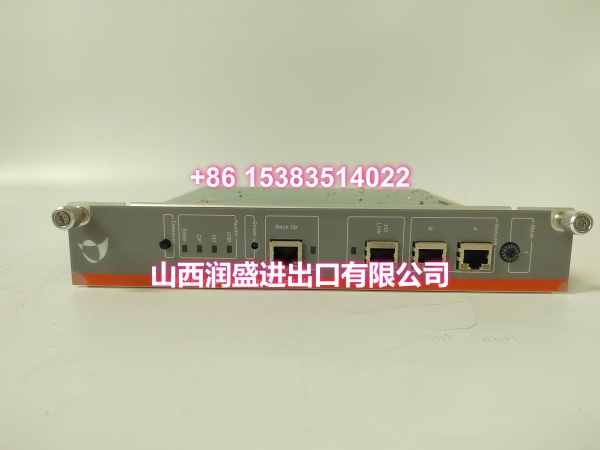
A: Check the front panel LEDs: Power (solid green), Run (blinking), and both Comm LEDs (solid or blinking green). Then verify in your engineering software that the module is online and synchronized with its redundant partner. Allow 2-3 minutes for full initialization.
Q: Do you provide firmware updates for this model?
A: Firmware updates are available through Metso’s support portal for registered systems. We can supply the latest stable version on USB if you lack portal access. Always backup configuration before updating; some firmware revisions require parameter migration and may reset diagnostic counters.