Product Core Brief
- Model: PCU1500S7
- Brand: APPLICOM (Woodhead / Molex)
- Series: 1500 Series Universal PCI
- Core Function: Universal PCI communication interface enabling PC-based control and data exchange with Siemens S7 PLCs via MPI/Profibus.
- Product Type: Industrial Communication Interface Card
- Key Specs: Universal PCI (3.3V/5V) | 1.5 Mbps MPI/S7 | Siemens S7 Protocol
- Condition: New Surplus / OEM Original
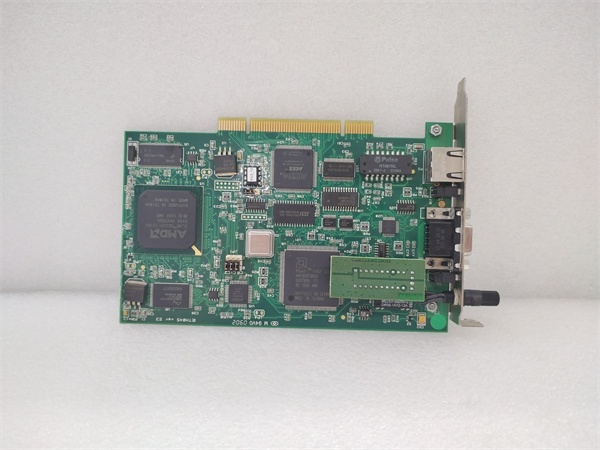
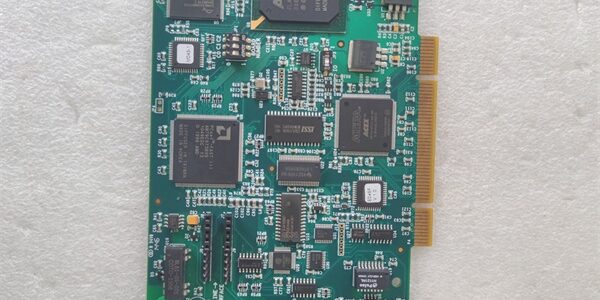
APPLICOM PCU1500S7
Key Technical Specifications
- Part Number: (also APP-PS7-PCU)
- Bus Interface: Universal PCI (supports both 3.3V and 5V slots)
- Supported Protocols: Siemens S7, MPI, PPI
- Max Baud Rate: 1.5 Mbps (MPI/S7)
- Connector Type: Sub-D9 (MPI) or RJ45 (depending on revision)
- Form Factor: Standard Universal PCI Card
- Driver Support: Windows NT/2000/XP, Linux, VxWorks, QNX
- Application: SCADA, MES, OPC Server, HMI Data Acquisition
- OEM Equivalence: Direct replacement for Woodhead/Molex Applicom SST-PFB-S7
Product Introduction
This APPLICOM serves as the critical bridge between your Windows-based SCADA or OPC server and legacy Siemens S7 PLCs. It handles the low-level MPI/S7 handshaking, freeing your host CPU from protocol overhead and ensuring deterministic data polling in high-speed manufacturing environments.
Unlike standard PCI cards, the Universal PCI form factor guarantees compatibility with both legacy 5V and modern 3.3V motherboard slots, eliminating the risk of slot mismatch during retrofits. For plants running decades-old S7-300/400 networks, this card remains the most reliable path to get data onto the network without upgrading the entire PLC infrastructure.
QA & Testing SOP
Communication cards are only as good as their last successful handshake. We don’t just check for power; we verify protocol integrity.
- Anti-Counterfeit & Visual Inspection: We verify the Applicom/Woodhead silkscreen, check for rework on the PCI edge connector, and validate component date codes against OEM production runs.
- PCI Bus Enumeration Test: We install the card in a test rig and verify the host OS correctly enumerates the device ID and allocates I/O memory windows without resource conflicts.
- MPI/S7 Loopback Validation: Using a Siemens S7 simulator, we push read/write requests to verify the card’s firmware correctly frames S7 telegrams and handles ACK/NACK sequences.
- Signal Integrity Check: We probe the MPI bus lines with an oscilloscope to ensure rise/fall times meet the 1.5 Mbps spec, confirming the transceivers aren’t degraded from years of electrical noise.
- ESD & Anti-Static Packaging: These cards are sensitive to static during transit. We bag them in shielding material with humidity indicators to prevent latent gate oxide damage.
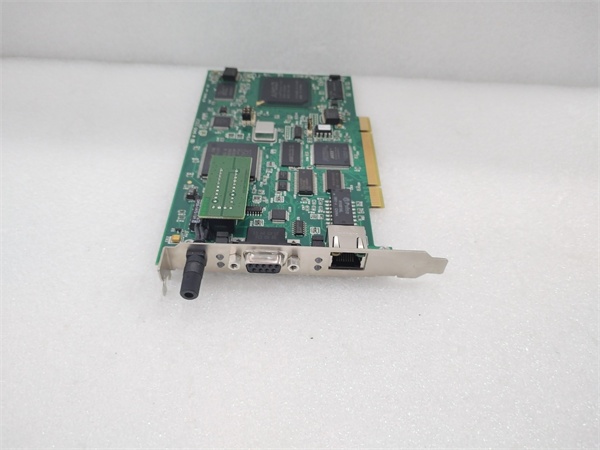
APPLICOM PCU1500S7
Installation Pitfalls & Guide
❗ Universal PCI Slot Keying: The “Universal” designation means it should fit both 3.3V and 5V slots, but some older industrial motherboards have non-standard keying. Always verify the notch position on the PCI slot before forcing the card; bending the edge connector is a one-way ticket to bricked hardware.
❗ MPI Bus Termination: This card does not provide bus termination. If you’re at the end of an MPI segment, you must use a terminated connector or an active terminator. Missing termination causes intermittent S7 timeout errors that look like driver bugs but are actually physics.
❗ Driver Version Hell: Applicom went through multiple ownership changes (Woodhead → Molex → SST). The driver version must match the card firmware. Installing the latest Molex driver on an early Woodhead-era will often result in a “Hardware Not Found” error. Always use the driver CD that shipped with the card or verify the firmware revision first.
Replacement SOP:
- Pre-Install: Document current MPI address, baud rate, and driver version; power down host completely.
- Removal: Remove mounting screw first, then pull card straight up; inspect slot for bent pins.
- Install: Align Universal PCI notch; press evenly until fully seated; secure mounting screw to prevent vibration loosening.
- Power-On Test: Boot OS, verify device manager shows no yellow bangs, then test S7 connection with a simple DB read.
Technical FAQ
Can I use this card with TIA Portal or WinCC?
Not directly as a programming interface. This card is designed for SCADA/OPC data acquisition, not for downloading PLC logic. For programming, you still need a Siemens CP5611 or similar. Use this card for your runtime data layer, not your engineering station.
Is this compatible with Linux OPC servers?
Yes, Applicom released Linux drivers for the 1500 series, but they are kernel-version specific. If you’re running a modern kernel (5.x+), you may need to patch the legacy driver or use a userspace USB-to-MPI bridge instead. Contact us with your exact kernel version before ordering for Linux deployments.
The PCU is the Universal PCI version (3.3V/5V), while the PCI1500S7 is the legacy 5V-only PCI card. If your motherboard is post-2005, you almost certainly need the PCU variant. The PCI1500S7 will physically fit but may not power up in a 3.3V-only slot.
Do you have the driver for Windows 10/11?
Officially, no. Applicom/Molex stopped supporting this card years ago. However, the Windows XP/Server 2003 drivers often work in Windows 10 64-bit if you install them in compatibility mode and disable driver signature enforcement. We provide the last known working driver package with every shipment.
Why is this new surplus and not refurbished?
This unit was pulled from sealed OEM overstock before installation. We test it to confirm functionality, but we aren’t replacing electrolytic capacitors or reflowing BGA chips. You’re getting unused silicon with original factory solder joints, which is critical for long-term reliability in 24/7 SCADA applications.