
Description
Hard-Numbers: Technical Specifications
| Parameter | Specification |
|---|---|
| Manufacturer | Bosch Rexroth Indramat |
| Part Number | CMP60.1-SP-304-FN-NNNN-NW |
| MPN | R911307078 |
| Module Type | CNC Control Module (PCI Bus) |
| Installation | Standard or high-end industrial PC via 3-pole cable |
| Maximum Axes | 64 |
| Maximum Spindles | 8 |
| NC Channels | 12 (independent) |
| Interpolated Axes/Channel | 8 (max) |
| Block Cycle Time | Minimum 250 µs |
| SERCOS Cycle Time | Minimum 250 µs (for 8-axis, 4-axis interpolation) |
| Communication Interface | SERCOS (fiber-optic) to digital drives |
| PC Communication | TCP/IP over network driver (static IP addressing) |
| High-Speed I/O | Optional interface (2 ribbon cables) – 8 inputs/outputs |
| Power Consumption | 21W typical |
| Operating Temperature Range | 5°C to 55°C |
| Storage/Transport Temperature | -40°C to 85°C |
| Humidity (Operating) | 5% to 95% non-condensing (per EN 50081-2) |
| Radio Interference Suppression | EN 50081-2 compliant |
| PCI Bus Compatibility | 3.3V and 5V supplies, universal PCI interface |
| Memory Type | Non-volatile Flash EPROM with FEPROM file system |
| Configuration Tool | MTX Control (commissioning and diagnostic) |
| Operating System Support | Windows XP, Windows 2000, Windows Server 2003 |
| Dimensions | Standard PCI card form factor |
| Weight | Approximately 2 kg (estimated) |
| Protection Class | IP20 (when installed in enclosure) |
| Vibration Resistance | 1g (typical for industrial PCs) |
| Shock Load | 15g (typical for industrial PCs) |
The Real-World Problem It Solves
Modern multi-axis CNC systems demand nanometer-level precision, sub-millisecond response times, and seamless integration with digital servo drives. The CMP60.1-SP-304-FN-NNNN-NW delivers a 250µs block cycle time, 64-axis capability across 12 independent NC channels, and SERCOS fiber-optic communication with up to 32 spindles—enabling complex 5/6-axis transformations, spline/NURBS interpolation, and high-speed spindle drives up to 180,000 RPM. It’s the core of the IndraMotion MTX system, combining CNC and PLC functionality in a PCI plug-in architecture compatible with both Bosch Rexroth industrial PCs and third-party computers.
Where you’ll typically find it:
- High-speed machining centers (HSC) requiring free-form surface machining
- Multi-spindle lathe centers with workpiece transfer
- Grinding machines with nanometer accuracy requirements
- Bending machines with 3D axis interpolation and hydraulic axis control
- Networked production systems requiring tight coordination across multiple machines
- Cutting and forming applications with complex kinematics
Bottom line: It’s a performance-class CNC control module designed for the most demanding motion control tasks—offering scalability, open architecture (Fieldbus, Ethernet, OPC, XML), and integration with higher-level ERP systems like SAP, making it an investment for future-proof automation.
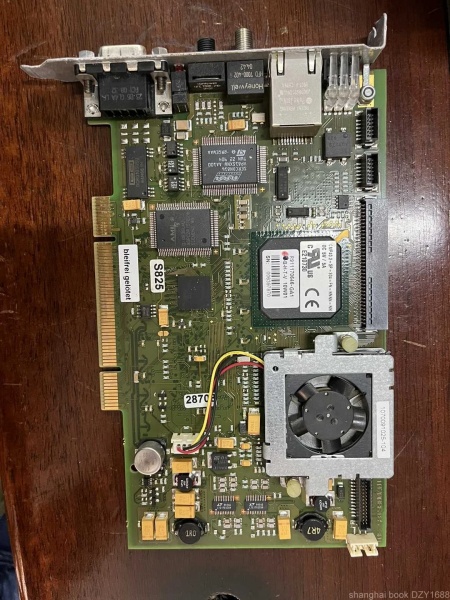
CMP60.1-SP-304-FN-NNNN-NW
Hardware Architecture & Under-the-Hood Logic
The CMP60.1-SP-304-FN-NNNN-NW is a PCI plug-in CNC control module that serves as the computational core of the IndraMotion MTX system. It combines CNC and PLC functionalities, communicating with the host PC via TCP/IP and with digital drives via SERCOS fiber-optic interface.
- PCI Bus Interface – Universal 3.3V/5V PCI bus connection for insertion into standard PCI slots on Bosch Rexroth industrial PCs or third-party computers
- Power Supply Circuitry – Internal DC/DC converter drawing power from PCI bus; typical consumption 21W
- CPU/Processing Core – High-performance CPU delivering 250µs block cycle time for rapid CNC program execution
- Flash EPROM Memory – Non-volatile memory with FEPROM file system for firmware and CNC program storage (retains data without battery)
- SERCOS Interface Controller – Fiber-optic SERCOS interface for communication with Rexroth IndraDrive digital drives (supports up to 64 axes)
- TCP/IP Network Interface – Ethernet-based communication with host PC; operates as distinct subnet with static IP address
- High-Speed I/O Controller – Optional interface supporting 8 digital inputs and 8 digital outputs via two ribbon cables (mounted on right side)
- Watchdog Timer – Hardware monitoring circuit that triggers safe shutdown on processor fault or lockup
- SERCOS LERR LED – Red LED indicator that illuminates on SERCOS communication errors or drive faults
- Watchdog Reset Button – Manual button for resetting watchdog faults; alerts watchdog logic when activated
- Configuration Memory – Non-volatile storage for IP addresses, network parameters, and module configuration
- Firmware Management System – FEPROM-based file system for firmware downloads and updates
- NC Channel Processors – 12 independent CNC processing channels; each can control multiple axes
- Axis Interpolation Engine – Supports up to 8-axis interpolation per channel for complex 3D motion paths
- Spindle Control – Capable of controlling up to 8 spindles with high-speed drives up to 180,000 RPM
- PLC Functionality – Integrated IEC 61131-3 compliant PLC for machine automation logic
- Temperature Monitoring – Internal sensors for over-temperature protection (operates 5°C-55°C range)
- Diagnostic Buffer – Internal storage for error codes and diagnostic messages accessible via MTX Control tool
- Network Driver – Software driver installed via Windows Device Manager for communication between PC and module
- Fan – Integrated cooling fan (sensitive component; do not touch during operation)
Field Service Pitfalls: What Rookies Get Wrong
Ignoring SERCOS Fiber-Optic Cable Integrity
Newbies assume fiber-optic cables are indestructible. They bend cables below minimum radius, pinch them in cable trays, or contaminate connectors with dust/oil, causing intermittent communication failures between CMP60.1 and IndraDrive units.
Field Rule: Always use SERCOS-approved fiber-optic cables with proper bend radius (check cable specifications). Route cables away from sharp edges, moving parts, and high-voltage conductors. Clean connectors with compressed air before mating. If LERR LED illuminates red, check fiber cable continuity first before replacing modules.
Misconfiguring IP Address in Windows XP
The CMP60.1 requires a static IP address assigned through Windows XP Network Connections. Rookies set module to DHCP or use incorrect subnet, making it unreachable from host PC—manifesting as “device not found” errors in MTX Control tool.
Quick Fix: Open Windows XP Network Connections, locate the network adapter corresponding to the CMP60.1 network driver. Set to static IP address (typically in 192.168.x.x range). Verify subnet mask and gateway settings match your network configuration. Test connectivity with ping command before attempting CNC program transfer.
Forgetting High-Speed I/O Ribbon Cable Orientation
The optional high-speed I/O interface connects via two ribbon cables on the module’s right side. Rookies reverse polarity or insert cables backward, causing I/O channels to fail or report incorrect signal states.
Field Rule: Verify ribbon cable orientation—connector keying typically ensures correct insertion, but always check pin 1 alignment before applying force. If I/O channels show unexpected behavior after installation, swap ribbon cables and retest. The interface is designed for retrofitting, but correct orientation is critical for reliable operation.
Neglecting Firmware Backup Before Updates
Firmware updates for CMP60.1 modules use FEPROM file systems. Rookies download new firmware without backing up existing firmware and CNC programs, risking bricking the module if update fails.
Quick Fix: Before any firmware update, connect to CMP60.1 via MTX Control tool and export complete backup including firmware version, CNC programs, and configuration files. Store backup in multiple locations (external drive + network share). Only proceed with update after verifying backup integrity. If update fails, restore from backup rather than attempting to resume without firmware.
Overlooking Watchdog Reset Button Functionality
The watchdog reset button clears pending watchdog errors and resets watchdog logic. Rookies assume pressing the button resolves all faults—ignoring that watchdog errors indicate underlying issues (processor lockups, power supply instability, or firmware corruption).
Field Rule: When watchdog fault occurs, press reset button only after identifying root cause. Check diagnostic buffer for watchdog-related error codes indicating processor faults, memory errors, or power issues. If watchdog faults recur after reset, investigate power supply quality, grounding, or ambient temperature—don’t mask systemic problems with repeated resets.
Incorrect SERCOS Cycle Time Configuration
CMP60.1 supports SERCOS cycle times as low as 250µs. Rookies leave cycle time at default (often 6ms) for CMP60 configuration, missing out on high-speed performance benefits.
Quick Fix: Access SERCOS configuration in MTX Control tool and set cycle time to 250µs for 8-axis configurations (or appropriate value for your axis count). Verify all IndraDrive units support the selected cycle time. Test axis response with JOG mode after adjustment to ensure stability at higher speeds.
Mixing Up NC Channel Assignments
With 12 independent NC channels available, rookies incorrectly allocate axes to wrong channels, causing unintended axis coupling or motion conflicts. This is especially problematic in multi-spindle lathe centers.
Field Rule: Document which axes belong to which NC channel before initial configuration. In MTX Control, verify each axis’s channel assignment matches your machine kinematic structure. For complex applications (workpiece transfer, multi-spindle), ensure channel boundaries are clear and axes are not incorrectly coupled across channels.
Ignoring PCI Slot Power Limitations
Some industrial PCs share power across multiple PCI slots. Rookies install CMP60.1 in overloaded slots causing intermittent failures or complete no-power conditions—the card never appears in Device Manager.
Quick Fix: Check PCI slot specifications in PC documentation. Avoid slots with power sharing if CMP60.1 will coexist with other power-hungry cards. Test CMP60.1 in different slots if power-up issues occur. Verify total PCI bus power draw doesn’t exceed PC’s capability—consider external power supplies for demanding configurations.
Prematurely Replacing Working Module
CMP60.1 modules show LERR LED on SERCOS errors from drive faults, cabling issues, or configuration mistakes. Rookies replace the CNC module when the fault is in the drive system or fiber cable—wasting time and money.
Field Rule: Isolate fault location before replacing CMP60.1. Check LERR LED behavior—is it solid red or blinking? Solid typically indicates module fault; blinking suggests drive/cable issues. Use MTX Control diagnostic buffer to identify fault codes. If errors reference specific axes or drives, troubleshoot those components before concluding CNC module failure.
Neglecting Windows XP Compatibility Requirements
CMP60.1 configuration requires Windows XP Network Connections for IP assignment. Rookies attempt setup on Windows 7/10 without compatibility mode or proper driver installation, encountering configuration failures.
Quick Fix: Verify Windows XP SP1, SP2, or SP3 installation (or Windows 2000/Server 2003 compatibility). Install MTX Control tool with administrative privileges. Ensure network driver installs correctly through Device Manager—if driver shows yellow exclamation mark, reinstall or update driver before configuring IP address.
Commercial Availability & Pricing Note
Please note: The listed prices are for reference only and are not binding. Final pricing and terms are subject to negotiation based on current market conditions, product condition (new vs. refurbished), and supplier.
Pricing Reference:
- New/Refurbished: Approximately $7,587.00 – $11,287.00 USD
- Spare Parts: Varies significantly depending on condition and supplier
- Warranty: 1 year standard (varies by supplier)
- Shipping: 3-7 days (expedited options available)
- Packaging: Custom military-grade foam packaging available
Availability: Limited supply through specialized industrial automation suppliers and refurbishment markets. This is a legacy IndraMotion MTX component—verify compatibility with existing IndraDrive SERCOS interface versions, host PC specifications, and MTX Control tool version before procurement.
Recommended Actions for Field Service:
- Always backup CNC programs and configuration before module replacement
- Verify host PC meets Windows XP compatibility requirements
- Confirm SERCOS fiber-optic cable integrity and drive compatibility
- Test module in known-good PCI slot before final installation
- Document all IP addresses, channel assignments, and axis configurations



