
Description
Hard-Numbers: Technical Specifications
- Protocol Support: EtherNet/IP, Remote I/O (RIO), Data Highway Plus (DH+)
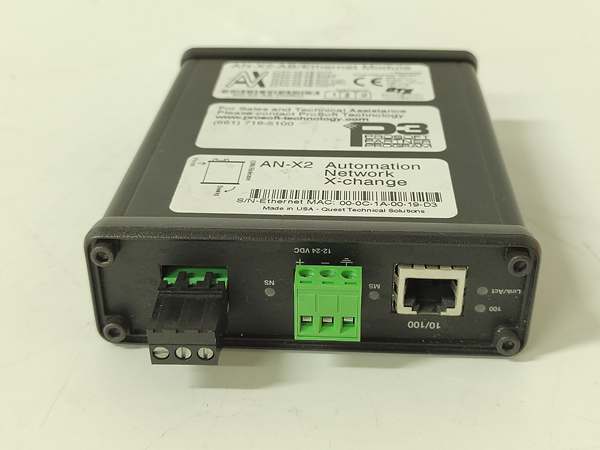
- Port Count: 1 × RJ45 10/100 Mbps Ethernet, 1 × 3-pin Phoenix RIO/DH+, 1 × 3-pin Phoenix power
- Baud/Data Rate: 57.6 / 115.2 / 230.4 kbaud (RIO/DH+); 10/100 Mbps auto-sense (Ethernet)
- Operating Temperature: 0°C to 50°C (32°F to 122°F)
- Storage Temperature: -40°C to 85°C (-40°F to 185°F)
- Humidity: 5% to 95% RH non-condensing
- Power Draw: 12-24 VDC, 200 mA @ 12V or 100 mA @ 24V, max 2.4W
- Isolation Rating: No isolation on communications ports; power isolation per UL/CE
- Dimensions: 107 × 126 × 34 mm (4.18 × 4.97 × 1.33 in)
- Weight: 0.31 kg
- RIO Rack Address Range: 0-76 octal
- DH+ Node Address Range: 0-77 octal configurable
- Max RIO Racks: 32 (in SCAN mode)
- Max EtherNet/IP Drives: 4 (in DRV mode)
- Max HMI Devices: 8 (in HMI mode)

AN-X2-AB-DHRIO
The Real-World Problem It Solves
Factory-floor headache: Your line runs on PLC-5 or SLC 500 with Remote I/O, but corporate pushed ControlLogix/CompactLogix. Replacing every 1771 I/O rack, wiring, and reprogramming the whole line costs too much downtime. You need a bridge that lets modern EtherNet/IP PACs talk to legacy RIO and DH+ equipment without touching PLC logic.
Where you’ll typically find it:
- Automotive assembly lines connecting ControlLogix to legacy SLC 500 weld controllers via DH+ Bridge mode
- Pulp & paper mills upgrading PLC-5 to ControlLogix while keeping 1771 I/O racks in Remote I/O Scanner mode
- Food processing plants replacing old PanelView terminals with PanelView Plus over EtherNet/IP using HMI mode
Bottom line: It protects your I/O investment and lets you migrate in phases instead of a big-bang shutdown.
Hardware Architecture & Under-the-Hood Logic
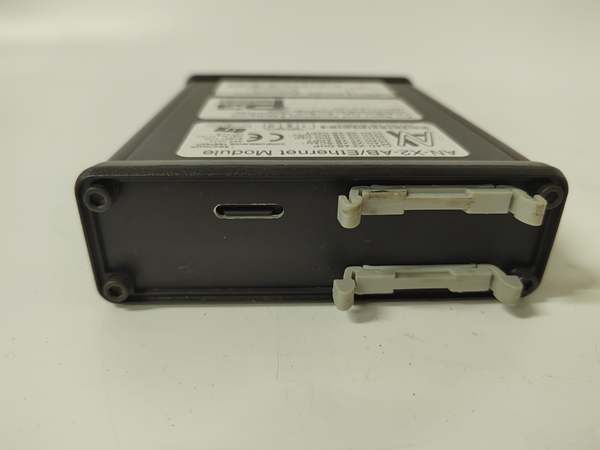
The AN-X2-AB-DHRIO is a standalone gateway with its own microcontroller. It does not mount on a PLC backplane; it sits on DIN rail or a flat surface. The processor runs user-selectable firmware that determines how it routes traffic between EtherNet/IP and the legacy network. There is no galvanic isolation on the RIO/DH+ port, so grounding integrity matters.
-
Power-up sequence: The module boots from the microSD card, loads the selected firmware (SCAN, DHP, HMI, DRV, ADPT, or RIO-EIPSCN), then initializes both the Ethernet PHY and the RIO/DH+ transceiver.
-
Legacy network detection: The module scans the RIO/DH+ network to detect baud rate and node addresses. In Auto-Configuration mode, it maps discovered racks/devices to EtherNet/IP objects automatically.
-
EtherNet/IP connection establishment: The module initiates CIP Class 1 connections to the Logix PAC (as Originator or Target depending on mode). It advertises its capabilities and establishes the data mapping based on the CSV configuration file or auto-discovered setup.
-
Data conversion and forwarding: During runtime, the firmware translates RIO block transfers or DH+ messages into CIP Implicit messages in real time. It maintains separate buffers for incoming and outgoing data to handle protocol timing differences.
-
Diagnostics and monitoring: The onboard watchdog monitors both networks. If the EtherNet/IP link drops or the legacy network times out, the module flags faults via LEDs and logs events to the microSD card for post-mortem analysis.
AN-X2-AB-DHRIO
Field Service Pitfalls: What Rookies Get Wrong
Picking the wrong firmware mode
Most engineers skip the AN-X Configuration dropdown in the Web GUI and assume the module “just works.” If you need Scanner mode but the firmware is set to DH+ Bridge, the Web interface will show missing tabs and the PLC won’t see the I/O racks. You can’t fix this by just editing CSV files; you must change the firmware mode first.
- Field Rule: Before applying power, check the Administration tab in the Web GUI and verify the firmware mode matches your application (SCAN for RIO Scanner, DHP for DH+ Bridge, HMI for PanelView migration, DRV for drive replacement). After changing firmware, force-refresh your 浏览器 (Ctrl+F5 or incognito mode) because the interface won’t reload automatically.
Reversing the Phoenix connector polarity
The three-pin Phoenix connector for RIO/DH+ has Line 1 and Line 2. If you wire them backward, the legacy network won’t communicate, but the NET/NS LED won’t always tell you why. This trips up technicians pulling cables from old PLC-5 chassis where color-coding is faded.
- Quick Fix: Line 1 is the pin closest to the power connector. Verify with a continuity tester before energizing. If NET/NS LED stays red and the Web GUI shows “Not Detected” on the legacy network, try swapping Line 1 and Line 2. This is the #1 cause of “no communications” calls on first power-up.
Setting DH+ Token Bytes too high
In DH+ Bridge mode, the Token Bytes parameter controls how much data the gateway sends per DH+ token rotation. The default is 250 bytes, but many legacy PLC-5s can’t buffer that much in one pass. You’ll see “No Memory NAKs” counting up in the diagnostics, and data updates stall.
- Field Rule: Start with Token Bytes set to 100. Monitor the “No Memory NAKs” counter in the Web GUI for at least 10 minutes. If it stays at zero, you can increase in 25-byte increments. If it climbs, dial it down. Never leave it at 250 on networks with mixed PLC-5/SLC generations unless you’ve verified every node’s buffer capacity.
Pulling the microSD card while powered
The microSD card holds firmware and configuration. Technicians think they can hot-swap it like a USB drive to copy files. The firmware doesn’t handle eject events gracefully. If you pull it live, the module faults immediately and may corrupt the config file.
- Field Rule: Always power down before removing or inserting the microSD card. For on-site backups, keep a spare pre-configured card. If you need to pull logs, use the Web GUI’s “Download Config” feature instead of touching the card. Hot-plugging is the fastest way to brick a working gateway during an outage.
FaultRioRacks timing in Drive mode
When migrating drives from RIO to EtherNet/IP, you can enable
FaultRioRacks to let the PLC monitor EtherNet/IP drive health via rack status bits. Rookies enable this before the drives are even online, which prevents the PLC from establishing the RIO connection because the gateway is waiting for CIP connections that don’t exist yet.- Quick Fix: In your configuration CSV, add the
FaultRioRackskeyword but comment it out with a semicolon at first (;FaultRioRacks). Get the drives talking and verified. Then remove the semicolon and reload the config. This way the PLC gets rack status bits only after EtherNet/IP links are solid.
Not accounting for connection counting in Flex I/O Scanner mode
The Flex I/O Scanner firmware (RIO-EIPSCN) replaces obsolete 1794-ASB adapters. Each EtherNet/IP connection costs one connection slot. But rookies forget that analog modules count as connections too—not just adapters. You max out at 16 connections and wonder why the last rack won’t come online.
- Field Rule: Count every discrete rack adapter as one connection, and each analog module as one connection. If you have eight 1794-AENT adapters with four analog modules each, that’s 8 + 32 = 40 connections—way over the limit. You’ll need multiple gateways or consolidate analogs into remote I/O blocks.



