
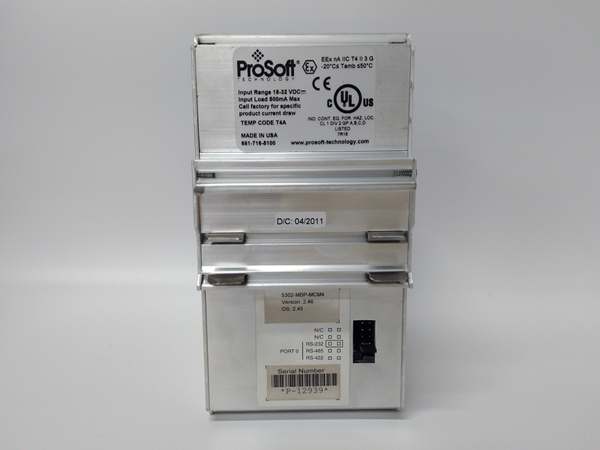
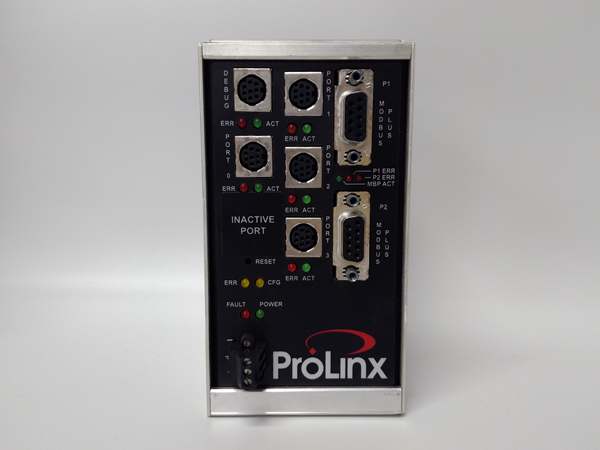
Description
Hard-Numbers: Technical Specifications
- Modbus Plus Port: 1 × DB9F connector, Master or Slave mode, up to 200 commands in Master mode
- Modbus Serial Ports: Up to 4 × RS-232/422/485 individually configurable ports
- Modbus Function Codes: 3 (Read Multiple Registers MSTR 2), 16 (Write Multiple Registers MSTR 1)
- Baud Rate (Serial): 110 to 115,200 bps configurable per port
- Data Table Size: Up to 1000 words per serial port
- Internal Database: Up to 4000 words shared across all ports
- Operating Temperature: -20°C to +50°C (-4°F to +122°F)
- Storage Temperature: -40°C to +85°C (-40°F to +185°F)
- Power Supply: 24 VDC nominal (18-36 VDC allowed)
- Current Load: 500 mA max @ 24 VDC
- Dimensions: 5.20″ H × 2.07″ W × 4.52″ D (13.2 × 5.25 × 11.48 cm)
- Humidity: 5% to 95% non-condensing
- Serial Port Isolation: 2500V RMS port signal isolation per UL 1577

5302-MBP-MCM4
The Real-World Problem It Solves
This gateway eliminates the need to replace legacy Modbus serial devices when migrating to Rockwell ControlLogix or PLC-5 systems. It sits on DIN rail and acts as a transparent protocol bridge, letting newer Rockwell PLCs communicate with older serial devices through existing Modbus Plus networks without MSG instructions.
Where you’ll typically find it:
- Water/wastewater treatment plants connecting Rockwell PLCs to legacy Modbus flow meters and level sensors
- Manufacturing facilities integrating Allen-Bradley controllers with Modbus serial drives and barcode scanners
- Power generation sites bridging ControlLogix SCADA systems to Modbus RTU protective relays and meters
The bottom line: One DIN-rail module saves months of reprogramming by translating protocols in hardware, preserving existing serial device investments while enabling modern EtherNet/IP backbone connectivity.
Hardware Architecture & Under-the-Hood Logic
The 5302-MBP-MCM4 operates as an intelligent protocol gateway with its own processor and shared internal database, translating between Rockwell’s Modbus Plus and standard Modbus serial protocols. It functions independently of host PLCs, handling all protocol conversion and timing internally.
- Modbus Plus master or slave on DB9F port exchanges data with Rockwell PLC network (ControlLogix, SLC, PLC-5)
- Internal processor manages shared database (up to 4000 words) accessible by all ports
- Configurable command lists (up to 200 on Modbus Plus port, 100 per serial port) define data transfer operations
- Modbus serial ports operate as master or slave per port configuration, polling or responding to Modbus RTU/ASCII devices
- Protocol translation occurs in real-time within module—Rockwell reads/writes data as if it were local I/O
- Serial ports feature opto-isolation (2500V RMS) protecting against ground loops and surge damage
- User-configurable polling rates (continuous, disabled, or on-change) optimize bandwidth utilization
- Status LEDs indicate power, module health, serial port activity, and error conditions
- Configuration stored in non-volatile memory managed via ProSoft Configuration Builder software
- RS-232 configuration port provides local setup access without disrupting production networks
5302-MBP-MCM4
Field Service Pitfalls: What Rookies Get Wrong
Modbus Plus Node Address Conflicts on Rockwell Network
Assigning a Modbus Plus node address that conflicts with existing Rockwell PLCs or devices causes intermittent communication failures and network instability.
- Field Rule: Always verify the entire Modbus Plus network address map before deploying. Set the gateway’s node address to a unique value within the valid range (typically 1-64 for Rockwell networks) and document it in the network schematic.
Baud Rate Mismatch Between Gateway and Serial Devices
Configuring serial port baud rates that don’t match the connected Modbus RTU device specifications causes no communication or garbage data.
- Quick Fix: Verify each serial device’s documentation for exact baud rate, parity, and 终止 bit settings. Match these exactly in the ProSoft Configuration Builder for each serial port. When in doubt, start low (9600 bps) and increment until communication stabilizes.
Exceeding Command List Limits on Modbus Plus Master Mode
Configuring more than 200 commands on the Modbus Plus port in Master mode causes configuration errors and truncated data transfer.
- Field Rule: Distribute large data requirements across multiple command lists if needed. Never exceed 200 commands total—monitor command count in ProSoft Configuration Builder’s summary panel. Each command consumes gateway resources and poll time.
Serial Port Termination Issues on RS-485 Networks
Forgetting to install termination resistors on RS-485 drops or endpoints causes signal reflections, leading to corrupted data and timeouts.
- Quick Fix: Install 120Ω termination resistors at both ends of the RS-485 trunk line. Remove termination at stub nodes (branches). Use shielded twisted-pair cable and ground the shield at one end only—typically at the PLC or master side.
Ignoring Serial Port Isolation Wiring
Miswiring serial connections or bypassing the isolation barrier defeats the 2500V RMS protection, exposing the gateway to ground surges and damaging the port.
- Field Rule: Never jumper or bypass the isolation circuitry. Use the provided RS-422/485 screw terminal adapters properly. In high-noise environments, verify isolation integrity with a multimeter before powering up—expect near-infinite resistance between isolated sides.
Polling Rate Misconfiguration Causing Broadcast Storms
Setting continuous polling at aggressive rates on Modbus Plus master port without considering network bandwidth can flood the Rockwell backplane and cause PLC scan time overruns.
- Quick Fix: Start with disabled or slow polling rates during commissioning. Use “on-change” mode for write-only commands to reduce unnecessary traffic. Monitor Rockwell PLC scan time and adjust polling intervals to stay under 80% of available scan window.
标价非实价,根据市场行情可适当议价出售



