
Description
Hard-Numbers: Technical Specifications
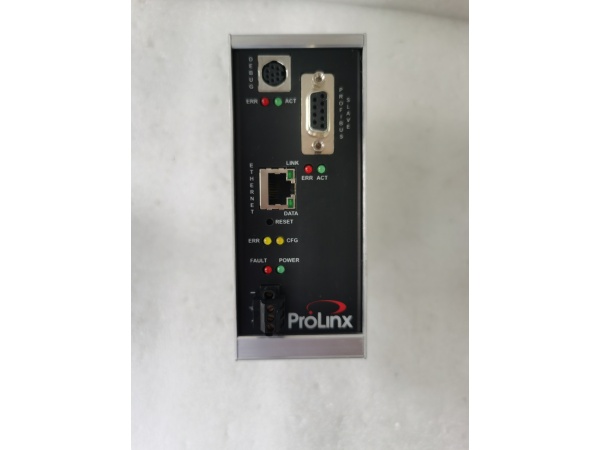
- EtherNet/IP Port: 10/100BaseTX RJ45, Explicit Messaging only (no I/O connection)
- PROFIBUS DP Slave Port: DB9F connector, 9.6 kbps to 12 Mbps baud rate
- EtherNet/IP Data Size: 125 words (250 bytes) read/write max per message
- PROFIBUS Data Size: 244 bytes Input + 244 bytes Output (400 bytes total)
- Internal Database: Up to 4000 words (8000 bytes) user-configurable
- Operating Temperature: -20°C to +50°C (-4°F to +122°F)
- Storage Temperature: -40°C to +85°C (-40°F to +185°F)
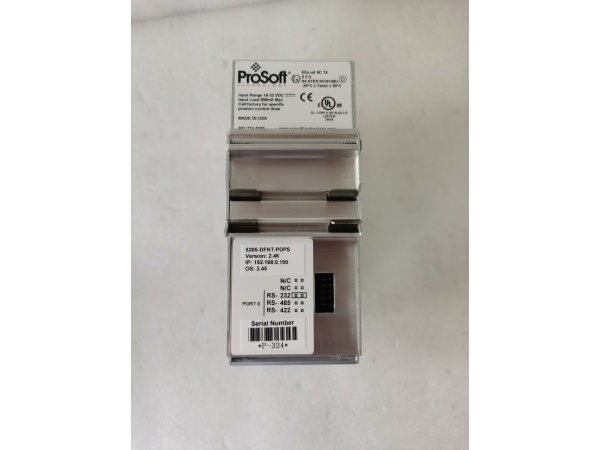
- Power Supply: 24 VDC nominal (18-36 VDC allowed)
- Current Load: 500 mA max @ 24 VDC
- Dimensions: 5.20″ H × 2.07″ W × 4.52″ D (13.2 × 5.25 × 11.48 cm) standard
- Humidity: 5% to 95% non-condensing
- Serial Isolation: 2500V RMS port signal isolation per UL 1577

5205-DFNT-PDPS
The Real-World Problem It Solves
This gateway eliminates the need to rip-and-replace existing Siemens PROFIBUS DP master PLCs when connecting to a Rockwell EtherNet/IP infrastructure. It sits on the DIN rail between worlds, translating CIP explicit messages into PROFIBUS DP cyclic data without writing a single line of ladder logic.
Where you’ll typically find it:
- Automotive assembly lines where Rockwell ControlLogix needs to control Siemens S7-300 master PLCs and their PROFIBUS DP slave drives
- Oil and gas upstream platforms integrating new EtherNet/IP SCADA systems with legacy Siemens PROFIBUS DP process controllers
- Food and beverage plants connecting Allen-Bradley PLCs to European packaging machinery running PROFIBUS DP networks
The bottom line: One DIN-rail module saves months of reprogramming by letting disparate PLCs talk to each other without touching either controller’s application code.
Hardware Architecture & Under-the-Hood Logic
The 5205-DFNT-PDPS operates as an intelligent protocol converter with its own processor and internal database, acting independently of both networks. It translates between Rockwell CIP Explicit Messaging and Siemens PROFIBUS DP V0 cyclic I/O through user-configurable data mapping.
- EtherNet/IP client initiates explicit message reads/writes to module’s internal database at user-defined intervals
- Module stores received data in internal register space (up to 4000 words)
- PROFIBUS DP master polls module as a standard slave device on its DP network
- Module maps internal database registers to PROFIBUS input/output data blocks (244 bytes each direction)
- Data exchange occurs cyclically on PROFIBUS side, asynchronously on EtherNet/IP side
- Module maintains data coherence between both networks through internal buffering
- EtherNet/IP server functionality allows simultaneous access from multiple Rockwell clients
- Status LEDs indicate power, module health, serial port activity, and network error conditions
- Configuration stored in non-volatile memory, managed via ProSoft Configuration Builder software
- Serial port (RS-232) provides local configuration access and firmware updates
5205-DFNT-PDPS
Field Service Pitfalls: What Rookies Get Wrong
Default PROFIBUS Node Address (126) Conflict
Leaving the factory default PROFIBUS address of 126 unchanged causes the module to be invisible to PROFIBUS masters since valid addresses are 1-125.
- Field Rule: Always change the PROFIBUS node address to a unique value between 1-125 in ProSoft Configuration Builder before deploying. Verify no address conflicts exist on the target DP network using Siemens Step7 or TIA Portal diagnostics.
Confusing EtherNet/IP Explicit Messaging with I/O Connection
Attempting to configure the module as an I/O adapter in RSLogix/Studio 5000 instead of using explicit MSG instructions causes connection failures.
- Quick Fix: The 5205-DFNT-PDPS only supports Explicit Messaging on EtherNet/IP. Configure MSG instructions in your Rockwell PLC to read/write data from the module using CIP Generic Object or PCCC protocol. Do not attempt to add it as an I/O module in the I/O Configuration tree.
Byte Swapping Errors in Data Mapping
Forgetting to enable data byte swapping when mapping 16-bit or 32-bit values between Rockwell and Siemens devices causes scaled values to read as garbage.
- Field Rule: Test data mapping with known values (like 12345 or 32767) before going live. If values appear scrambled, enable byte swapping in the module configuration for affected PROFIBUS data blocks. Rockwell is little-endian; Siemens PROFIBUS can vary—verify target device byte order.
Exceeding 244-Byte PROFIBUS Data Block Limit
Configuring more than 244 bytes of input or 244 bytes of output data in the PROFIBUS mapping causes configuration errors and data truncation.
- Field Rule: Keep cyclic I/O under 244 bytes each direction. If you need more data, use MSG commands over EtherNet/IP for non-cyclic parameter transfer or install multiple gateway modules. The 400-byte total limit (244+244) is hard-coded in the SPC3 chipset.
Ignoring RS-232 Port Configuration Lock-Up
Connecting to the configuration serial port while the module is powered and running in production mode causes intermittent communication lock-ups requiring power cycling.
- Quick Fix: Only connect the RS-232 configuration cable when the module is in a 终止ped or configuration state. For online diagnostics, use the web interface (if available) or EtherNet/IP explicit messages to read status registers. Never leave the configuration cable dangling in a live cabinet.



