
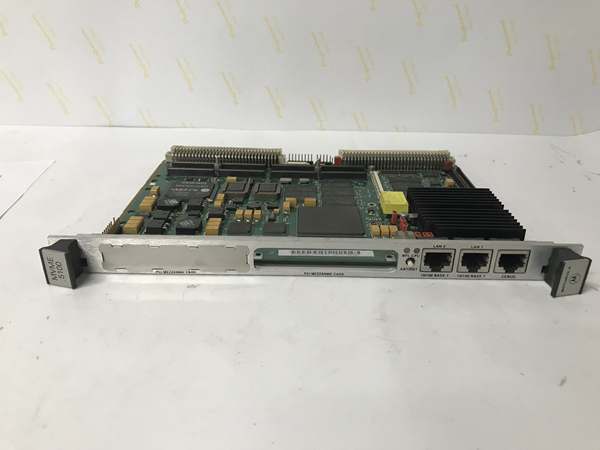
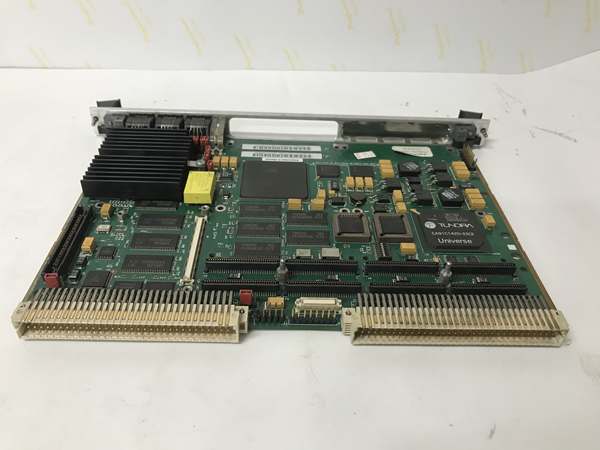
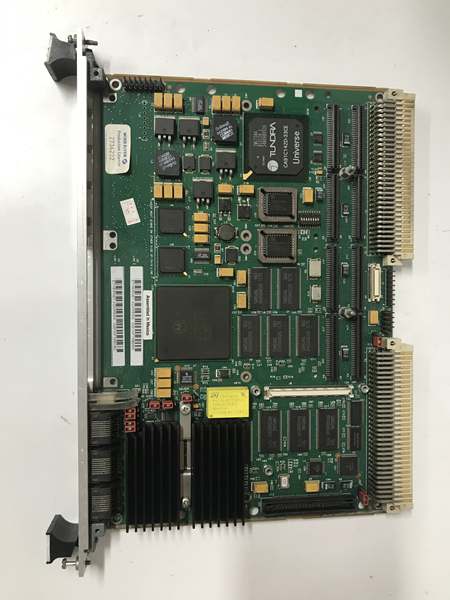
Description
Hard-Numbers: Technical Specifications
-
Processor: PowerPC 750 (G3), 450 MHz (32-bit, superscalar, 1.8V core)
-
L2 Cache: 1 MB backside cache (running at core speed, 2:1 ratio)
-
Memory: Up to 512 MB SDRAM (PC-100, ECC, two DIMM slots)
-
VME Interface: VME64x (ANSI/VITA 1.1-1997), D64 transfer mode, 80 MB/s burst
-
PCI Bus: 32-bit/33 MHz PCI (Hawk ASIC), 2x PMC slots (PMC/XMC compatible)
-
Ethernet: 2x 10/100BASE-TX (Intel 82559, RJ-45 front panel)
-
Serial Ports: 2x RS-232 (DB-9 front, 16550-compatible)
-
SCSI Interface: Ultra2 LVD SCSI (NCR 53C896, 80 MB/s, P2 connector)
-
Operating Temperature: 0°C to +55°C (standard), -40°C to +71°C (conduction-cooled)
-
Isolation Rating: 1500V DC isolation on Ethernet ports (magnetic coupling)
-
Power Draw: 28W typical, 38W max (+5V/±12V/3.3V VME rails)
-
Flash Storage: 8 MB boot flash (socketed), 128 KB NVRAM (battery-backed)
-
Dimensions: 6U x 160mm (VME standard, P1/P2/R1/R2 connectors)

Motorola MVME5100
The Real-World Problem It Solves
Your MVME162 or MVME2600 is choking on new control loops, but the VME chassis is full of custom I/O that cost millions to develop. Rehosting on new hardware means requalifying safety systems—an 18-month nightmare. The MVME5100 drops into that same backplane, runs the same VxWorks or pSOS+ binaries (recompiled, not rewritten), and gives you 10x the compute headroom without touching the wiring.
Where you’ll typically find it:
-
Nuclear power plants: Safety-related DCS upgrades where 10CFR50.59 change evaluations are required; the 5100 keeps the same I/O while meeting new cyber-security mandates.
-
Oil & gas pipelines: SCADA controller replacements in compressor stations; dual Ethernet ports separate control traffic from corporate IT.
-
Aerospace test stands: Engine test cell data acquisition systems where 68K code handles the math but PCI-based PMC modules handle modern ADC speeds.
Bottom line: It’s a surgical strike—modern processor, legacy bus, zero requalification of field wiring.
Hardware Architecture & Under-the-Hood Logic
This board is a hybrid beast. The PowerPC 750 is a modern RISC core, but it’s glued to the VME world through Motorola’s Hawk ASIC—a custom chip that bridges PCI, VME, and local memory buses. The result is a board that can DMA data from a VME slave at 80 MB/s while the CPU crunches floating-point without stalling.
-
Power-on sequence: VME rails stabilize → Hawk ASIC releases CPU reset → 750 fetches boot vector from 0xFFF00100 (default) → Boot flash initializes SDRAM controller and runs POST.
-
Memory architecture: SDRAM sits on a dedicated 100 MHz bus; Hawk manages cache coherency during VME or PCI master cycles that target local RAM.
-
PCI expansion: Hawk’s PCI bus feeds two PMC slots at 33 MHz; XMC modules work if they don’t need 66 MHz or PCI-X. Common fit: GE Fanuc reflective memory or Acromag high-speed ADC.
-
VME mastering: Programmable VME window maps local DRAM to A32/A24 space; D64 block transfers use Hawk’s FIFO to decouple CPU from slow VME slaves.
-
Interrupt routing: VME IRQ1-7 map to OpenPIC controller; PCI INTA/B/C/D and local sources (Ethernet, SCSI) prioritized independently of VME.
Motorola MVME5100
Field Service Pitfalls: What Rookies Get Wrong
Assuming DIMM Compatibility
The 5100 is picky about SDRAM. PC-133 sticks won’t downclock reliably, and high-density 512MB modules often fail POST. Worse, some “industrial” DIMMs have incompatible SPD EEPROM timing that confuses the Hawk memory controller.
-
Field Rule: Stick with the original Motorola part numbers (01-W3060Fxx series) or verified PC-100 ECC DIMMs with 16-chip layout (not 8-chip high-density). If the board hangs with memory errors, pull one DIMM—slot independence isn’t guaranteed on early Hawk revisions.
Forgetting the VME64x Backplane Requirement
This board wants VME64x (2mm connectors on P0/J0). Drop it into an old VME64 chassis and the D64 transfers fall back to D32, or worse, the board doesn’t seat fully due to P0 keying.
-
Quick Fix: Verify your chassis has the extra row of 2mm connectors. If you’re retrofitting a legacy 2600 chassis, check that P0 pins aren’t blocked or damaged. The 5100 will run in VME64 mode, but you’re leaving 40% bandwidth on the table. For critical apps, upgrade the chassis or stick with 2600- series boards.
SCSI LVD vs. SE Confusion
The NCR 53C896 auto-negotiates, but auto-negotiation fails catastrophically with old SE (single-ended) drives on the same chain. A single SE device drags the whole bus down to 5 MB/s and causes timeouts.
-
Field Rule: Inspect every device in the SCSI chain. If you see 50-pin narrow connectors or passive termination, you’re in SE territory. Either isolate legacy drives on a separate bus or force LVD-only mode via Hawk register 0x8000_0068 (bit 3) before the BIOS scans devices. Check P2 pins for bent contacts—LVD is sensitive to impedance.


