
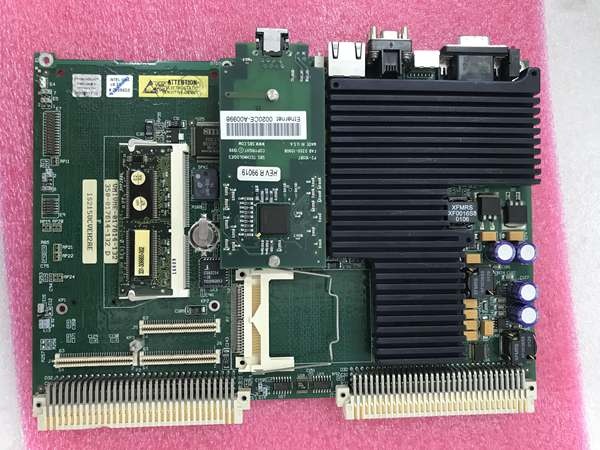
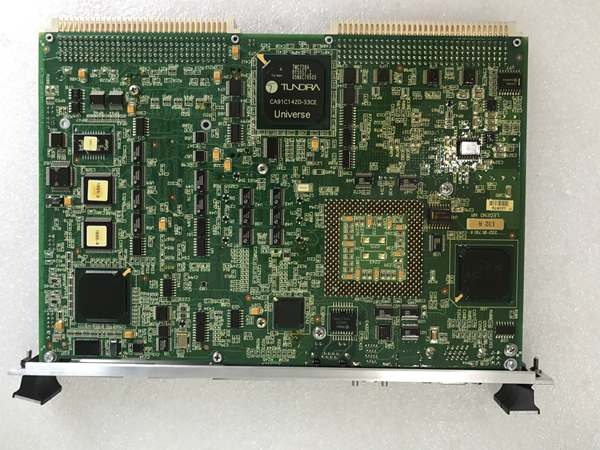
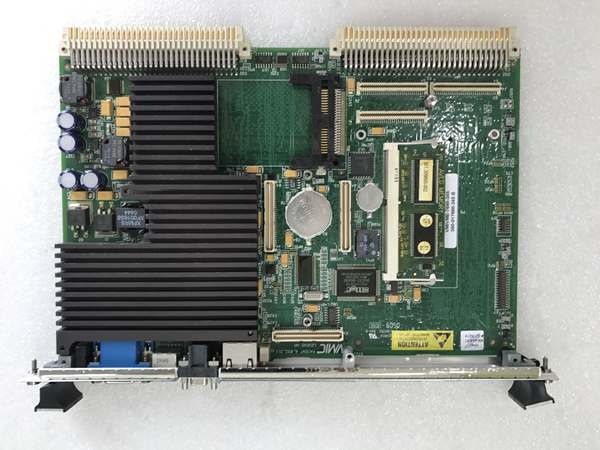
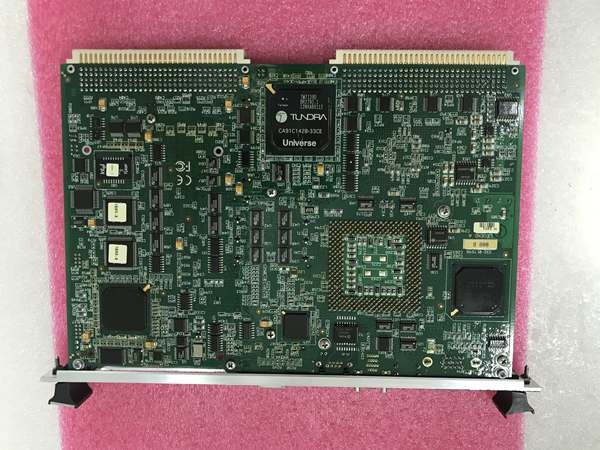
Description
Hard-Numbers: Technical Specifications
-
Processor: 366 MHz Intel Celeron PPG (Socket 370) with MMX technology
-
System Bus: 32-bit addressing, 64-bit data bus
-
Memory: 64 MB SDRAM (dual-ported for VMEbus access)
-
Storage: 64 MB Compact Flash (bootable, contains system/video BIOS)
-
Graphics: 64-bit Intel AGP SVGA controller with 2 MB SGRAM
-
VME Interface: VME64 connector (J1/J2), single-slot 6U form factor
-
Ethernet: 1× Fast Ethernet (10BaseT/100BaseTX) onboard controller
-
Storage Controllers: Ultra DMA/33 hard drive and floppy drive controllers (VMEbus P2 I/O)
-
Serial Ports: 2× RS-232 (16550-compatible, high-performance)
-
Keyboard/Mouse: PS/2-style ports on front panel
-
Timers: 3× 16-bit timers (82C54-compatible, software programmable) plus system timer
-
Power Supply: +5V, ±12V from VME backplane (standard VME power)
-
Operating Temperature: 0°C to +60°C (standard), -40°C to +85°C (extended variants)
-
Dimensions: 233.35 mm × 160 mm (6U VME single-slot)
-
Weight: Approximately 0.4 kg (0.9 lbs)
- OS Support: VxWorks, Linux, Windows XP/2000, QNX

GE VMIVME-7698-345 350-017698-345 B
The Real-World Problem It Solves
You know the scenario: legacy VME systems from the 1990s still running critical processes, but the original CPU boards are failing and the manufacturer stopped production a decade ago. The VMIVME-7698-345 bridges that gap—dropping a 366 MHz Celeron with modern SDRAM and Ethernet into your existing VME chassis without rewiring the backplane or rewriting control software. It keeps aging turbine controls, radar systems, and test stands alive when the original Pentium-based boards are unobtainium.
Where you’ll typically find it:
-
Upgraded Mark VI Speedtronic turbine control cabinets replacing obsolete IS215 or VMIVME-7750 boards
-
Military ground vehicle electronics and naval shipboard control systems requiring MIL-STD-810G ruggedization
-
Aerospace test stands and engine monitoring systems where VME form factor is locked in by certification
Bottom line: It extends the life of VME-based control architectures by providing a then-modern x86 processor with Ethernet connectivity, letting you integrate legacy I/O with contemporary networks without forklift upgrades.
Hardware Architecture & Under-the-Hood Logic
The VMIVME-7698-345 mounts in a single VME slot and functions as a complete PC on a card. Unlike modern CompactPCI or VPX boards, this is pure VME64—no PCIe, no serial RapidIO, just the classic 64-bit VME bus for I/O and memory access. The Celeron processor runs standard x86 code, making it compatible with off-the-shelf operating systems, while the dual-ported DRAM allows both the CPU and external VME masters to access memory without contention.
Signal flow and processing logic:
-
Processing Core: The 366 MHz Celeron executes the host operating system and application code with full x86 compatibility, including MMX instructions for signal processing
-
Memory Access: The 64 MB SDRAM is dual-ported—one port for the Celeron, one for VMEbus masters—allowing external CPUs to read/write memory directly for inter-processor communication
-
VME Arbitration: The board interfaces with VME backplane via standard VME64 protocols, responding to address modifiers and interrupt requests from other VME cards
-
Graphics Output: The AGP SVGA controller drives standard VGA monitors via the front panel connector, supporting embedded HMI applications without external graphics cards
-
Network Integration: The onboard Fast Ethernet connects to plant networks or engineering workstations, bridging the VME world to TCP/IP infrastructure
GE VMIVME-7698-345 350-017698-345 B
Field Service Pitfalls: What Rookies Get Wrong
Confusing This with a Digital I/O Module Here’s the trap: some distributors list VMIVME-7698-345 as a “32-channel digital I/O module” or “IGBT power module.” It’s not. This is a single board computer that requires an operating system, boot device, and proper shutdown procedures. If you order expecting isolated I/O channels or motor drive capabilities, you’ll have a very expensive paperweight.
Field Rule: Verify the physical form factor before accepting delivery. The VMIVME-7698-345 is a 6U VME card with a heatsink, Ethernet port, and VGA connector on the front panel—not terminal blocks for field wiring. Check for the GE/VMIC logo and the 350-017698-345 part number etched on the PCB.
Forgetting the Socket 370 Heatsink Clearance The Celeron processor sits in a Socket 370 with a substantial heatsink. Rookies install the board in a VME chassis with inadequate clearance above the card, or they block the heatsink with cables. Thermal shutdown happens at 70°C, but performance degrades above 60°C.
Quick Fix: Verify your VME chassis provides at least 25mm clearance above the board for the heatsink and fan. Check that chassis airflow moves front-to-back across the processor. If the system runs hot, add a VME fan tray or replace the thermal paste on the Celeron (standard Socket 370 thermal compound, accessible after removing the heatsink retention clips).
Mixing Up Flash Memory and BIOS Settings The 64 MB Compact Flash holds the BIOS and boot image, but rookies assume it’s just storage. Changing the boot order or disabling the onboard Ethernet in BIOS without documenting settings bricks the board—no video, no network, no way to recover without a keyboard and monitor attached.
Field Rule: Document BIOS settings (boot priority, memory timing, VME interrupt levels) before making any changes. Always have a PS/2 keyboard and VGA monitor available for recovery—USB keyboards won’t work in the BIOS on this vintage board. Keep a backup of the Compact Flash image; if the flash fails, you need the exact BIOS revision to restore functionality.



