
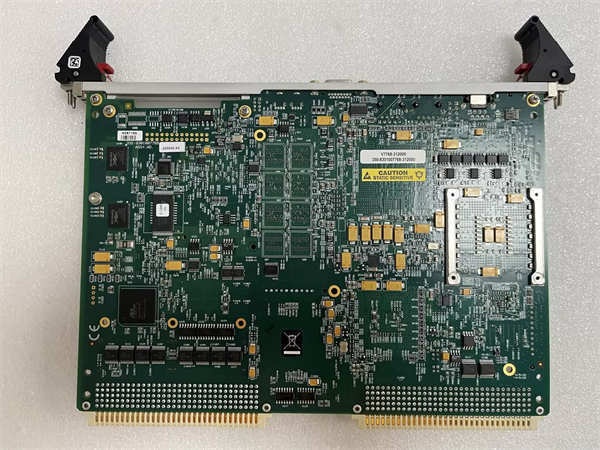
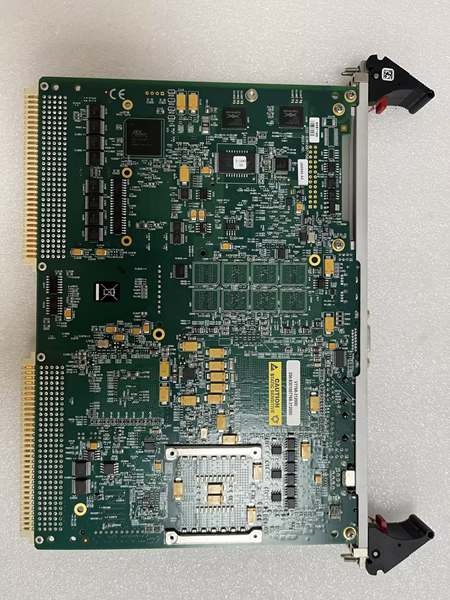
Description
Hard-Numbers: Technical Specifications
-
Processor: Intel Core 2 Duo up to 2.16 GHz (32-bit x86), optional Celeron M for extended temperature
-
Chipset: Intel 945GM Express with GMA 950 integrated graphics
-
System Bus: 667 MHz front-side bus
-
Memory: Up to 2 GB DDR2 SDRAM via single SODIMM slot
-
Cache: Up to 4 MB L2 cache (processor dependent)
-
Storage: Up to 8 GB bootable CompactFlash (onboard socket)
-
VME Interface: VME64x (6U form factor, dual-slot width), PCI-X PMC expansion site
-
Ethernet: 2× Gigabit Ethernet ports (10/100/1000 Mbps) on front panel
-
Serial Ports: 2× RS-232/RS-422/RS-485 configurable
-
USB: 4× USB 2.0 ports (2 front, 2 via header)
-
SATA: 2× SATA interfaces for hard drive expansion
-
Graphics: Integrated Intel GMA 950 with SVGA front panel output
-
Input: PS/2 keyboard and mouse ports on front panel
-
Power Supply: +5V, ±12V from VME backplane (standard VME power)
-
Operating Temperature: 0°C to +60°C (standard), -40°C to +85°C (extended temp option)
-
Dimensions: 233.35 mm × 160 mm × 23 mm (standard 6U VME)
-
Weight: Approximately 350g (0.77 lbs)
-
Operating System Support: Windows XP/7, VxWorks, QNX, Linux

GE V7768-312000
The Real-World Problem It Solves
You know the limitation: legacy VME systems running on 200 MHz Pentium boards that can’t handle modern HMI graphics, complex control algorithms, or Ethernet-based I/O. The V7768-312000 drops a 2.16 GHz Core 2 Duo into that same VME chassis—giving you modern processing power without ripping out your entire control system infrastructure. It breathes new life into aging DCS and PLC platforms while keeping your VME backplane, cabling, and I/O modules intact.
Where you’ll typically find it:
-
Upgraded Mark VI Speedtronic turbine control cabinets where the original CPU can’t handle modern graphics or communication loads
-
Military radar and electronic warfare systems requiring rugged VME form factor with contemporary computing power
-
Aerospace test stands and simulation systems needing real-time OS support (VxWorks/QNX) on reliable hardware
Bottom line: It lets you upgrade processing performance by an order of magnitude without the cost and risk of replacing your entire VME-based control architecture.
Hardware Architecture & Under-the-Hood Logic
The V7768-312000 is a dual-slot VME64x board that functions as a complete computer on a single card. Unlike traditional PLCs with fixed I/O, this is a general-purpose computing platform that runs full operating systems (Windows, Linux, VxWorks) while interfacing with VME-based I/O and communication modules. The dual-slot design accommodates the Core 2 Duo processor, DDR2 memory, and extensive I/O without requiring mezzanine cards for basic operation.
Signal flow and processing logic:
-
Processing Core: The Core 2 Duo executes the host operating system and application software (control algorithms, HMI, communication stacks) with full x86 compatibility
-
VME Arbitration: The board interfaces with VME backplane via the Tundra Universe II or equivalent VME bridge chip, allowing access to legacy I/O modules, memory-mapped devices, and interrupt handling
-
PMC Expansion: The PCI-X PMC site accepts specialized mezzanine cards (additional serial, fiber optic, custom I/O) via the EasyRail mounting system—no need to disassemble the entire VME chassis
-
Network Integration: Dual Gigabit Ethernet ports provide high-speed connectivity to modern PLCs, operator stations, and plant networks, independent of the VME backplane
-
Storage Options: The CompactFlash socket holds the bootable OS image, while SATA ports allow spinning hard drives or SSDs for data logging and application storage

Field Service Pitfalls: What Rookies Get Wrong
Assuming It’s a Drop-In Replacement Rookies see “VME” and think any V7768-312000 swaps directly for an old VMIVME-7750 or IS215UCVEH2AE. It’s not. The Core 2 Duo draws more power (peak 30W vs. 15W for older boards), and your chassis power supply might not have the +5V margin. Plus, the BIOS settings for VME interrupt handling differ from legacy boards.
Field Rule: Check your VME chassis power supply rating (+5V at 20A minimum recommended) before installation. Verify the VME interrupt jumper settings match your existing I/O configuration—default settings often conflict with legacy interrupt schemes.
Ignoring Thermal Management The 2.16 GHz Core 2 Duo runs hot, and VME chassis often have marginal airflow. Rookies install the board, close the cabinet, and wonder why it thermal-shutdowns after 30 minutes. The heatsink on the V7768-312000 requires direct airflow across the fins.
Quick Fix: Verify chassis fans are operational and spinning in the correct direction (intake at bottom, exhaust at top). If the VME rack lacks forced air, add a fan tray immediately. Monitor the CPU temperature via BIOS or OS tools during commissioning—sustained operation above 60°C reduces reliability.
Mixing Up the PMC Site The PCI-X PMC expansion site uses the EasyRail system—it’s designed for tool-less installation from the top of the board. Rookies try to force PMC cards in from the side or remove the entire VME assembly to access screws, damaging the retention mechanism.
Field Rule: The EasyRail system allows PMC installation with the V7768-312000 already seated in the chassis. Slide the PMC card into the guide rails from the top until it clicks—no tools needed. If you need to remove it, press the release tab and lift straight up. Forcing lateral movement breaks the plastic retainers.



