
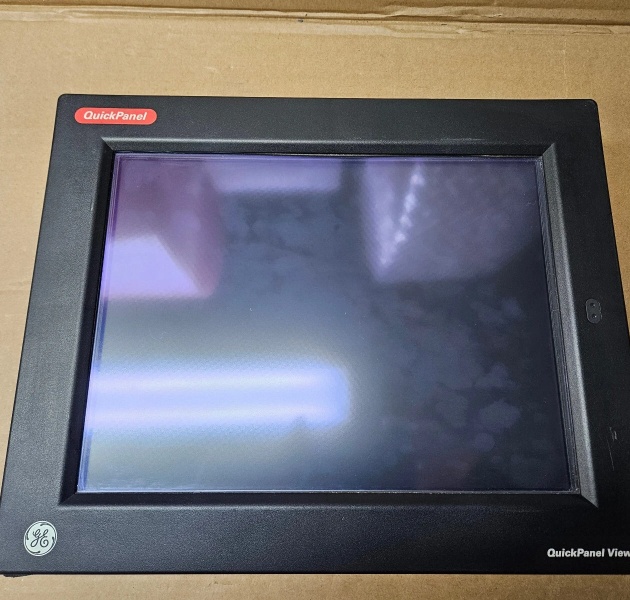
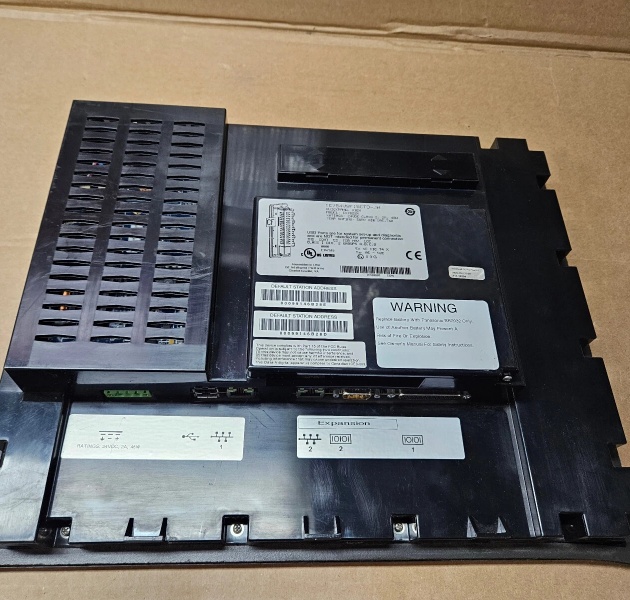
Description
Hard-Numbers: Technical Specifications
- Display Type: 15.0-inch TFT LCD, active matrix
- Display Resolution: 1024 x 768 pixels (XGA)
- Touchscreen: Projected Capacitive Touch (PCT) with multi-touch support
- Brightness: 400 nits (cd/m²) typical
- Contrast Ratio: 500:1 typical
- Backlight: LED with 50,000-hour MTBF
- Processor: Marvell PXA166 @ 1.0 GHz (dual-core architecture)
- System Memory: 1 GB DDR3 RAM
- Storage: 2 GB Flash (operating system and application storage)
- Operating System: Windows CE 6.0 + Logic Engine (PACMachine Edition runtime)
- Communication Ports: Dual Ethernet (10/100/1000Mbps), 2 x USB 2.0 host, 1 x USB device, 1 x RS-232 serial, 1 x RS-485
- Protocol Support: SRTP, Modbus TCP/IP, Modbus RTU, Ethernet/IP, OPC UA Client/Server, PROFINET IO Device
- Input Voltage: 24VDC nominal (18-36VDC range)
- Power Consumption: 20W typical at 24VDC
- Operating Temperature: 0°C to 50°C (32°F to 122°F)
- Storage Temperature: -20°C to 60°C (-4°F to 140°F)
- Enclosure Rating: NEMA 4X/12 (IP65) front panel
- Mounting: Panel mount (cutout: 14.5″ x 11.0″)
- Certifications: UL 508, CSA C22.2 No. 142, CE, IEC 61010-1

IC754VSF15CTD
The Real-World Problem It Solves
Operators need reliable access to process data and control functions without walking to the PLC cabinet. The IC754VSF15CTD provides a rugged 15-inch interface that survives industrial environments. It runs Windows CE for HMI applications and a built-in Logic Engine for standalone control when network connectivity is lost.
Where you’ll typically find it:
- Operator stations on water treatment plant SCADA systems
- Manufacturing line control panels with machine visualization and local recipe management
- Packaging equipment requiring operator input and production monitoring
Bottom line: It’s a rugged HMI that keeps operators in control whether networked or standalone.
Hardware Architecture & Under-the-Hood Logic
The QuickPanel+ uses a dual-OS architecture combining Windows CE 6.0 and a dedicated Logic Engine runtime. Windows CE handles HMI visualization, graphics rendering, and communication services. The Logic Engine provides deterministic execution of IEC 61131-3 logic programs for standalone control. The Marvell dual-core processor splits duties—one core manages Windows CE and HMI graphics, the second runs Logic Engine execution. The touchscreen is a projected capacitive interface supporting multi-touch gestures and glove-friendly operation. Dual Ethernet ports provide network redundancy or separate plant and office network segmentation. The device supports remote file transfer and debugging via FTP and web server. Communication with PLCs uses native GE SRTP protocol plus Modbus TCP/IP, Ethernet/IP, and OPC UA for multi-vendor integration.
Internal signal flow:
- Power applied to 24VDC input; internal DC-DC converter powers subsystems
- Windows CE OS boots from flash; Logic Engine runtime initializes
- HMI application loads from flash storage into RAM
- Touchscreen inputs processed by touch controller; events sent to Windows CE
- HMI graphics engine renders screens to TFT display via LVDS interface
- Communication stacks establish connections to PLCs via Ethernet/serial
- Tag values exchanged with PLCs using SRTP, Modbus, Ethernet/IP, or OPC UA
- Logic Engine executes control programs using I/O from local modules or network
- Operator inputs from touchscreen trigger HMI events; tags updated and sent to PLCs
- Dual Ethernet ports provide independent network paths or segmentation
- USB ports support external storage, keyboard, or programming connections
- RS-232/485 serial ports support legacy device communication
IC754VSF15CTD
Field Service Pitfalls: What Rookies Get Wrong
Using 12VDC power supply destroys the unitI’ve seen technicians wire 12VDC to the IC754VSF15CTD and fry the internal DC-DC converter. The unit is rated for 24VDC only—anything below 18VDC won’t boot reliably, and overvoltage above 36VDC can damage the power circuitry permanently.
- Field Rule: Verify your power supply outputs 24VDC before connecting. Use a dedicated 24VDC supply with at least 2A current capacity. Install a 3A fuse on the supply side for overcurrent protection. Measure voltage at the HMI terminals with a multimeter during operation—should be 18-36VDC stable.
Incorrect network configuration causes communication failuresThe dual Ethernet ports are powerful but confusing. I’ve seen technicians configure both ports on the same subnet, creating IP address conflicts and erratic PLC communication.
- Field Rule: Configure Ethernet ports for different subnets or network segmentation. Port 1 typically connects to the PLC network (device-level Ethernet). Port 2 can connect to the plant information network for SCADA/HMI data. Never assign both ports to the same subnet without VLAN separation. Document IP addresses and subnets in your network topology diagram.
Ignoring backlight brightness causes premature failureThe LED backlight is rated for 50,000 hours at typical brightness. I’ve seen operators crank brightness to 100% in bright plants, reducing backlight life to under 30,000 hours. The HMI becomes unusably dim within a few years.
- Field Rule: Set brightness to the lowest usable level for your ambient lighting. Use automatic brightness adjustment if the application supports it. For 24/7 operation in bright environments, consider using sun hoods or anti-glare screen protectors instead of maximum brightness. Schedule periodic brightness checks during maintenance rounds.
Forgetting to calibrate the touchscreen creates driftProjected capacitive touchscreens are generally stable, but physical damage or temperature extremes can cause touch drift. I’ve seen operators mis-touching buttons and making errors because no one calibrated the unit after installation.
- Field Rule: Calibrate the touchscreen during commissioning and after any physical shock or relocation. Access calibration via the HMI’s settings menu (typically requires technician-level password). Follow the on-screen touchpoint sequence precisely. Document calibration procedure in your HMI maintenance checklist.
Not backing up HMI applications before serviceWindows CE is generally stable, but flash storage corruption can occur. I’ve seen technicians service HMIs without backing up the application, then lose everything when a firmware update fails or the flash sector goes bad.
- Field Rule: Back up the HMI application (.pvx or .app file) to external USB storage quarterly and before any service action. Keep backups on network drives if the HMI has network connectivity. Document the application version and configuration in your CMMS. Test restore procedure on a spare HMI to verify backup integrity.
Daisy-chaining network cables causes performance issuesI’ve seen technicians daisy-chain multiple QuickPanel+ units through the Ethernet ports, creating a single point of failure and bottlenecking network traffic. Each HMI communicates with multiple PLCs through the same cable chain.
- Field Rule: Use star topology with industrial Ethernet switches. Each QuickPanel+ should have its own dedicated cable to a managed switch. If network redundancy is required, configure both Ethernet ports for separate links to redundant switches. Never daisy-chain Ethernet devices through HMI ports—the switching fabric isn’t designed for it.
Commercial Availability & Pricing Note
Please note: The listed price is for reference only and is not binding. Final pricing and terms are subject to negotiation based to current market conditions and availability.



