
Description
Hard-Numbers: Technical Specifications
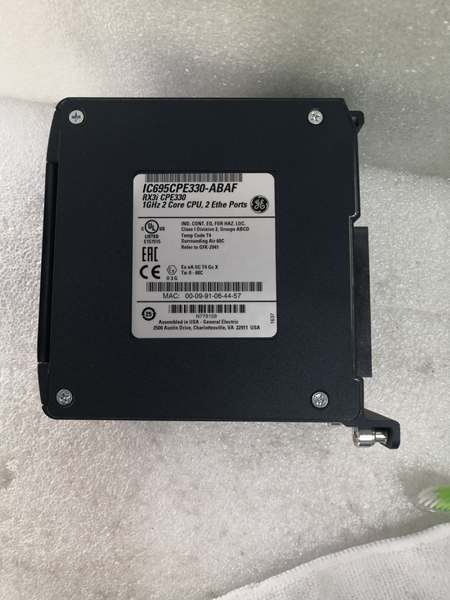
- Processor Speed: 1GHz dual-core microprocessor
- User Memory: 64Mbytes (configurable data and program memory)
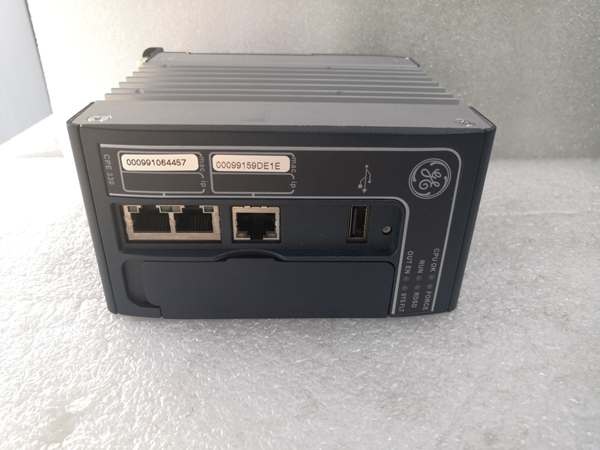
- Embedded Ethernet Ports: 2 independent 10/100/1000Mbps LANs (LAN1: single RJ45, LAN2: dual RJ45 with embedded switch)
- Protocol Support: SRTP (48 server connections), Modbus TCP (16 server connections), OPC UA (5 sessions, 10 subscriptions, 12,500 variables), EGD (255 exchanges), PROFINET (via IC695PNC001)
- I/O Capacity: Up to 32K discrete (%I/%Q), 32K words analog (%AI/%AQ), bulk memory %W up to max user memory
- Power Draw: +3.3VDC @ 0.0A, +5.0VDC @ 0.0A, +24VDC Relay @ 0.625A (without Energy Pack), 0.750A (with IC695ACC402)
- Operating Temperature: 0°C to 60°C (32°F to 140°F)
- Isolation Rating: 1500Vrms (not specified in document – verify with GFK-2314)
- Baud/Data Rate: 10/100/1000Mbps auto-sensing on both LANs
- Port Count: 3 Ethernet ports (1 on LAN1, 2 switched on LAN2), 1 USB 2.0 Master port
- Programming Languages: Ladder Diagram, Structured Text, Function Block Diagram, C Language
- Hot Standby Redundancy: Supports PROFINET I/O, Ethernet (EGD), and Genius I/O
- Energy Pack: IC695ACC402 only (instant save/restore on power cycles)
- Firmware Upgrade: Field upgradeable via Ethernet (Firefox 41.0.2+, Chrome 46.0+, IE 11.0.9600+, Opera 32.0+, Safari 9.0+)

GE IC695CPE330
The Real-World Problem It Solves
This CPU eliminates the need for external Ethernet modules while delivering gigabit speed, dedicated Ethernet processing cores, Hot Standby Redundancy support with PROFINET I/O, and USB field maintenance access. You get a modern CPU with 64MB memory and dual independent LANs without consuming backplane slots for Ethernet modules.
Where you’ll typically find it:
- Manufacturing lines with PROFINET devices requiring gigabit communication
- Hot Standby Redundant systems with PROFINET I/O, EGD, or Genius I/O
- Applications requiring OPC UA connectivity to enterprise systems (SCADA, MES)
- Multi-tier communication architectures with multiple Ethernet protocols (SRTP, Modbus TCP, EGD)
- Systems needing USB field maintenance without connecting a PC
Bottom line: It’s your high-performance RX3i CPU for gigabit Ethernet applications with Hot Standby Redundancy – but it has NO serial ports and draws nearly double the power of CPU320.
Hardware Architecture & Under-the-Hood Logic
The CPE330 is a 1GHz dual-core CPU with two independent high-speed Ethernet LANs (10/100/1000Mbps) supported by dedicated microprocessor cores that offload Ethernet processing from the main CPU. LAN1 uses a dedicated RJ45 connector; LAN2 provides dual RJ45 connectors with an embedded switch for device daisy-chaining. The CPU supports Hot Standby Redundancy with PROFINET I/O (via IC695PNC001), Ethernet (EGD), and Genius I/O. Embedded OPC UA server provides secure data exchange with HMIs and SCADA systems. USB 2.0 Master port enables program/data transfer using removable storage devices. Energy Pack IC695ACC402 instantly saves user memory to non-volatile storage on power loss and restores on power-up.
Internal signal flow:
- 1GHz dual-core processor executes logic independently
- Dedicated microprocessor cores manage both Ethernet LANs independently
- LAN1: Single dedicated RJ45 port for primary Ethernet connection
- LAN2: Dual RJ45 ports with embedded switch (supports daisy-chaining up to 3 devices)
- SRTP Server: Handles up to 48 simultaneous connections
- Modbus TCP Server: Handles up to 16 simultaneous connections
- OPC UA Server: Up to 5 concurrent sessions, 10 subscriptions, 12,500 variables
- EGD: Up to 255 simultaneous Class 1 exchanges
- Redundant IP: Two independent IP addresses (one per LAN)
- Embedded SNTP Client: Syncs high-resolution Time of Day Clock to network time server
- USB 2.0 Master port: Upload/download programs and data to/from RDSDs
- Energy Pack connector (IC695ACC402): Instant save/restore on power cycles
- Real-Time Clock Battery: BR2032-BA (5-year estimated life)
- HART Pass Through: Communicates HART data between HART-capable I/O and PC tools (requires additional hardware)
- Hot Standby Redundancy: Supports PROFINET I/O (IC695PNC001), EGD, Genius I/O
- Memory: 64MB configurable user memory, auto-located Symbolic Variables
- Reference tables: %I/%Q 32K bits, %AI/%AQ 32K words each, %W up to max user memory
- Programming: LD, ST, FBD, C via Proficy Machine Edition (PME) 8.60 or later
- I/O: Supports all IC694 and IC695 modules, limited Series 90-30 compatibility
- CFast slot: Present but not enabled in firmware 9.21
- Power: Higher consumption than CPU320 (18W max vs 9.3W max)
- Backplane: Requires specific hardware revisions (IC695CHS012-BAMP, IC695CHS016-BAMP, or later)
- Firmware: Field upgradeable via Ethernet using supported web browsers
Ethernet capabilities:
- LAN1: Dedicated RJ45, operates independently of LAN2
- LAN2: Dual RJ45 with embedded switch, supports up to 3 daisy-chained devices
- Protocols: SRTP, Modbus TCP, OPC UA, EGD, PROFINET (via PNC001), HTTP (firmware update)
- Redundant IP: Each LAN can have independent IP address
- Achilles Level 2 Certification: Available in firmware R8.80 and later
Hot Standby Redundancy support:
- PROFINET I/O: Requires IC695PNC001 PROFINET Controller firmware 2.25 or later
- EGD: Full support with Hot Standby Redundancy
- Genius I/O: Full support with Hot Standby Redundancy
- Cannot mix: PROFINET I/O and EGD/Genius I/O in same redundancy system
Memory management:
- Energy Pack IC695ACC402 automatically saves all user memory to flash on power-off and restores to RAM on power-on
- No support for Service Requests 56 & 57 (Logic Driven Read/Write to Flash)
- Symbolic Variables auto-located, can use any amount of user memory
Firmware upgrade notes:
- Upgrade via Ethernet using web browser
- Process takes up to 4 minutes, CPU may reset one or more times during update
- Do not power cycle or remove Energy Pack during update
- All versions field upgradeable to latest release
GE IC695CPE330
Field Service Pitfalls: What Rookies Get Wrong
Wrong Energy Pack Connected
Techs connect the IC695ACC400 Energy Pack (designed for CPE305/310) or ICRXIACCEPK01 RXi Energy Pack to the CPE330. The ACC400 won’t fit physically; the RXi Energy Pack connects but causes continuous reset, preventing the CPU from powering up.
Field Rule: Only IC695ACC402 Energy Pack is compatible with CPE330. The ACC400 (CPE305/310 pack) doesn’t fit; the RXi Energy Pack physically connects but triggers continuous reset. If connected to RXi pack, power down and disconnect immediately. The RXi Capacitor Pack ICRXIACCCPK01A can connect to ACC402 base but causes longer charge time and may log battery fault – don’t use it.
Backplane Hardware Revision Mismatch
Installers plug CPE330 into older RX3i backplanes without checking revision compatibility. CPU doesn’t work or behaves unpredictably due to incompatible backplane hardware.
Field Rule: CPE330 requires specific backplane revisions: IC695CHS012-BAMP, IC695CHS016-BAMP, IC695CHS012CA-BAMP, IC695CHS016CA-BAMP, or IC695CHS007-AA (or later), IC695CHS012-CA (or later), IC695CHS016-CA (or later), IC695CHS012CA-CA (or later), IC695CHS016CA-CA (or later). Verify backplane revision before installation.
Power Supply Undersized
Engineers upgrade from CPU320 to CPE330 without recalculating power consumption. CPE330 max consumption is 18W, CPU320 is 9.3W – nearly double. Existing power supply can’t handle the load, causing random resets or brownouts.
Field Rule: CPE330 requires +24VDC @ 0.625A (0.750A with Energy Pack) vs CPU320 @ 0.0A on +24VDC. Recalculate total backplane power load. You may need additional RX3i power supplies or upgrade to higher-capacity models (IC695PSA040H, IC695PSA140D or later for AC power supplies).
Serial Port Migration Failure
Programmers migrate from CPU315/CPU320/CRU320 applications to CPE330 and expect serial ports to work. CPE330 has NO embedded serial ports, application fails at runtime.
Field Rule: CPE330 does not have embedded serial ports. Move serial functionality to IC695CMM002 or IC695CMM004 Serial Communication Modules when migrating applications. This is mandatory – serial COMMREQ calls will fail without these modules.
Firmware Update Interrupted
Technicians power cycle the CPE330 or remove the Energy Pack cap during firmware update because the CPU resets and LEDs turn off. This bricks the CPU, placing it in an unrecoverable state.
Field Rule: During firmware update, the CPE330 may automatically reset one or more times, and all LEDs may turn off during resets. The Energy Pack (if present) also blinks and resets. This is normal behavior. Do NOT power cycle or remove cap pack until update completes (up to 4 minutes). If interrupted, return CPU to factory.
Redundant IP Not Supported on All Protocols
Engineers configure Redundant IP addresses for OPC UA Server connections, thinking it provides redundancy. Redundant IP only works with SRTP Server, Modbus TCP Server, and EGD – not OPC UA.
Field Rule: Redundant IP is NOT supported for OPC UA Server and Ethernet firmware update web page. Use separate redundant hardware or network design for OPC UA redundancy. Configure Redundant IP only for SRTP, Modbus TCP, and EGD protocols.
CFast Slot Expected to Work
Users try to use the CFast card slot for program storage or data logging. The CFast slot is present but NOT enabled in firmware 9.21 and earlier releases.
Field Rule: Do not rely on CFast slot for storage in current firmware releases. It’s physically present but disabled. Use Energy Pack IC695ACC402 for automatic save/restore on power loss, or USB port for manual program/data transfer with removable storage devices.
Clear All Masks Energy Pack Failures
Maintenance personnel perform Clear All operation on CPU with failing Energy Pack. The PLC_BAT status bit is cleared and indicates good state even though Energy Pack remains in failed condition, masking the real problem.
Field Rule: Clear All operation clears %S bits including PLC_BAT. If Energy Pack is in failed state before Clear All, it remains failed afterward but PLC_BAT indicates good. Remove Cap Pack from Energy Pack base and reinstall to reassert the PLC_BAT status bit and reveal true condition.
Compatibility Mode Not Switched
Techs download CRU320 application to CPE330 without changing compatibility mode from Normal (CPU320) to CRU320 mode. Application doesn’t run or behaves incorrectly.
Field Rule: CPE330 ships in Normal (CPU320) compatibility mode. Must switch to CRU320 mode before downloading CRU320 applications. If using PME version with native CPE330 support, you can store CPE330 configuration directly without changing modes. Refer to Quick Start Guide GFK-2941D for mode change procedure.
CPU320/CRU320 Application Without PME Upgrade
Engineers try to download CPU315/CPU320/CRU320 applications using older PME versions without CPE330 support, expecting embedded Ethernet to work. Embedded Ethernet properties cannot be configured, only default IP addresses available.
Field Rule: PME 8.60 or later required for native CPE330 configuration and embedded Ethernet support. Older PME versions can download CPU320/CRU320 compatibility mode applications but cannot configure embedded Ethernet. Use PME 8.60+ for full CPE330 capabilities.
HART Pass Through Hardware Missing
Users enable HART Pass Through without installing required HART-compatible I/O modules and firmware. The feature doesn’t work, wasting configuration time.
Field Rule: HART Pass Through requires additional HART-compatible products: RX3I Analog modules with HART functionality and optionally supporting PROFINET products. Remote Get HART Device Information COMMREQ requires CPE330 firmware 8.95+, IC695PNC001 PROFINET Controller firmware 2.26+, IC695PNS001 PROFINET Scanner firmware 2.41+, and specific GSDML file.
Hot Standby Redundancy Protocol Mixing
System designers try to configure Hot Standby Redundancy system mixing PROFINET I/O and EGD/Genius I/O in same redundant pair. The configuration fails or behaves unpredictably.
Field Rule: CPE330 Hot Standby Redundancy supports PROFINET I/O (via IC695PNC001) OR Ethernet (EGD) & Genius I/O, but NOT both simultaneously. Cannot mix PROFINET I/O and EGD/Genius I/O in same redundancy system. Choose one redundancy protocol for your application.
Real-Time Clock Battery Replacement Ignored
Maintenance staff never replace the RTC battery after 5 years. CPU boots with date/time reset to 12:00 AM, 01-01-2011. No diagnostic indicators monitor battery status, so the failure goes unnoticed until time-critical applications misbehave.
Field Rule: Replace RTC battery (IC690ACC001 – Lithium BR2032-BA) every 5 years on scheduled maintenance. There are no diagnostics or indicators to monitor battery status. The CPU operates normally with failed battery, but time-of-day clock is incorrect after power loss. Don’t wait for symptoms.
IE11 Firmware Update Status Not Displayed
Technicians use Internet Explorer 11 to update CPE330 firmware. Firmware updates successfully but Installation Status and Completed pages don’t display, causing confusion about update success.
Field Rule: IE11 has display issues with firmware update status pages. After upload completes, refresh browser home page to verify new firmware version. Use Chrome 46.0+ or Firefox 41.0.2+ for reliable update status display if available.
Power Requirements Miscalculated
Installers only calculate +3.3V and +5V loads, missing the +24VDC relay requirement. CPE330 draws 0.625A @ +24VDC without Energy Pack, 0.750A with Energy Pack – significant load not present on CPU320.
Field Rule: CPE330 power draw on +24VDC relay supply is 0.625A (0.750A with Energy Pack). CPU320 draws 0.0A on +24VDC. Don’t forget to calculate this load when selecting power supplies. This single rail can make or break your power budget.
Series 90-30 Module Compatibility Overlooked
Technicians assume all Series 90-30 modules work with CPE330. Only specific modules from the list are supported; others won’t work.
Field Rule: CPE330 supports specific Series 90-30 modules only. Refer to compatibility list in GFK-2942. Supported modules include discrete inputs (IC693MDL series), discrete outputs (IC693MDL series), analog I/O (IC693ALG220/221/222/223/390/391/392/442), high-speed counters (IC693APU300), and specific other modules. Verify each Series 90-30 module against the compatibility list.
USB Device Compatibility Assumed
Users try to use USB 3.0 devices expecting high-speed transfers. CPE330 only supports USB 1.1 and USB 2.0 devices.
Field Rule: CPE330 USB port supports USB 1.1 and USB 2.0 devices only. Do not use USB 3.0 devices – they may not work or cause unpredictable behavior. Use standard USB 2.0 thumb drives or other USB 2.0 devices for reliable operation.
Commercial Availability & Pricing Note
Please note: The listed price is for reference only and is not binding. Final pricing and terms are subject to negotiation based on current market conditions and availability.



