
Description
Hard-Numbers: Technical Specifications
- Number of Slots: 10 I/O module positions (Slot 1 dedicated to power supply)
- Backplane Bus Type: High-speed serial only—no PCI bus support
- Internal Power Draw: 150 mA @ 5 VDC (backplane logic only)
- Maximum Expansion Cable Length: 50 feet (15 meters) from CPU backplane
- Expansion Connector: 25-pin D-shell female (right side of chassis)
- Operating Temperature: 0°C to 60°C (32°F to 140°F)
- Compatible Power Supplies: IC694PWR321, IC694PWR330, IC694PWR331
- Dimensions: 5.12″ H × 17.44″ W × 5.59″ D (130 × 443 × 142 mm)
- Weight: 2.06 lbs (0.94 kg)
- Hot Swap Support: Not supported—power down before module installation
- Rack Addressing: DIP switch selection (must set before module insertion)
- Maximum Daisy-Chained Backplanes: Up to 7 serial expansion racks per CPU backplane
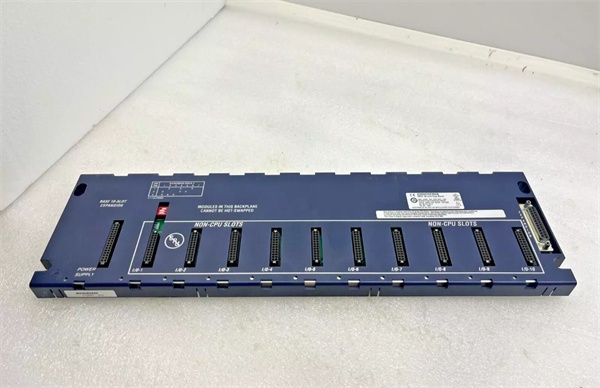
GE IC694CHS392
The Real-World Problem It Solves
When your main PLC cabinet runs out of I/O slots, you’re staring down a costly control system redesign or a new PLC rack purchase. The IC694CHS392 lets you bolt on 10 additional module positions without touching your existing CPU configuration—run a single serial cable up to 50 feet away and mount the expansion rack wherever the field devices are clustered.
Where you’ll typically find it:
- Distributed I/O installations where sensors and actuators are grouped in remote zones (process skids, conveyor segments)
- Retrofit jobs where cabinet space constraints prevent adding a second universal backplane
- Legacy system expansions that need to keep the original CPU rack intact while adding 10+ I/O points
Bottom line: De-centralizes your I/O without the cost of a second CPU or networked remote I/O hardware.
Hardware Architecture & Under-the-Hood Logic
The IC694CHS392 is a passive serial backplane with no onboard intelligence—no microprocessor, no firmware, no configuration software. It’s purely a mechanical and electrical platform that routes the high-speed serial bus signals from the CPU backplane through a 25-pin D-shell expansion cable to 10 I/O module slots.
Signal Flow & Physical Layout:
- Expansion Cable Input (Right Side): 25-pin D-shell connector receives the serial bus from the upstream backplane (CPU rack or another expansion rack). Cable part number: IC693CBL302.
- Serial Bus Distribution: Internal backplane traces route the high-speed serial signals (data, clock, control) to all 10 slots in parallel. This is a passive bus topology—no signal repeaters or buffers.
- Slot 1 Power Supply Position: Leftmost slot is mechanically keyed for a serial expansion power supply (IC694PWR321/330/331). This supply provides 5VDC backplane power and 24VDC field power to the I/O modules installed in Slots 2-10.
- DIP Switch Rack Addressing: A physical DIP switch (typically 4-position) sets the rack number (0-7). The CPU identifies this backplane by this address during configuration. Must be set before powering up.
- Expansion Output (Optional): If chaining additional expansion racks, the right-side connector can pass the serial bus downstream to the next backplane in the daisy chain. Maximum total cable length from CPU to final rack: 50 feet.
- Termination Requirement: The last backplane in the chain must have a terminating resistor (IC693ACC307) installed at the expansion connector to prevent signal reflections on the serial bus.
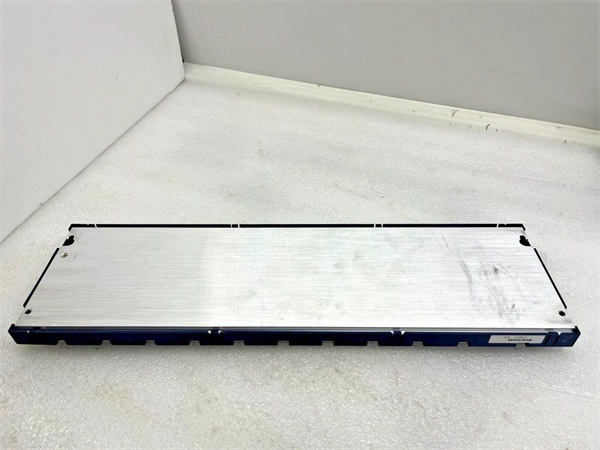
GE IC694CHS392
Field Service Pitfalls: What Rookies Get Wrong
Installing Modules Without Setting the DIP Switch
The DIP switch sets the rack address, and the CPU won’t recognize the backplane if it’s left at default (or conflicts with another rack). If you install modules first and realize later the switch is wrong, you’ll have to pull everything out and start over.
- Field Rule: Set the DIP switch to the correct rack number before installing any modules or connecting the expansion cable. Verify it against your hardware configuration in Proficy Machine Edition.
Exceeding the 50-Foot Cable Limit
I’ve seen guys run 75-foot cables because “the signal looks fine.” It’s not. The serial bus timing margins degrade past 50 feet, and you’ll get intermittent I/O faults, module dropouts, or erratic behavior under electrical noise. The 50-foot limit is a hard constraint, not a suggestion.
- Quick Fix: If your remote I/O location is beyond 50 feet, use a remote backplane (IC693CHS393) which supports up to 700 feet, or switch to Ethernet-based distributed I/O.
Forgetting the Terminating Resistor on the Last Rack
Without the terminating resistor (IC693ACC307) on the final backplane in the chain, the serial bus signal reflects back down the cable. This causes communication errors, I/O module faults, and random CPU stops—especially in electrically noisy environments.
- Field Rule: Install the terminating resistor on the last backplane only. If you add another expansion rack downstream, move the resistor to the new end of the chain.
Hot-Swapping Modules on This Backplane
Unlike the RX3i universal backplanes (IC695CHS012/016), the IC694CHS392 does not support hot insertion or removal. Pulling a module while powered up can damage the backplane traces, corrupt serial bus communication, or cause the CPU to fault.
- Quick Fix: Power down the entire expansion rack before swapping modules. If hot-swap capability is required, use a universal backplane with PCI/serial support instead.
Commercial Availability & Pricing Note
Please note: The listed price is for reference only and is not binding. Final pricing and terms are subject to negotiation based on current market conditions and availability.


