
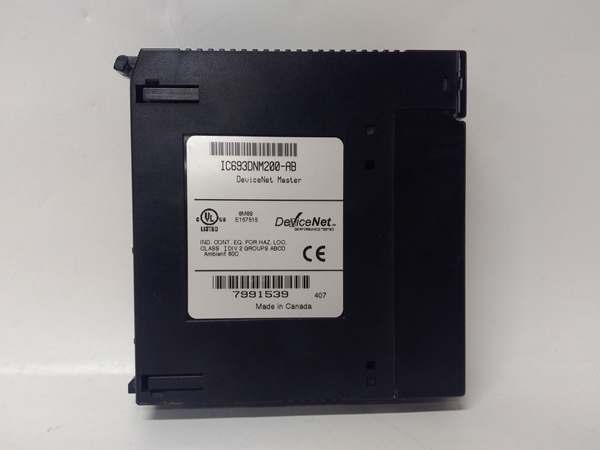
Description
Hard-Numbers: Technical Specifications
- Protocol: DeviceNet (ODVA-compliant)
- Communication Rate: 125 Kbps, 250 Kbps, 500 Kbps (selectable via DIP switches)
- Node Capacity: Up to 63 slave nodes
- I/O Data Size: 512 bytes input / 512 bytes output per scan
- Network Power: 24V DC input for network power (separate from backplane power)
- Backplane Current Draw: ~350mA @ 5V DC (unchanged from prior revisions)
- Isolation: Optical isolation on DeviceNet port (500V minimum, enhanced filtering)
- Operating Temperature: 0°C to 60°C (32°F to 140°F)
- Connector: 5-pin DeviceNet Mini-Change (M12) connector
- LED Indicators: MOD, NET, PWR, FAULT, I/O (per configured data exchange)
- Module Slot: Single slot width in 90-30 universal backplane
- Configuration Software: VersaPro or Proficy Machine Edition DeviceNet configuration tool
- Watchdog: Improved watchdog granularity (10ms to 5000ms configurable)
- ESD Rating: Enhanced per IEC 61000-4-2 (±8kV contact, ±15kV air) – key BD upgrade
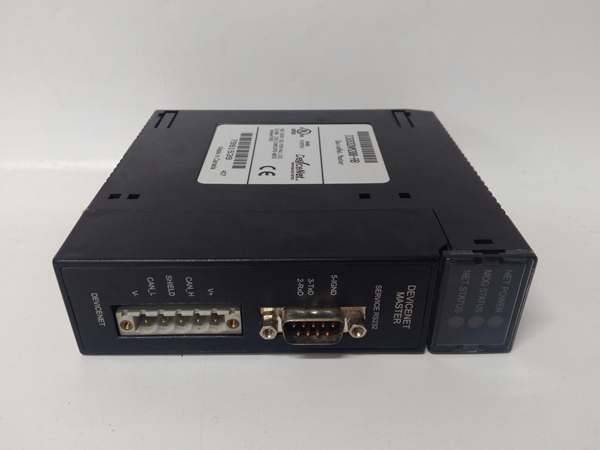
GE IC693DNM200
The Real-World Problem It Solves
The -BD revision specifically targets environments with heavy EMI/RFI interference where earlier revisions (AA through AD) experienced intermittent communication dropouts. It reduces ghost node dropouts in VFD-heavy installations where ESD from operators touching field devices causes scanner faults.
Where you’ll typically find it:
- Wastewater treatment plants with VFD-driven pumps and long DeviceNet runs
- Automotive assembly lines with robotic welders and high-frequency noise sources
- Packaging facilities with frequent operator interaction (ESD-prone environments)
Bottom line: The -BD is the go-to replacement for older IC693DNM200 revisions in electrically noisy plants, providing rock-solid DeviceNet communication without full system replacement.
Hardware Architecture & Under-the-Hood Logic
The IC693DNM200-BD plugs into the 90-30 backplane as a scanner, exchanging data with the CPU through shared memory mapping while managing DeviceNet messaging on the network side. Its architecture remains identical to earlier revisions, but the CAN transceiver and input protection circuitry are redesigned for noise immunity.
- Initialization: The module reads its configuration from CPU memory and establishes DeviceNet network identity using an improved bootloader.
- Network scanning: The module polls configured slave nodes based on COS/polling intervals, with enhanced filtering on the CAN bus inputs.
- Data mapping: Input/output data exchange follows the same mapping logic as prior revisions—no programming changes required when upgrading from older revisions.
- Diagnostics monitoring: Enhanced diagnostics capture more granular fault codes, particularly for ESD events and signal integrity issues.
- Watchdog action: Improved watchdog granularity allows faster detection of offline nodes (down to 10ms) and reduces false-positive faulting.
Field Service Pitfalls: What Rookies Get Wrong
Assuming All Revisions Are Identical
Techs replace a failed IC693DNM200-AA with a -BD without downloading the updated EDS file, then wonder why the configuration tool shows revision mismatch warnings. The hardware works, but diagnostics and firmware features may not align.
Field Rule:When upgrading to -BD from any earlier revision, always update the EDS file in the DeviceNet configuration project. The EDS contains critical revision-specific parameters (watchdog behavior, diagnostics granularity). Back up the old .EDS file first for rollback.
Ignoring the Enhanced ESD Protection Zone
Rookies treat -BD like older revisions and continue installing it in standard cabinets without additional grounding measures. The -BD has better ESD tolerance, but in extreme environments (conveyor lines with static-generating materials), ground faults still occur.
Field Rule:Even with -BD’s enhanced ESD rating (±8kV contact), maintain proper grounding discipline: bond the cabinet door to the frame, use grounded floor mats in ESD-prone areas, and ensure DeviceNet cable shields are grounded at exactly one point (the cabinet side).
Misconfiguring Watchdog Timers After Upgrade
The -BD supports faster watchdog settings (down to 10ms) that earlier revisions did not. Techs copy configuration from an older module without adjusting watchdog values, causing nuisance faulting on slow-responding legacy devices.
Field Rule:After installing -BD, review and re-validate watchdog timers for each slave node. Legacy drives may require 200-500ms watchdog; newer devices can handle 10-50ms. Set watchdog based on the slowest device on the network, not the module’s maximum capability.
Network Power Budgeting—Still a Trap
Despite revision changes, the -BD still draws 350mA at 5V and has the same network power limits. Techs assume “newer means lower power” and overload the 24V network supply with additional nodes, causing brownouts.
Field Rule:Calculate total DeviceNet node current consumption regardless of revision. The -BD does not reduce power requirements. For networks exceeding 3A total node current, use an external DeviceNet power supply with a mid-trunk power tap—this is unchanged from earlier revisions.
Commercial Availability & Pricing Note
Please note: The listed price is for reference only and is not binding. Final pricing and terms are subject to negotiation based on current market conditions and availability.



