
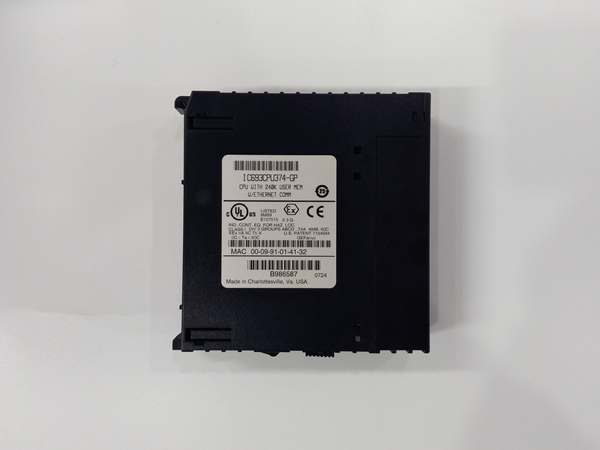
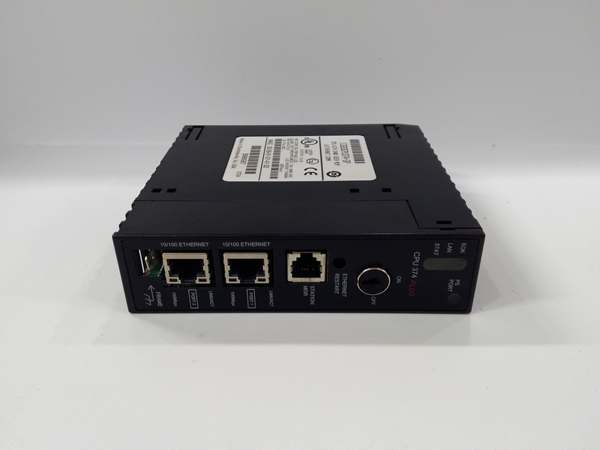
Description
Hard-Numbers: Technical Specifications
- Processor: Three (3) x Intel 80486DX4 @ 96 MHz per processor
- Firmware Revision: DJ (matched across all three processors in TMR set)
- Architecture: Triple Modular Redundancy (TMR) – 3-vote 2-out-of-3
- User Program Memory: 240 KB per processor (720 KB total)
- Register Memory: 240 KB per processor (720 KB total)
- Floating Point: Supported (32-bit hardware per processor)
- Discrete I/O: 2048 points max combined (%I + %Q)
- Analog Input: 128 words (%AI) per processor (up to 8K with option modules)
- Analog Output: 64 words (%AQ) per processor (up to 8K with option modules)
- Ethernet Ports: 2 x RJ-45 10/100 Mbps auto-sensing (redundant pair)
- Ethernet Protocols: SRTP, Modbus TCP, EGD
- Ethernet Redundancy: Automatic failover between primary and secondary ports (< 100ms)
- Serial Ports: 2 x SNP/X (master/slave)
- Baud Rate: Up to 115.2 Kbaud
- Internal Coils (%M): 1024 bits per processor
- Timers/Counters: 340 combined per processor
- Scan Rate: 0.22 ms per 1K Boolean logic per processor (typical)
- Voting Cycle: 50-100 microseconds (processor synchronization and compare)
- Network Failover Time: < 100 ms (port-to-port switchover)
- Power Draw: 3.5 A @ +5 VDC (all three processors + dual Ethernet active)
- Operating Temperature: 0°C to 60°C (32°F to 140°F)
- SIL Rating: SIL 3 capable (per IEC 61508)

GE IC693CPU374
The Real-World Problem It Solves
Your safety-critical TMR system with dual redundant Ethernet is running DJ firmware across all three CPU374 processors, and you need an exact-revision replacement to maintain system integrity. The DJ revision provides specific dual-network failover behavior, timing parameters, and synchronization protocol for the 240K configuration with dual Ethernet. Installing a different firmware revision—DK, DL, or even a different DJ build—will break TMR synchronization and fault the rack. You need the exact DJ revision to keep your redundant network safety system running without requiring a full three-processor firmware upgrade.
Where you’ll typically find it:
- Legacy Offshore ESD Systems: Existing offshore platform safety systems with dual redundant network requirements originally configured with DJ firmware, often operating for years without firmware changes due to re-validation requirements
- Spares Management for Critical Infrastructure: Facilities with dual-network TMR safety systems maintaining DJ-revision spares to ensure compatibility with installed base
- Firmware-Stable Nuclear Applications: Nuclear facilities where safety system firmware changes require complete re-validation, so dual-redundant network systems remain locked on DJ revision through the asset lifecycle
Bottom line: The DJ suffix identifies your firmware version—and in TMR systems with dual redundant Ethernet, matching DJ revisions across all three processors is mandatory for proper network failover and voting operation.
Hardware Architecture & Under-the-Hood Logic
The IC693CPU374-DJ operates identically to the base IC693CPU374 in terms of hardware—three 80486DX4 processors at 96 MHz with 240KB program and register memory each, dual independent 10/100 Mbps Ethernet controllers, and TMR voting circuit. The “-DJ” designation refers only to the firmware revision loaded onto each processor, which defines dual-network coordination, failover timing, synchronization protocol, and diagnostic behavior for the 240K memory configuration with dual Ethernet. All three processors must execute identical DJ firmware to ensure proper TMR voting and network failover operation.
-
DJ Firmware Dual-Network Initialization: Each of the three processors loads DJ revision firmware during power-up. DJ firmware includes specific initialization routines for dual Ethernet controllers, establishing independent link on both Port A and Port B. The firmware configures the failover circuit with DJ-specific timing parameters and failover thresholds.
-
Dual-Network Synchronization in DJ Revision: DJ firmware implements the synchronization algorithm that coordinates dual Ethernet operations across all three processors. The firmware ensures all three processors agree on which port is active (Port A or Port B) and maintain consistent failover behavior. Mismatched firmware would cause processors to disagree on network state, causing voting faults.
-
Network Failover Logic in DJ Firmware: DJ firmware defines the specific failover criteria and timing for switching between Port A and Port B. The firmware specifies link detection methods, heartbeat intervals, and failover timeout values. All three processors must use identical failover logic to maintain TMR synchronization during network switchover.
-
Voting Circuit Coordination with Dual Ethernet: DJ firmware defines how the TMR voting circuit interfaces with dual Ethernet controllers. The firmware specifies which processor outputs are routed to which Ethernet port under normal and failover conditions. The voting circuit ensures only one coherent data stream reaches the active port, regardless of which port is currently active.
-
MAC Address Management in DJ Revision: DJ firmware manages MAC address handling for dual Ethernet ports. Both ports have unique MAC addresses, but the firmware ensures the active port presents the correct MAC to the network during failover. All three processors must use identical MAC address management to avoid network conflicts during switchover.
-
Dual-Network Diagnostics in DJ Firmware: DJ firmware includes diagnostic routines specific to dual Ethernet operation. The firmware monitors link status on both ports, tracks failover events, and logs network errors. All three processors run identical diagnostics, and results are compared by the voting circuit. DJ firmware includes specific fault codes for network-related issues.
-
IP Address Failover in DJ Revision: DJ firmware implements the IP address failover mechanism—when Port A fails, Port B assumes the same IP address. The firmware ensures all three processors agree on which port holds the IP address at any given time. Mismatched firmware would cause IP conflicts during failover.
-
Safe-State Network Behavior in DJ Firmware: DJ firmware defines network behavior when the CPU enters safe state due to dual-processor failure. The firmware specifies whether Ethernet ports maintain link, transmit safe-state notifications, or shut down completely. Identical firmware ensures consistent network behavior across all three processors during safe-state transitions.
-
Protocol Handler Coordination with Dual Networks: DJ firmware coordinates SRTP, Modbus TCP, and EGD protocol handlers with dual Ethernet ports. The firmware ensures protocol stacks remain synchronized across all three processors and handle failover seamlessly. Mismatched protocol handler versions would cause communication failures during switchover.
-
Power Management with Dual Ethernet in DJ Revision: DJ firmware manages power states for dual Ethernet controllers. Both controllers remain powered and maintain link, but only the active port handles data transmission. The firmware optimizes power usage while maintaining redundant standby capability. Identical firmware ensures consistent power behavior across all three processors.
GE IC693CPU374
Field Service Pitfalls: What Rookies Get Wrong
Mixing DJ with other revisions in TMR set
You replace a failed DJ processor with a newer DK revision because DJ spares are unavailable. The TMR system faults immediately because DK firmware has different failover timing and network coordination for dual Ethernet. The three processors cannot synchronize on network state.
Field Rule: Never mix firmware revisions in a TMR system with dual Ethernet. All three IC693CPU374 modules must have identical revision codes (all -DJ, all -DK, etc.). DJ firmware has specific failover timing and network coordination logic that differs from other revisions. Verify revision labels before installation. Use programming software to confirm firmware matches across all three processors. Maintain spares inventory with exact matching revisions.
Assuming CPU374 DJ and CPU372 DJ are interchangeable
You try to use a CPU372-DJ spare because you’re out of CPU374-DJ modules. Both have DJ firmware, so you think they’re compatible. The TMR system faults because CPU374 has dual Ethernet controllers and CPU372 has single Ethernet—they cannot synchronize network operations.
Field Rule: DJ firmware is specific to the CPU model. CPU372-DJ and CPU374-DJ are not interchangeable—they have different Ethernet hardware configurations and different firmware implementations. The DJ revision refers to firmware version within a specific model, not across models. CPU374-DJ includes dual-network failover logic that CPU372-DJ lacks. Maintain separate spares for CPU372 and CPU374, each with their own DJ revision inventory.
Neglecting to verify DJ build number for dual network
You install a CPU374-DJ spare from inventory. The revision label says DJ, so you assume it’s correct. The TMR system faults because your installed base is running DJ build 5.3, but the spare is DJ build 5.1—an older build with different failover timing parameters.
Field Rule: Firmware revisions have sub-build numbers (e.g., DJ 5.1, DJ 5.2, DJ 5.3). All three processors must match on both revision letter AND build number. Use programming software to read the exact firmware version including build number. Document the build number in your maintenance log. For dual Ethernet systems, build-specific timing parameters are critical—mismatched builds cause failover issues. Verify full version before installation.
Forgetting DJ-specific failover configuration
You configure network settings using generic CPU374 documentation. DJ revision has specific failover parameters (heartbeat intervals, failover timeouts) that differ from default settings. Network failover behaves unpredictably because DJ-specific parameters weren’t configured.
Field Rule: Consult DJ-specific documentation for network failover configuration. Different DJ builds may have different default failover thresholds and timing parameters. Configure DJ-specific failover settings in programming software, not just generic network settings. Test failover with DJ parameters active. Don’t assume all DJ builds have identical failover behavior—check the specific build documentation for configuration details.
Overlooking DJ-specific network diagnostics
You’re troubleshooting network failover issues and consult generic CPU374 documentation. DJ revision has specific diagnostic codes and alarm behaviors for dual-network operation that differ from earlier or later revisions. You misinterpret the fault code and replace a working CPU.
Field Rule: Consult DJ-specific documentation and diagnostic guides. DJ firmware includes additional network fault codes and detailed failover event logging. Different firmware revisions have different fault code definitions for network-related issues. Use documentation specific to your exact DJ build when troubleshooting dual-network issues. DJ-specific diagnostics provide detailed failover history that helps identify chronic network problems.
Skipping dual-network failover testing with DJ firmware
You install a CPU374-DJ replacement, verify communication works on Port A, and move on. A switch fails two months later and Port B doesn’t take over because DJ-specific failover logic wasn’t tested. You discover the DJ build has different default behavior than expected.
Field Rule: Test network failover for both directions (A to B and B to A) after installing any DJ-revision module. Verify failover occurs within DJ-specified timing (< 100ms). Check that IP address transfers correctly between ports. Document failover performance. DJ firmware may have build-specific failover characteristics—verify they meet your requirements. Untested DJ failover is no better than no redundancy.
Neglecting DJ spares management for dual-network systems
You maintain spares for your CPU374-DJ systems but don’t track which DJ build is in which spare location. A CPU374-DJ fails and you grab a spare labeled “DJ” from inventory. The TMR system faults because the spare is an older DJ build that doesn’t match your current base.
Field Rule: Track DJ firmware build numbers in your spares inventory, not just revision letters. Maintain spares at the exact same DJ build as your installed base. When upgrading DJ firmware, update your spares simultaneously. Document build numbers in your CMMS or spares tracking system. Don’t discover DJ build mismatches during an emergency—find and fix them during planned maintenance. For dual-network systems, build-specific timing is too critical to leave to chance.
Assuming DJ network parameters match earlier revisions
You upgrade from an earlier CPU374 revision to DJ and use the same network configuration. Network failover behaves differently because DJ firmware has different default heartbeat intervals and failover thresholds. Your safety system experiences unexpected network behavior.
Field Rule: When upgrading to DJ firmware, review and reconfigure network parameters. DJ firmware may have different default values for failover timing, heartbeat intervals, and link detection. Verify DJ-specific network settings in programming software. Test failover with DJ parameters active. Don’t assume configuration from earlier revisions translates directly to DJ behavior. DJ may offer improved failover characteristics, but you need to configure them correctly.
Commercial Availability & Pricing Note
Please note: The listed price is for reference only and is not binding. Final pricing and terms are subject to negotiation based on current market conditions and availability.



