
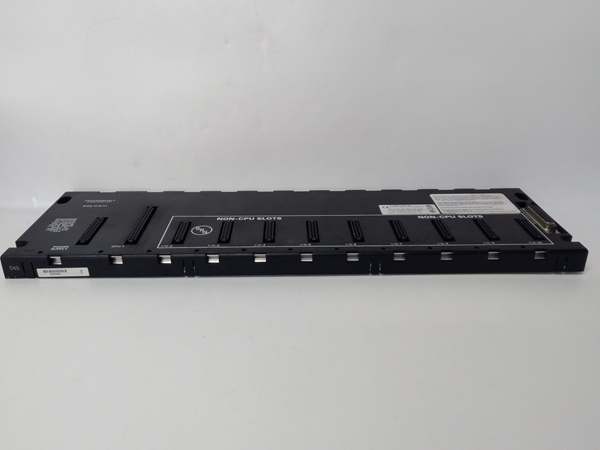
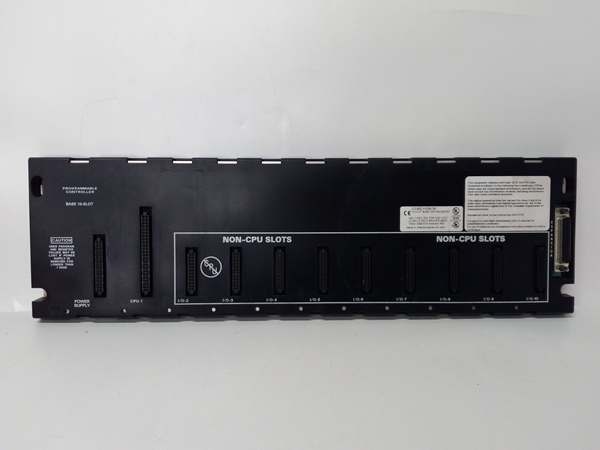
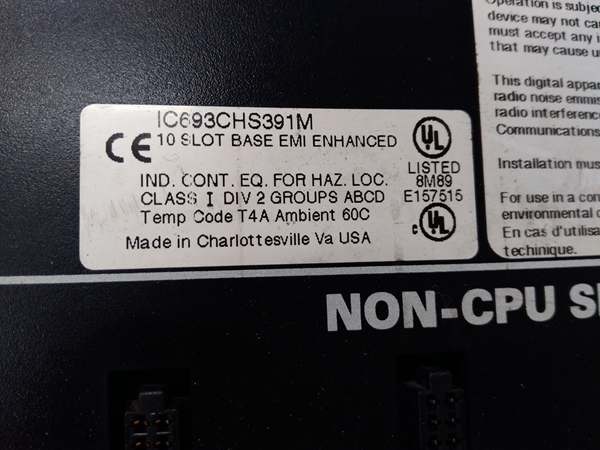
Description
Hard-Numbers: Technical Specifications
- Slot Count: 10 slots (universal—CPU can be installed in any slot)
- Baseplate Type: CPU Baseplate (main controller rack)
- Voltage Rating: 115/230 VAC (50/60 Hz) power input
- Current Capacity: Supports IC693PWRxxx series power supplies (up to 10 amps with IC690PWR124)
- Isolation: 1500 VAC isolation between logic and field circuits
- Backplane Power Bus: 5 VDC logic power, 24 VDC field power distribution
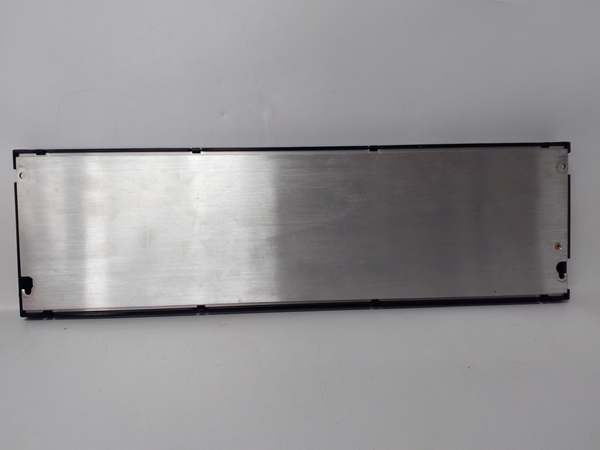
- Mounting: DIN rail or panel mount (grounded metal construction)
- Dimensions: Approx. 420 mm × 132 mm × 98 mm
- Weight: Approximately 3.0 kg (6.6 lbs)
- Operating Temperature: 0°C to 60°C (32°F to 140°F)
- Humidity: 5% to 95% non-condensing
- Connector Type: Edge connector for all Series 90-30 module types
- Power Supply Compatibility: IC693PWRxxx series power supplies (115/230 VAC input models)
- CPU Compatibility: All Series 90-30 CPUs (IC693CPU3xx series)
- Expansion Capability: Supports up to 7 remote baseplates (CPUs 350-364) or 4 baseplates (CPUs 331-341) via IC693CBL300 series cables
- Maximum Expansion Distance: 213 meters (700 feet) to last remote baseplate
- Grounding: Integral grounding studs for proper chassis grounding
- Slot Universality: No dedicated CPU slot—any of the 10 slots can host CPU
- Product Lifecycle Status: Active

GE IC693CHS391
The Real-World Problem It Solves
Medium to large applications need serious I/O density at the main control point—5 slots just doesn’t cut it when you’re mixing CPUs, multiple analog cards, high-density digital I/O, and communications modules all in one rack. The IC693CHS397 gives you a full 10-slot backplane that supports any Series 90-30 CPU and provides I/O bus expansion capability for distributed I/O architectures up to 700 feet away—no additional main rack hardware needed.
Where you’ll typically find it:
- Central control rooms: Main control cabinets where the CPU resides with a full complement of local I/O modules and communicates to multiple remote I/O racks throughout a facility
- High-density control centers: Process skids, machine control centers, or equipment packages where you need 8-10 modules worth of I/O, communications, and specialty cards in one location
- Expansion hub systems: Main PLC rack acting as communications and control hub for multiple remote I/O baseplates distributed across a plant
Bottom line: The IC693CHS397 is your high-density main controller rack—10 slots of universal backplane that supports any Series 90-30 CPU and provides expansion capability for distributed I/O architectures up to 700 feet away.
Hardware Architecture & Under-the-Hood Logic
The IC693CHS397 is the big brother of the 5-slot IC693CHS393—it’s essentially the same architecture with double the slot capacity. Like its smaller sibling, this rack includes circuitry to support and communicate directly with the CPU module. The backplane provides 5 VDC logic power to the CPU and all modules, distributes 24 VDC field power to I/O cards, and hosts the I/O bus transmitter that sends data to remote expansion racks.
-
Universal Slot ArchitectureAll ten slots are identical—no dedicated CPU slot, no special I/O slots. You can mount the CPU in slot 1, 5, or 10—backplane doesn’t care. This flexibility matters in tight cabinets where cable routing or airflow might force a specific CPU position. The backplane detects what’s plugged in and configures itself accordingly.
-
CPU Support CircuitryUnlike remote I/O baseplates, IC693CHS397 includes CPU-specific support logic:
- CPU power regulation and monitoring
- Address and data bus routing to and from the CPU
- I/O bus transmitter circuitry for sending data to remote baseplates
- Watchdog and health monitoring for the main CPUThe backplane knows the difference between a CPU module and an I/O module—it routes signals accordingly.
-
Power Supply InterfaceThe baseplate accepts standard Series 90-30 power supplies (IC693PWR321, PWR322, PWR330, etc.). Power supply connects to the backplane, which then distributes:
- 5 VDC logic power to CPU and all modules
- 24 VDC field power to I/O modules for field device driving
- Regulated power for backplane electronicsThe power supply is the heart—without it, nothing on this baseplate runs.
-
I/O Bus Transmitter SystemThe IC693CHS397 includes integral I/O bus transmitter circuitry. This is what enables expansion:
- Communicates with remote baseplates over shielded twisted-pair cable (IC693CBL300 series)
- Supports up to 7 remote baseplates with CPUs 350-364, 4 baseplates with CPUs 331-341
- Maximum distance to last remote baseplate: 213 meters (700 feet)
- Uses differential signaling for noise immunityWithout this transmitter, you’ve got a standalone system with no expansion capability.
-
Isolation and Grounding SystemThe metal chassis grounds your main rack to plant earth ground. The backplane provides 1500 VAC isolation between logic circuits (CPU, module electronics) and field circuits (I/O points). Integral grounding studs provide connection points for safety ground. As the main rack, this grounding reference is critical—remote baseplates and field devices reference this ground point.
-
Backplane Data Bus ArchitectureThe CPU communicates with all modules via the backplane data bus:
- Address bus for module selection and addressing
- Data bus for I/O image exchange
- Control signals for module configuration and health monitoring
- The backplane handles arbitration, routing, and timing—CPU just sees a set of slots to manage.
-
Physical Construction and Thermal ManagementMetal chassis absorbs vibration, dissipates heat, and provides EMI shielding. The baseplate mounts to DIN rail or directly to panel. Ground studs connect to your plant ground system. The assembly is designed to survive 60°C ambient temperature and industrial shock and vibration per IEC standards. The 10-slot footprint is substantial—ensure your cabinet depth and mounting structure can handle the weight and thermal load.
GE IC693CHS391
Field Service Pitfalls: What Rookies Get Wrong
Installing incompatible CPUs
You try to plug a VersaMax or RX3i CPU into this Series 90-30 baseplate because “it’s GE, right?” The pinout matches, but the backplane doesn’t recognize the CPU, it won’t power up properly, or worse—you damage the CPU or backplane.
- Field Rule: IC693CHS397 is Series 90-30 only. No VersaMax CPUs, no RX3i CPUs, no mixed systems. Verify CPU series before installation. If you need multi-PLC communication, use networking modules (Genius Bus, Ethernet) and keep each system on its native baseplate.
Overloading expansion beyond CPU limits
You chain 8 remote baseplates to a CPU 350-364. The 8th rack is ignored, you’re missing half its I/O points, and you’re troubleshooting why your system is incomplete.
- Field Rule: Respect CPU expansion limits. CPUs 350-364 support maximum 7 remote baseplates. CPUs 331-341 support maximum 4 remote baseplates. Document rack count and CPU model in as-built drawings. If you need more racks, consider additional CPUs or network-based I/O architectures.
Improper chassis grounding
You mount the main CPU baseplate to a painted surface or plastic backplate without scraping to bare metal. The main ground reference floats, noise immunity drops to zero, and your entire system suffers—ghost inputs, erratic outputs, CPU faults for no apparent reason.
- Field Rule: The metal chassis must connect to plant ground. Scrape paint to bare metal at mounting points, use star washers, and connect to your ground bus. This is your primary ground reference—remote racks and field devices depend on it. Don’t cheat the ground on the main rack.
Exceeding 700-foot expansion limit
You chain remote baseplates beyond 700 feet from the CPU. Signal degradation causes intermittent I/O faults, communication timeouts, or complete I/O bus failure that mimics CPU problems.
- Field Rule: Never exceed 213 meters (700 feet) total distance from CPU to last remote baseplate. Measure and document cable runs during installation. If you need I/O beyond this limit, use fiber optic repeaters, multiple PLC systems, or network-based distributed I/O architectures.
Forgetting I/O bus termination
You chain multiple remote baseplates but forget to terminate at the last rack. Signal reflections cause data errors, ghost inputs, erratic outputs, and faults that come and go with temperature or cable movement.
- Field Rule: Always terminate the I/O bus at the last remote baseplate. Use IC693ACC307 Terminator Plug or IC693CBL302/314 (15m cable with built-in termination). Never leave the bus unterminated—reflections cause faults that are hell to troubleshoot.
Hot-swapping the CPU
You pull or insert the CPU module while the baseplate has power. You induce backplane transients, brown out adjacent modules, or worst case—damage the CPU or backplane traces.
- Field Rule: Kill all power before touching the CPU. Remove the power supply or switch off the mains. Verify zero voltage on the backplane with a multimeter. Never hot-swap Series 90-30 CPUs—these aren’t designed for it, and you’ll eventually pay for a smoked processor.
Incorrect power supply sizing
You power a CPU-heavy 10-slot baseplate with a small IC693PWR330 supply when you need IC690PWR124. The supply sags, the CPU browns out or resets intermittently, and you’re chasing what looks like CPU faults when it’s actually power starvation.
- Field Rule: Calculate total load including CPU, all modules, and any external devices powered from the backplane. Size your power supply for the combined load plus 20% margin. For 10-slot high-density or power-hungry systems, use IC690PWR124 (10 amp). Don’t guess on power—calculate it.
Poor slot organization for airflow
You pack all 10 slots with high-power output modules without considering heat dissipation. The rack overheats, modules derate or fault, and you’re chasing thermal issues that damage components prematurely.
- Field Rule: Plan your slot layout considering thermal load. Spread high-power modules across the rack. Provide adequate cabinet ventilation or forced cooling. The metal chassis dissipates heat, but it can only handle so much. Don’t pack all your heat sources in one cluster.
Mixing 115VAC and 230VAC without configuration
You install a 230VAC power supply but leave jumpers or configuration for 115VAC. The power supply doesn’t start, or worse—you apply wrong voltage to the backplane and smoke components.
- Field Rule: Verify power supply voltage matches your facility voltage. Some supplies are auto-ranging (115/230VAC), some require jumpers or configuration. Check the supply’s voltage selector and your mains. Never assume—it’s your responsibility to match supply to mains.
Improper cable routing for CPU placement
You install the CPU in a slot that makes cable routing to I/O modules or field devices impossible. The system works, but you’re fighting cable runs, creating service nightmares, and preventing proper maintenance access.
- Field Rule: Plan your slot layout before mounting. Consider cable routing to field devices, airflow around high-power modules, and access for maintenance. The universal slots give you flexibility—use it to your advantage, not disadvantage.
Ignoring ambient temperature limits
You install this baseplate in an enclosure that hits 65°C ambient. The backplane runs hot, the CPU derates or faults, and you get premature failure of sensitive electronics.
- Field Rule: IC693CHS397 is rated to 60°C ambient. If your enclosure runs hotter, add ventilation, move the rack, or use forced cooling. The CPU is your most expensive component—don’t cook it with poor environmental control.
Commercial Availability & Pricing Note
Please note: The listed price is for reference only and is not binding. Final pricing and terms are subject to negotiation based on current market conditions and availability.



