
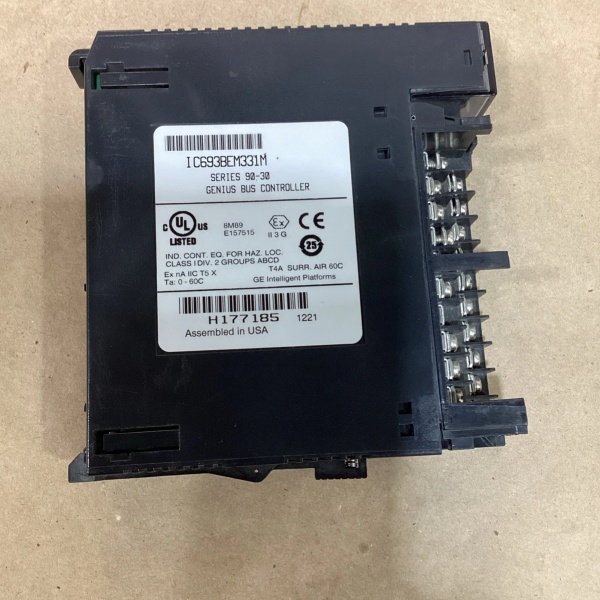
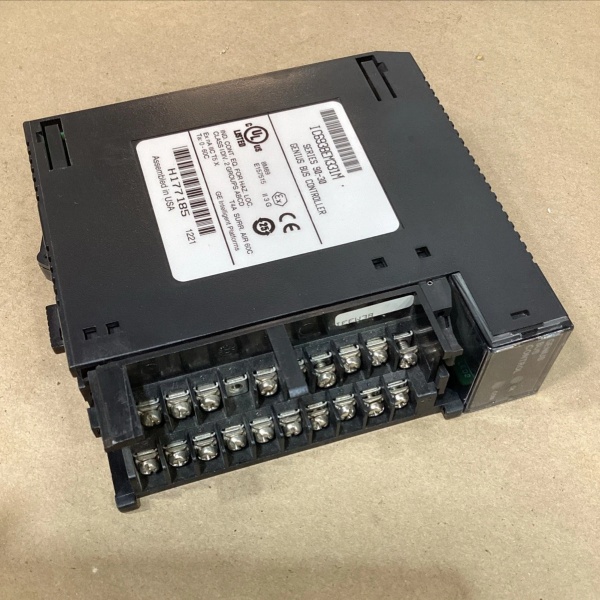
Description
Hard-Numbers: Technical Specifications
- Interface Type: Genius Bus Controller (GBC) for Series 90-30
- Network Type: Genius I/O Serial Bus – token-passing, single twisted pair
- Global Memory: 128 bytes total (64 input + 64 output)
- Maximum Devices: 31 devices on Genius bus
- Hand-Held Monitor Ports: Compatible with Genius HHM (connected via bus)
- Communication Speed: Variable baud rates (up to 153.6 kbaud)
- Update Rates: Programmable (default 10–20 ms)
- Diagnostic LEDs: OK, COMM OK
- Power Consumption: <300 mA @ 5 VDC from backplane
- Isolation: 1500 VAC continuous between field and backplane
- Operating Temperature: 0°C to +60°C (32°F to +140°F)
- Storage Temperature: –40°C to +85°C (–40°F to +185°F)
- Humidity: 5–90% non-condensing
- IP Rating: IP20
- Lifecycle Status: Discontinued/Obsolete

GE IC693BEM331M
The Real-World Problem It Solves
Standard Series 90-30 PLC systems require a dedicated interface to communicate with Genius I/O blocks and remote drops over the Genius serial bus. The IC693BEM331M provides this critical bridge, enabling up to 31 distributed Genius devices to exchange up to 128 bytes of data with the PLC without requiring direct wired connections to each device.
Where you’ll typically find it:
- Manufacturing automation: Production lines with multiple Genius I/O blocks distributed across the factory floor
- Process control: Water/wastewater treatment plants with remote Genius I/O stations
- Material handling: Conveyor systems with distributed sensor and actuator blocks
- Legacy system integration: Connecting Series 90-70 remote drops to Series 90-30 PLCs
Bottom line: The IC693BEM331M enables distributed I/O architecture on Genius networks, reducing wiring complexity and enabling flexible device placement in industrial automation applications.
Hardware Architecture & Under-the-Hood Logic
The IC693BEM331M is functionally identical to earlier IC693BEM331 revisions but incorporates Revision M firmware. The module acts as a communication bridge between the Series 90-30 PLC backplane and the Genius I/O serial bus, managing data exchange with up to 31 distributed devices.
-
Processor & Memory Architecture
- Dedicated microprocessor manages Genius protocol and token passing
- 128 bytes global data memory (64 input + 64 output bytes)
- Global memory mapping allows PLC CPU to read/write remote I/O data transparently
- Revision M firmware includes bug fixes and improvements over earlier revisions
-
Genius Network Interface
- RS-485 transceiver provides physical layer connectivity over twisted pair
- Support for single-wire bus topology up to 7500 feet
- Variable baud rate support (38.4 kbaud to 153.6 kbaud)
- Electrical isolation (1500 VAC) between network and backplane
-
Device Management
- Supports up to 31 Genius devices on the bus
- Compatible with Genius blocks, Series 90-70 remote drops, and field control I/O stations
- Device Present status bits verify proper configuration and communication
- No fault table logging (unlike 90-70 GBC) – relies on status bits
-
Global Data Exchange Mechanism
- PLC writes output data to global memory, GBC transmits to remote devices
- Remote devices write input data to global memory, GBC transmits to PLC
- Data exchange occurs transparently to PLC program
- Configurable data lengths per device
-
Hand-Held Monitor (HHM) Interface
- Compatible with Genius HHM via bus connection
- Allows on-site diagnostics and configuration
- Password protection for configuration security
- HHM revision 4.5 or later required
-
Diagnostic & Error Handling
- LED indicators provide instant visual status (OK, COMM OK)
- Device Present bits indicate configuration status per device
- Comprehensive fault detection for network errors and communication timeouts
- Configuration stored in non-volatile memory
GE IC693BEM331M
Field Service Pitfalls: What Rookies Get Wrong
Ignoring Revision M firmware differences
Rookies treat IC693BEM331M as identical to earlier revisions (A, B, C, etc.). Revision M includes firmware improvements that may affect compatibility with older Genius blocks or remote drops, causing communication failures.
- Field Rule: Verify firmware version before installation. Revision M may require Genius blocks with compatible firmware versions. If upgrading from an earlier revision, test all Genius devices after installation to ensure compatibility.
Not verifying Device Present bits
Rookies rely only on LED indicators. The COMM OK LED may be on, but individual Genius devices aren’t communicating properly. They waste hours troubleshooting without checking Device Present bits.
- Field Rule: Always verify Device Present status bits for each Genius device address (0-31). A Device Present bit of 0 indicates configuration mismatch or communication failure. Use HHM to check individual device status before troubleshooting network issues.
Exceeding 31-device limit
Rookies add a 32nd Genius block to the network. The GBC can’t address it, and the new block doesn’t communicate, causing mysterious I/O failures.
- Field Rule: Never exceed 31 total Genius devices per GBC. If you need more devices, install additional GBC modules (up to 8 per PLC system with firmware 5.0 or later). Document device addresses and total count in as-built drawings.
Using unshielded cable for long runs
Rookies install 3000-foot bus segments with unshielded twisted pair. Electrical noise causes communication errors and corrupted data, especially at high baud rates.
- Field Rule: Always use shielded twisted-pair cable for Genius bus, regardless of length. Ground the shield at the GBC end only—never at both ends. For runs over 1000 feet, verify cable impedance matches requirements for the configured baud rate.
Mismatching data lengths in configuration
Rookies configure Genius blocks for 16 bytes but program the GBC for 8 bytes. The Device Present bit never turns on, and communication fails.
- Field Rule: Data lengths must match exactly between the GBC configuration and each Genius device. Verify both input and output data lengths are correct. For combo blocks, ensure both %I and %Q references are configured with matching byte counts.
Assuming compatibility with Phase A Genius blocks
Rookies attempt to connect old Phase A Genius blocks. Revision M GBC is incompatible with Phase A blocks, causing communication failures and potential network disruption.
- Field Rule: Never mix Phase A Genius blocks with IC693BEM331M or any later GBC revisions. Phase A blocks require older GBC modules. Document Genius block revisions in your system inventory to prevent incompatibility issues.
Forgetting CPU firmware requirements
Rookies install IC693BEM331M in a system with pre-5.0 CPU firmware. The GBC doesn’t initialize properly, and the PLC can’t communicate with Genius devices.
- Field Rule: IC693BEM331M requires Series 90-30 CPU firmware 5.0 or later. Before installing, verify CPU firmware version. If using Series 6 PLCs, ensure Series 6 Bus Controller is IC660CBB902F/903F (firmware 1.5 or later).
Mixing GBC and GCM modules in same system
Rookies install both GBC and GCM+ modules in the same PLC rack. These modules are incompatible when installed together, causing configuration errors and system instability.
- Field Rule: Never install IC693BEM331M GBC in the same system as GCM or GCM+ modules. Use one type of Genius communications module per PLC system. GBC is for Genius I/O blocks; GCM/GCM+ is for different communication protocols. Choose the appropriate module for your application.
Commercial Availability & Pricing Note
Please note: The listed price is for reference only and is not binding. Final pricing and terms are subject to negotiation based on current market conditions and availability.



