
Description
Hard-Numbers: Technical Specifications
- Battery Chemistry: Lithium (primary, non-rechargeable)
- Output Voltage: 3 VDC
- Capacity: 1200–1500 mAh (1200 mAh per source, 1500 mAh per alternate source)
- Mounting Location: Inside power supply cover on plastic clip; accessed via bottom cover of power supply module
- Connector Type: Wire leads with Berg female connector (2-wire)
- Operating Temperature: 0°C to +25°C (+32°F to +77°F)
- Storage Temperature: -40°C to +85°C (-40°F to +185°F)
- Relative Humidity: Non-condensing conditions required
- Shelf Life: 10 years
- Operating Life: 1–2 years (CPU-dependent)
- Weight: 0.08–0.19 lbs (0.04–0.09 kg)
- Dimensions: Diameter 0.68 inches (17.2 mm) × Height 1.32 inches (33.5 mm)
- Quantity per Pack: 2 batteries (typically included; only one installed per CPU)
- Status Indication: BATT LED on power supply module; Fault Table entry; system reference bits for HMI alarm
- Compatible CPU Models: All Series 90-30 CPUs (311, 313, 323, 331–364, 374)
The Real-World Problem It Solves
This battery is the final line of defense against catastrophic program loss. When AC power fails or the PLC is powered down, the IC693ACC301 keeps the CMOS RAM alive—preserving user logic, retentive registers, and configuration data that would otherwise vanish instantly.
Where you’ll typically find it:
- Discrete manufacturing: Prevents lost recipes and production data in machining and assembly lines.
- Process control: Maintains process parameters, setpoints, and historical data during power interruptions.
- Building automation: Preserves HVAC schedules and security system configurations after outages.
- Legacy systems: Extends the service life of aging Series 90-30 installations where memory backup is critical.
Bottom line: It’s a $15 insurance policy against hours or days of downtime caused by program loss. Neglecting it is false economy.

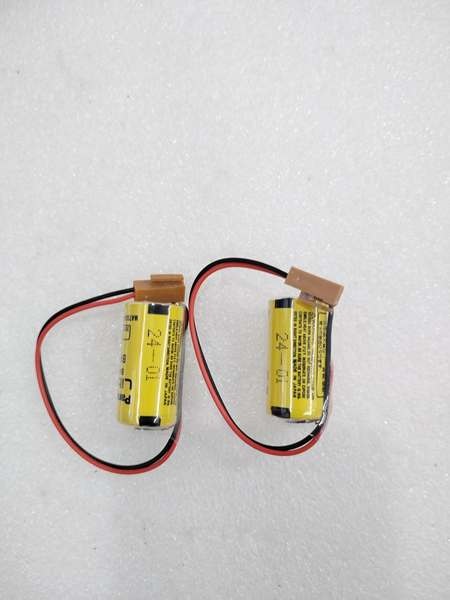
GE IC693ACC301
Hardware Architecture & Under-the-Hood Logic
The IC693ACC301 is a primary lithium cell wired directly to the CPU’s CMOS RAM. It provides standby power whenever the main 5 VDC bus is unavailable.
-
Battery Connection:
- The battery is mounted on a plastic clip inside the power supply module’s lower cover.
- Two-wire harness terminates in a Berg connector that plugs into the power supply PCB.
- The battery floats across the CMOS RAM supply rail and only supplies current when main power drops below threshold.
-
Memory Retention Circuitry:
- Series 90-30 CPUs use CMOS RAM for user programs and retentive data.
- When 5 VDC logic power is present, the battery is idle—draw negligible current.
- When 5 VDC is lost, a diode OR-ing circuit switches to battery power seamlessly.
- Estimated backup duration: weeks to months, depending on ambient temperature and memory type.
-
Low Battery Detection:
- Power supply module monitors battery voltage continuously.
- When voltage falls below threshold (approximately 2.4–2.6 VDC), the red BATT LED activates.
- PLC updates Fault Table with “battery low” message; sets system reference bits for user-programmed alarms.
- HMI can display battery status via dedicated memory coil or diagnostic bits.
-
Hot-Swap Capability:
- Battery can be replaced with PLC powered on—provided main power supply is functional.
- The 5 VDC bus powers the RAM while battery is disconnected, preventing data loss.
- This feature eliminates the need for full PLC shutdown for battery replacement (with proper safety precautions).
-
CPU-Dependent Load:
- Different CPU models draw different standby currents from the battery.
- CPU311/313/323: lower current draw—battery life up to 2 years at 25°C.
- CPU331–364: higher current draw—battery life ~1 year at 25°C.
- CPU374: highest current draw—battery life ~14 months at 25°C; consider IC693ACC302 extended-capacity battery.
Field Service Pitfalls: What Rookies Get Wrong
Replacing battery with PLC powered down
The most common rookie mistake: shutting down the PLC before swapping the battery. If main power is removed and the battery is disconnected, RAM contents are lost instantly. Rookies then reload a stale backup program from months ago, losing weeks of recipe updates or tuning adjustments.
- Field Rule: Perform hot-swap replacement only. Keep PLC powered on during battery change. Ensure the power supply’s BATT LED is not already solid red before disconnecting—if it is, RAM may already be corrupt.
Ignoring the BATT LED for months
The BATT LED on the power supply is the primary warning. Rookies ignore it until the PLC fails to retain memory after a brief power glitch, revealing that the battery died weeks or months earlier.
- Field Rule: Check BATT LED during every preventive maintenance visit. If solid red, replace battery immediately. If off or flashing, verify with Fault Table—some systems use the LED for other diagnostic states.
Assuming all CPUs have the same battery life
Battery life varies by CPU model and ambient temperature. Rookies replace batteries on a fixed 2-year schedule, causing early failure in CPU374s or wasting battery life in CPU311s.
- Field Rule: Adjust replacement intervals based on CPU model:
- CPU311/313/323: Replace every 2 years
- CPU331–364: Replace every 1 year
- CPU374: Replace every 14 months or upgrade to IC693ACC302
Operating in high ambient temperatures without derating
Lithium battery capacity drops exponentially at elevated temperatures. Rookies install batteries in enclosures exceeding 40°C and wonder why they fail in 6 months instead of 12.
- Field Rule: For every 10°C above 25°C, reduce expected battery life by 50%. In hot environments, schedule semi-annual replacement or improve enclosure cooling.
Not verifying RAM retention after replacement
After swapping batteries, rookies assume everything is fine. They don’t perform a power-cycle test to confirm RAM survived the swap, only discovering a blank PLC during the next actual power outage.
- Field Rule: After battery replacement, perform a controlled power-down test:
- With PLC powered on, verify BATT LED is off.
- Remove AC power for 10–15 seconds.
- Restore power and verify program and retentive registers are intact.
- If RAM is lost, recheck battery connection or battery voltage.
Damaging the Berg connector or wire harness
The Berg connector is fragile. Rookies yank it by the wires instead of grasping the connector body, breaking pins or damaging the insulation, leading to intermittent contact and random memory loss.
- Field Rule: Always pull connectors by their plastic housing, never by wires. Inspect connector pins for corrosion or bending before reconnecting. Replace harness if damaged—don’t try to crimp new pins in the field.
Mixing old and new batteries in the pack
The pack includes 2 batteries, but only one is installed. Rookies keep the second as a “spare” for years, then install it alongside a partially-used battery, causing uneven discharge and premature failure.
- Field Rule: Install both batteries as a matched set if the application allows dual-battery configuration (some power supplies support two for redundancy). Otherwise, store the spare properly—cool, dry place—and check its voltage with a multimeter before installation. If below 2.8 VDC, discard it.
Forgetting to clear the low battery alarm after replacement
After replacing the battery, the BATT LED may remain lit and the Fault Table may retain the “battery low” message. Rookies assume the new battery is defective, causing confusion and unnecessary warranty claims.
- Field Rule: Clear PLC fault table after battery replacement and perform a power cycle. If the BATT LED remains illuminated after a full power cycle, check battery voltage with a multimeter—should read 3.0–3.3 VDC for a fresh cell.
Commercial Availability & Pricing Note
Please note: The listed price is for reference only and is not binding. Final pricing and terms are subject to negotiation based on current market conditions and availability.



