
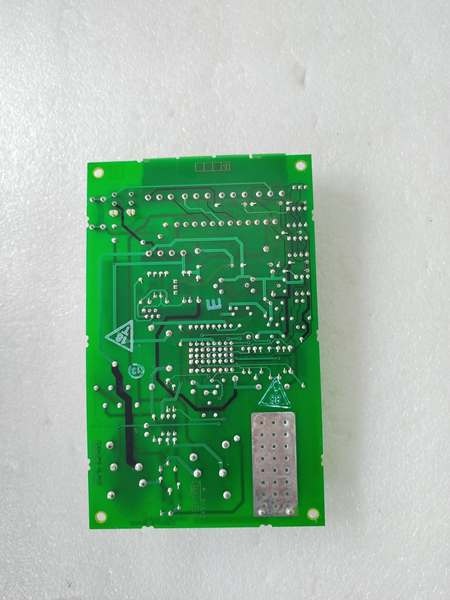
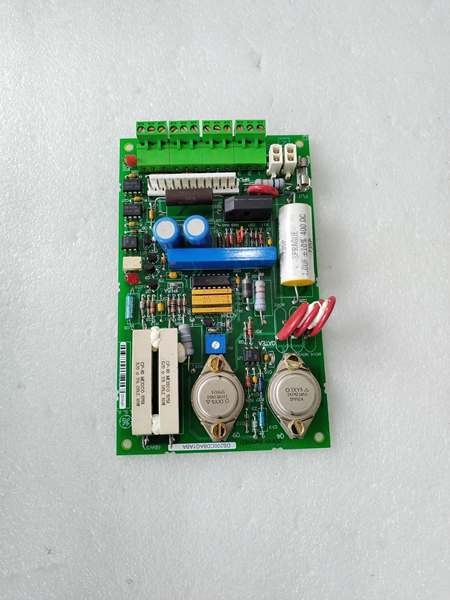
Description
Hard-Numbers: Technical Specifications
- Fault Capture Channels: 64 digital fault inputs, 16 analog trigger inputs
- Capture Depth: Up to 1024 pre-trigger events, 512 post-trigger events
- Sampling Rate: 1 kHz digital, 100 Hz analog (typical)
- Time Stamping: 1 ms resolution (internal clock)
- Backplane Interface: VME-style 96-pin DIN connector
- Non-Volatile Memory: 128 KB EEPROM for fault log storage
- Trigger Modes: Edge-triggered, level-triggered, software-triggered
- Analog Input Range: 0-10 VDC, 4-20 mA, ±10 VDC (differential)
- Digital Input Voltage: 24 VDC ±20%, dry contact (5-30 VDC wetting)
- Power Requirements: +5 VDC @ 2.5 A, +15 VDC @ 0.5 A
- Operating Temperature: 0°C to 55°C (32°F to 131°F)
- LED Indicators: Power, Fault Capture Active, Memory Full, Communication Status
- Diagnostic Capabilities: On-board diagnostics, fault history logging, trend capture
- Terminal Block: Removable screw terminal for trigger inputs

GE DS200CDBAG1A
The Real-World Problem It Solves
Turbine trips happen without clear root cause, delaying restart and reducing uptime. The DS200CDBAG1A captures high-resolution fault data, enabling rapid troubleshooting and preventing repeat trips.
Where you’ll typically find it:
- GE gas and steam turbine control systems (Mark V)
- Generator protection and monitoring systems
- Critical drive and auxiliary systems
- Retrofit diagnostic applications for legacy controls
Bottom line: Real-time fault capture for rapid turbine trip diagnosis.
Hardware Architecture & Under-the-Hood Logic
The DS200CDBAG1A uses high-speed digital capture circuitry to record system state before and after fault events. Analog trigger inputs and digital fault inputs are continuously monitored. When a fault condition occurs (edge or level trigger), the board captures the system state from the VME backplane and external inputs, storing data in non-volatile memory for later retrieval.
Signal flow:
- System continuously monitors digital fault inputs and analog triggers
- Analog inputs sampled at 100 Hz for trend and trigger detection
- Digital inputs sampled at 1 kHz for high-speed capture
- Trigger condition met (edge or level)
- Board captures pre-trigger events from circular buffer
- Post-trigger events captured and stored
- Fault data with timestamps stored in EEPROM
- Data available for retrieval via VME backplane or serial port
- LEDs indicate capture status and memory condition
GE DS200CDBAG1A
Field Service Pitfalls: What Rookies Get Wrong
Trigger level set too sensitive causes nuisance capturesTrigger threshold too low captures normal transients. I’ve seen technicians setting triggers at 5% of nominal, filling memory with nuisance data and masking real faults.
- Field Rule: Set trigger threshold at 10-15% above nominal operating level for analog triggers, or 2-3x normal operating range. Test trigger sensitivity with normal operation—should not capture during normal transients. Document trigger levels and test results. Review captured data weekly—if full of nuisance events, adjust thresholds upward.
Forgotten to clear fault log before testing causes confusionOld fault data remains in memory. I’ve seen technicians analyzing week-old fault data as current, wasting hours diagnosing already-resolved issues.
- Field Rule: Clear the fault log before any planned test or commissioning activity. Document the “before” fault log status for baseline comparison. After capturing test data, clear the log again to prevent confusion. Never mix test data with operational data. Document fault log clearing procedures and timestamps.
Incorrect trigger polarity causes missed faultsFalling-edge vs rising-edge selection matters. I’ve seen technicians configuring rising-edge triggers on normally-open contacts that open on fault, missing the actual fault event.
- Field Rule: Verify trigger polarity matches the fault signal behavior. For NO contacts that open on fault, use falling-edge trigger. For NC contacts that close on fault, use rising-edge trigger. Test trigger operation with a known fault simulation (open/close contact, apply voltage). Document trigger polarity and test results.
Analog input wiring errors cause false triggersGround loops and noise cause erratic triggers. I’ve seen nuisance captures traceable to unshielded analog inputs or ground loops between the diagnostic board and field devices.
- Field Rule: Use shielded twisted pair for analog trigger inputs. Ground the shield at the cabinet end only. For differential inputs, maintain proper polarity (+ to +, – to -). Measure ground potential between board and field device—should be less than 1 VAC. Document wiring configuration and test results. Use filtering to reduce noise sensitivity.
Memory overflow causes data lossCapture depth limited to 1024 pre-trigger events. I’ve seen high-frequency faults filling memory before capturing the actual root cause event, resulting in incomplete diagnostic data.
- Field Rule: Configure pre-trigger capture depth appropriate to your application (256-512 events typical). Monitor memory status LED—if flashing “Memory Full,” download data and clear log promptly. For high-frequency fault conditions, reduce pre-trigger depth to capture more post-trigger data. Document memory configuration and download schedule.
Hot-swapping while capturing corrupts dataRemoving the board during capture disrupts data integrity. I’ve seen technicians pulling boards to download data while capture is active, causing corrupted fault logs.
- Field Rule: Stop active fault capture before removing the board. Download fault data via VME backplane or serial port without removing the board. If board removal is necessary, ensure capture is disabled and memory is empty. Never hot-swap diagnostic boards—follow proper shutdown procedures. Data corruption results in wasted troubleshooting time and delayed restart.
Incorrect timestamp configuration causes root cause confusionClock drift causes event misalignment. I’ve seen technicians ignoring timestamp synchronization, leading to incorrect root cause conclusions when correlating events across multiple boards.
- Field Rule: Synchronize the diagnostic board clock with the master clock or GPS time source during commissioning. Verify timestamp accuracy weekly—should be within ±10 ms of master clock. Document clock sync procedure and schedule. For multi-board applications, synchronize all boards to the same time source.
Forgotten to enable desired fault inputs causes missed captureNot all inputs enabled by default. I’ve seen technicians failing to enable critical fault inputs, missing the root cause entirely during turbine trips.
- Field Rule: Enable all relevant fault inputs during commissioning. For turbine trips, enable all protection relay inputs, overspeed, vibration, and flame detector inputs. Test each enabled input with a simulated fault to verify capture. Document enabled inputs and test results. Review and update input enable list after any system modification.
Overlooking analog capture resolution causes missed transientsAnalog sampling rate too low misses fast events. I’ve seen technicians using 100 Hz sampling on 60 Hz systems, missing critical voltage sag events.
- Field Rule: Configure analog sampling rate at least 10x the highest frequency of interest. For 60 Hz systems, use 600 Hz minimum (1 kHz recommended). Verify sampling rate configuration via software tool. Test with a step input to verify captured resolution. Document sampling rate and test results.
Ignoring capture buffer status causes delayed troubleshootingBuffer full indicator provides early warning. I’ve seen technicians ignoring the “Memory Full” LED for weeks, discovering the log is full only after a critical trip, with no room to capture the fault.
- Field Rule: Monitor the “Memory Full” LED during routine inspections (daily or weekly). If flashing, download fault data and clear the log immediately. Document memory status checks in maintenance log. Set up automated alerts if supported by your SCADA system. Never allow the fault log to remain full—this defeats the purpose of the diagnostic board.
Commercial Availability & Pricing Note
Please note: The listed price is for reference only and is not binding. Final pricing and terms are subject to negotiation based on current market conditions and availability.



