
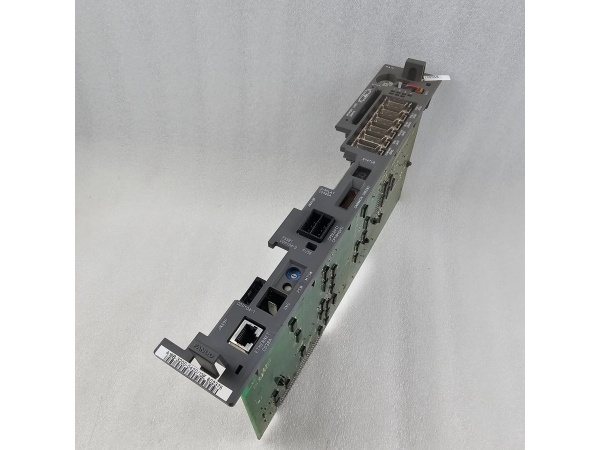
Description
Hard-Numbers: Technical Specifications
- Series: Series 30i/31i CNC Control
- Processor Type: 64-bit RISC CPU (Core processor)
- Control Axes: Up to 16 axes (expandable to 32)
- Spindle Control: Up to 8 spindles
- Memory Capacity: 2GB DDR4 (standard) / 4GB (optional)
- PMC (Programmable Machine Control): PMC-S integrated
- I/O Points: Up to 2048 inputs / 2048 outputs
- Communication Ports: Gigabit Ethernet, RS-232C, USB 2.0
- Operating Temperature: 0°C to +55°C
- Storage Temperature: -20°C to +60°C
- Relative Humidity: 10% to 90% non-condensing
- Certifications: CE, UL, CSA, RoHS
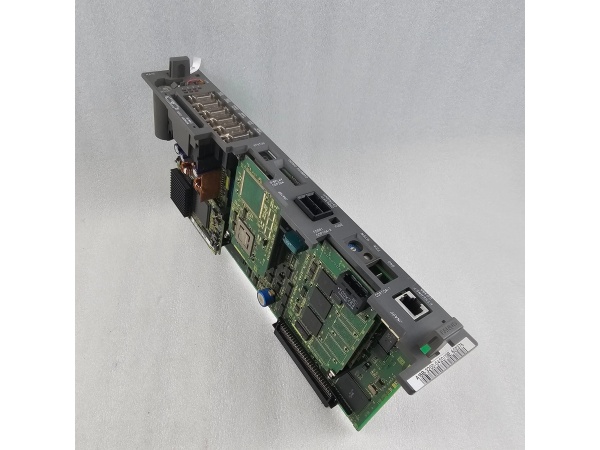
Fanuc A16B-3200-0782
The Real-World Problem It Solves
High-performance CNC machines need multi-axis coordination and complex motion planning. Old control boards lack the processing power for high-speed interpolation and large program sizes, limiting machine capabilities. The A16B-3200-0782 delivers 64-bit processing power with advanced CNC functions, enabling complex multi-axis machining while maintaining precision and reliability even under heavy workloads.
Where you’ll typically find it:
- 5-axis CNC machining centers
- High-speed CNC turning centers with live tooling
- Large CNC gantry routers
- Multi-tasking CNC machines (turn-mill centers)
Bottom line: It provides high-performance multi-axis CNC control for advanced machining applications.
Hardware Architecture & Under-the-Hood Logic
This main CPU board is the core of the Series 30i/31i CNC control system. It houses a 64-bit RISC CPU, high-speed memory modules, and integrated I/O interfaces. The board processes CNC programs, calculates motion interpolation, and communicates with servo amplifiers and peripherals through high-speed internal and external buses.
- The 64-bit RISC CPU executes CNC motion planning, interpolation calculations, and coordinate transformations for up to 16 axes.
- DDR4 memory stores large CNC programs, parameters, and temporary data for fast access during high-speed machining.
- The PMC-S CPU executes ladder logic for machine control, managing tool changers, spindle orientation, and safety interlocks.
- The board communicates with servo amplifiers via the FSSB (FANUC Serial Servo Bus) for real-time motion control.
- Gigabit Ethernet and USB ports provide high-speed data transfer for DNC operations and peripheral connectivity.
- Integrated I/O interfaces handle digital and analog signals for machine sensors, actuators, and operators.
- Redundant watchdog timers monitor system health, triggering safe shutdowns or error displays if faults are detected.
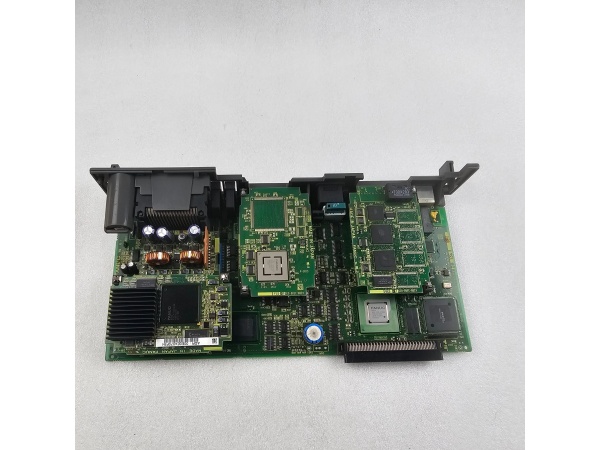
Fanuc A16B-3200-0782
Field Service Pitfalls: What Rookies Get Wrong
Forgetting to Back Up SRAM Data Before ReplacementTechnicians replace the CPU board without backing up CNC parameters, programs, and PMC ladder. After replacement, the machine won’t run, and critical data is lost permanently, costing days of downtime. I’ve seen shops lose weeks of work because they skipped this step.
- Field Rule: Always perform a full SRAM backup using FANUC’s PCMCIA card or USB drive before touching the CPU board. Verify backup integrity by checking file sizes and CRCs.
Incorrect Servo Amplifier Communication SettingsNew engineers replace the CPU board without restoring FSSB (Fanuc Serial Servo Bus) settings. The system won’t recognize servo amplifiers, leading to axis communication errors and machine lockup.
- Quick Fix: Back up FSSB parameters (axis assignment, communication speed) from the old board. After replacement, restore parameters using the 30i/31i setup menu. Perform axis matching to ensure communication is established.
Poor Handling Causing ESD DamageRookies handle the CPU board without proper ESD protection, touching components or circuit traces directly. Static discharge damages the CPU, memory chips, or I/O circuits, leading to intermittent faults or complete failure.
- Field Rule: Always wear an ESD wrist strap and ground yourself before handling the board. Place the board only on an ESD mat or original anti-static packaging. Never touch the bottom of the board or exposed components.
Ignoring Battery Backup for CMOS DataTechnicians forget to install or check the CMOS battery after replacement. The battery dies within hours, causing loss of critical parameters including calendar date, time, and network settings when power is cycled.
- Field Rule: Install a fresh lithium battery (typically CR2032) during CPU board replacement. Verify battery voltage is 3V or higher using a multimeter. Set calendar date and time through the CNC setup menu after initial power-on.
Please note: The listed price is for reference only and is not binding. Final pricing and terms are subject to negotiation based on current market conditions and availability.



