
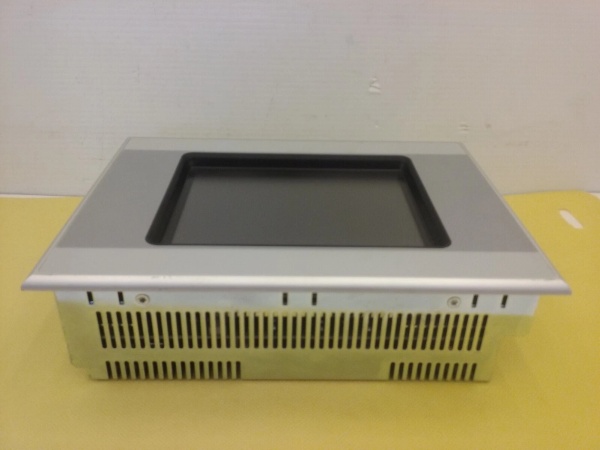
Description
Hard-Numbers: Technical Specifications
- Display Specifications:
- Screen Size: 5.7 inch (diagonal)
- Display Type: CSTN (Color Super Twisted Nematic)
- Resolution: QVGA, 320 × 240 pixels
- Colors: 256 colors
- Visible Screen Area: 115 mm × 86 mm
- Touch Technology: Infrared (IR) touch
- Logical Channels: 47 × 31 (infrared touch matrix)
- Front Panel: Laminated safety glass, anti-reflective
- Backlight: CCFL (Cold Cathode Fluorescent Lamp), software dimmable
- Backlight Life: 50,000 hours (typical)
- Brightness: 150 cd/m² (typical for CSTN)
- Contrast Ratio: 35:1 (typical for CSTN)
- System Specifications:
- Processor: 32-bit RISC, 400 MHz (typical for XVS400 series)
- Memory:
- RAM: 64 MB (typical for XVS400 series)
- Non-Volatile Memory: 32 KB (battery-backed)
- Internal Flash: 1.5 MB (linear address space)
- Project/User Memory: 64,000 KB (64 MB) for HMI project storage
- Storage: CompactFlash™ Card slot (1 slot) – user must supply CF card for OS and project storage
- Operating System: Windows CE (license required)
- Real-Time Clock Backup: CR2032 lithium battery, soldered in (approximately 10 years backup)
- Communication Interfaces:
- Ethernet: 1 × RJ45 port, 100Base-TX/10Base-T auto-negotiating
- RS232: 1 × D-Sub 9-pin male, non-isolated (system port)
- PROFIBUS/MPI: 1 × D-Sub 9-pin male, supports Siemens PROFIBUS DP and MPI protocols
- USB Host: 1 × USB Type A, USB 2.0 (1.5-12 Mbit/s), non-galvanically isolated
- USB Device: 1 × USB Type B, USB 1.1, non-galvanically isolated (for PC connection, programming)
- Power Supply:
- Input Voltage: 24 VDC SELV (Safety Extra Low Voltage)
- Rated Voltage: 24 VDC
- Allowable Voltage Range: 20.4-28.8 VDC (-15%/+20%)
- Absolute Range (with ripple): 19.2-30.0 VDC
- Power Consumption: 19 W (typical)
- Heat Dissipation: 19 W
- Reverse Polarity Protection: Yes
- Undervoltage Detection: Yes (typically ~18V threshold)
- Environment:
- Operating Temperature: 0°C to +50°C (32°F to +122°F)
- Storage/Transport Temperature: -20°C to +60°C (-4°F to +140°F)
- Humidity: 10% to 95% non-condensing
- Altitude: Up to 2000 m without derating (typical)
- Pollution Degree: 2
- Enclosure Rating:
- Front Panel: IP65 (dust-tight, water jet protected)
- Rear Enclosure: IP20 (finger-safe)
- Physical Characteristics:
- Front Panel Width: 212 mm
- Front Panel Height: 156 mm
- Installation Depth: 55 mm
- Weight: Approximately 1.6 kg (3.5 lb) – shipping weight
- Mounting Type: Flush mounting (panel mount)
- Front Frame Material: Metal enclosure and front plate
- Front Frame Type: Standard front with standard membrane
- Mounting Cutout (approximate): 198 mm × 142 mm (refer to installation guide for exact dimensions)
- PLC Functionality:
- PLC License: Retrofittable by user, part number 140389 (LIC-PLC-MXP-SMALL)
- Programming Standard: IEC 61131-3 (LD, FBD, ST, SFC, IL) via CODESYS V3 customized version
- Integrated PLC: When license installed, device functions as HMI-PLC integrated controller
- Without PLC License: Functions as standard HMI terminal only
- Certifications and Approvals:
- CE Mark
- UL 60950-01 (UL File No. E208621)
- CSA C22.2 No. 60950-1
- EN 60950 / IEC 60950
- IEC/EN 61131-2 (PLC compliance when licensed)
- EN 61000-6-2 (EMC immunity)
- EN 61000-6-4 (EMC emission)
- UL Category Control No: NWGQ2, NWGQ8
- EAC (EurAsian Conformity)
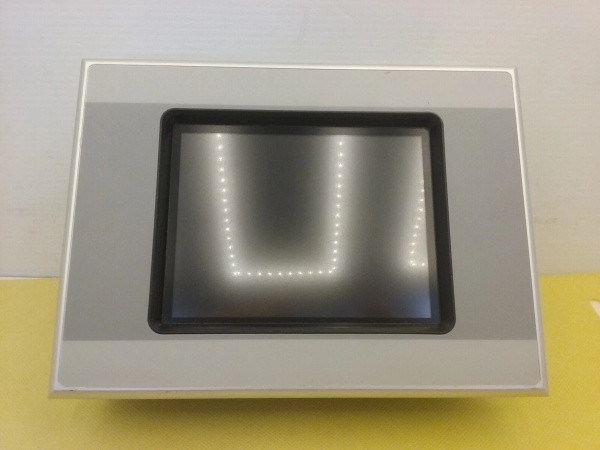
XVS-440-57MPI-1-10
The Real-World Problem It Solves
You need a compact HMI with PLC capability in tight spaces where larger panels won’t fit, but you don’t want to commit to an integrated PLC upfront. The XVS-440-57MPI-1-10 delivers a 5.7-inch HMI with PROFIBUS/MPI connectivity that can be upgraded to a full HMI-PLC later by simply purchasing and installing a license (140389 LIC-PLC-MXP-SMALL). It’s the difference between buying separate HMI and PLC hardware (with double the wiring and integration effort) and a single, compact device that can evolve with your application requirements from pure visualization to integrated control.
Where you’ll typically find it:
- Compact packaging machines (labelers, cartoners, small case packers) with limited panel space
- Factory automation cells and workstations where local HMI control is required alongside main PLC
- Building automation systems (HVAC, lighting control) requiring local visualization and optional control
- Pump stations and skid-mounted equipment with PROFIBUS DP networks
- Mobile automation and process control equipment where vertical (portrait) format is advantageous
Bottom line: This is a space-saving, cost-effective HMI solution with future-proof PLC upgradeability—ideal for applications where you need visualization today but may want integrated control tomorrow without replacing hardware.
Hardware Architecture & Under-the-Hood Logic
The XVS-440-57MPI-1-10 is a 5.7-inch HMI from Eaton’s XVS400 series, featuring a CSTN color display and infrared touch technology. It runs on Windows CE (license required) and can be upgraded to an HMI-PLC integrated controller by purchasing a separate PLC license (140389 LIC-PLC-MXP-SMALL). The device includes a CompactFlash card slot for OS storage and project files, with built-in Ethernet, RS232, PROFIBUS/MPI, and USB interfaces.
-
Display Subsystem: The 5.7-inch CSTN (Color Super Twisted Nematic) display offers 320×240 QVGA resolution with 256 colors. CSTN technology provides color capability with lower cost than TFT but has slower response times and narrower viewing angles. The CCFL backlight is software-dimable to adjust brightness for ambient lighting conditions and extend backlight life.
-
Touch System: Infrared touch technology uses an array of infrared emitters and receivers around the screen perimeter to create a 47×31 infrared light matrix. When a finger or object interrupts the infrared beams, the controller triangulates the touch position. Advantages: high durability (no surface coating to wear), works with gloves/objects, and 100% light transmittance. Disadvantages: susceptible to dust/contamination on the IR frame edges.
-
Processing and Memory: The device uses a 32-bit RISC processor at 400 MHz with 64 MB RAM for Windows CE and HMI runtime. Non-volatile memory (32 KB) and internal flash (1.5 MB) store configuration and system data. A CompactFlash card slot (user-supplied) is mandatory for storing the Windows CE OS and HMI projects (64 MB user/project memory available).
-
Communication Architecture:
- Ethernet: 100Base-TX/10Base-T for TCP/IP networking and connection to SCADA systems or other PLCs
- RS232: Non-isolated serial port for system programming or legacy device communication
- PROFIBUS/MPI: Supports Siemens PROFIBUS DP Master/Slave and MPI protocols for integration with Siemens PLCs and PROFIBUS networks
- USB Host: USB 2.0 port for connecting USB storage devices, keyboards, or mice
- USB Device: USB 1.1 port for PC connection for project transfer and programming via Galileo software
-
PLC Functionality (Optional) : The base device functions as a pure HMI terminal. By installing the PLC license (140389 LIC-PLC-MXP-SMALL), the device unlocks integrated PLC functionality based on CODESYS V3 customized version. The PLC supports all IEC 61131-3 languages (LD, FBD, ST, SFC, IL). When licensed, the device becomes an HMI-PLC integrated controller capable of executing control logic alongside HMI visualization.
-
Power Supply and Protection: 24 VDC input feeds internal DC-DC converters for system power. Reverse polarity protection prevents damage from incorrect wiring. Undervoltage detection shuts down the device gracefully if voltage drops below approximately 18V. The device consumes approximately 19 W including backlight and all interfaces.
-
Real-Time Clock and Battery Backup: A CR2032 lithium battery (soldered in, non-replaceable by user) provides approximately 10 years of real-time clock backup during power loss. The battery maintains date/time and system settings.
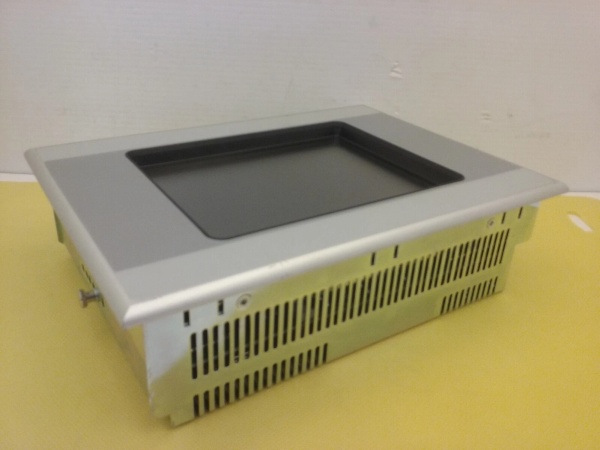
XVS-440-57MPI-1-10
Field Service Pitfalls: What Rookies Get Wrong
Forgetting the CompactFlash CardTechs commission the device without a CompactFlash card installed, then wonder why the HMI won’t boot or displays “No Card in CF slot 0 detected.”
- Field Rule: The XVS-440 REQUIRES a CompactFlash card for Windows CE OS and HMI project storage. The card is NOT included with the base unit. Purchase a CF card (typically 256 MB to 2 GB is sufficient), format it for Windows CE, and load the OS image before first boot. Always keep a backup CF card with your project image on-site for quick recovery.
Confusing CSTN Display with TFT PerformanceExpecting the 5.7-inch CSTN display to have the same brightness, viewing angle, and response time as larger TFT models, then struggling with sunlight washout or ghosting in fast animations.
- Quick Fix: CSTN (Color Super Twisted Nematic) is cost-effective color technology with tradeoffs: lower brightness (150 cd/m² vs. 300+ cd/m² for TFT), narrower viewing angles (especially vertically), and slower pixel response. For high-brightness environments, consider the larger XVS400 models with TFT displays (10.4″, 12.1″). For the 5.7″ model, avoid placing in direct sunlight and minimize high-speed animation.
Misunderstanding PROFIBUS/MPI InterfaceAttempting to use the PROFIBUS/MPI port as a generic RS485 port or expecting it to function without proper termination and addressing, then discovering communication failures on the Siemens network.
- Field Rule: The PROFIBUS/MPI port is designed for Siemens PROFIBUS DP Master/Slave and MPI protocols. It requires proper termination (120Ω resistors at both ends of the bus), correct baud rate settings (match network speed), and unique PROFIBUS/MPI address configuration (no duplicate addresses). Use shielded twisted-pair cable with proper grounding. The port is NOT a general-purpose RS485 port—stick to PROFIBUS/MPI devices.
Overlooking PLC License RequirementAssuming the device has built-in PLC functionality out of the box, then struggling to find I/O points or CODESYS programming tools.
- Field Rule: The base XVS-440-57MPI-1-10 is an HMI-only device. PLC functionality requires purchasing and installing license 140389 (LIC-PLC-MXP-SMALL). After license installation, the device unlocks CODESYS V3 runtime and IEC 61131-3 programming capability. Without the license, you’re limited to HMI visualization only. Verify your project requirements before purchasing—if you need integrated control from day one, buy the license upfront.
Contaminating Infrared Touch FrameInstalling the device in dusty, oily environments without regular cleaning, then experiencing erratic touch responses or “TOUCH ERROR” LED illumination.
- Quick Fix: Infrared touch relies on unobstructed IR beams across the screen perimeter. Dust, oil, or debris on the IR frame edges blocks beams and causes false touches or dead zones. Clean the IR frame regularly with isopropyl alcohol and a lint-free cloth. Avoid touching the frame surface with dirty gloves. In harsh environments, consider a resistive touch model (XV-430 series) which is more tolerant of contamination.
Incorrect CompactFlash Card FormattingUsing a CF card formatted as FAT32 or NTFS from a PC, then finding the device can’t boot or read the project files.
- Field Rule: Windows CE typically requires FAT16 or FAT32 formatting, but the OS image must be prepared using Eaton’s image tool, not simple file copy. Use Eaton’s Galileo software to create a bootable CF card with the Windows CE OS image. For project transfer, the CF card should be formatted as FAT16 (2 GB max) for compatibility. Always verify the CF card works in a spare device before critical commissioning.
Tightening Mounting Screws Too MuchOver-tightening the mounting clamps or threaded pins during installation, causing the front panel to warp and the infrared touch frame to bind, resulting in stuck touch points.
- Field Rule: Use minimal torque when tightening the mounting hardware. The front panel is designed for flush mounting with clamps—do not overtighten. If the device doesn’t seat flush, check the mounting cutout dimensions (198 mm × 142 mm approximate) and ensure the panel is flat. Warped front panels cause IR touch misalignment. Refer to installation guide IL04802011Z for exact torque specifications.
Neglecting Real-Time Clock BatteryAssuming the CR2032 battery will last forever, then discovering date/time resets after power loss, affecting data logging and alarm timestamps.
- Field Rule: The CR2032 battery is soldered in and NOT user-replaceable. It typically lasts 10 years, but in high-temperature environments or with frequent power cycles, battery life may be shorter. Monitor date/time accuracy annually. If the battery fails, the entire device must be returned for service. Document battery installation date and plan for device replacement before battery end-of-life in critical applications.
Ignoring USB Port LimitationsAttempting to power high-draw USB devices from the USB Host port, then experiencing device brownouts or USB port failure.
- Field Rule: The USB Host port is designed for standard USB peripherals (keyboards, mice, storage devices) with limited power output. Do NOT connect USB-powered hard drives, printers, or other high-current devices without an external powered USB hub. The port is not galvanically isolated—use caution with industrial USB devices that may have different ground potentials.
Commercial Availability & Pricing Note
Please note: The listed price is for reference only and is not binding. Final pricing and terms are subject to negotiation based on current market conditions and availability.



