
Description
Hard-Numbers: Technical Specifications
- Display: 12.1-inch TFT LCD, 1024×768 (XGA) resolution, resistive touchscreen
- Processor: Intel Core i5 (Mobile/ULV variant, typically 2nd–4th generation)
- Memory: 4GB DDR3 RAM (upgradable to 8GB, verify chipset support)
- Storage: 64GB SSD (or 32GB eMMC on some variants)
- Operating System: Windows 7 Embedded or Windows 10 IoT Enterprise
- Front Panel Rating: IP65 / NEMA 4/4X (dust-tight, washdown capable)
- Operating Temperature: 0°C to +50°C
- Storage Temperature: -20°C to +70°C
- Humidity: 20–90% RH non-condensing
- Power Supply: 24V DC ±20% (typical B&R power module input)
- Power Draw: ~65W typical (with SSD, no peripherals)
- Ethernet Ports: 2× or 3× 10/100/1000 Mbps (varies by specific variant)
- USB Ports: Typically 2–4× USB 2.0/3.0 ports (front and rear)
- Serial Ports: 1× or 2× RS-232/422/485 (configurable in BIOS or via adapter)
- Digital I/O: Optional digital I/O (8-bit) via internal expansion board
- Dimensions: Approximately 12″ × 9″ × 3″ (305 × 229 × 76 mm) – verify exact dimensions
- Panel Cutout: Custom mounting bracket system ( varies by variant)
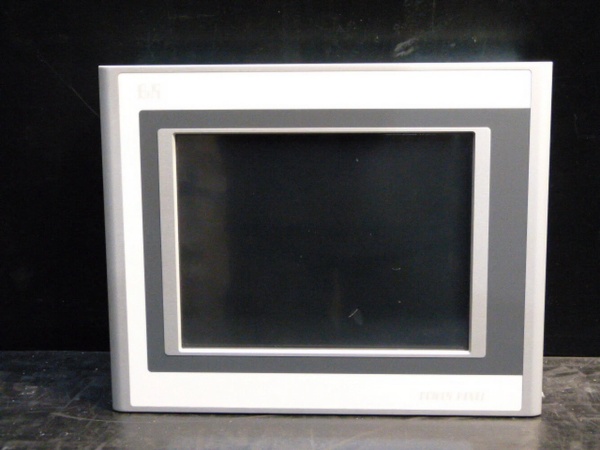
B&R 5PP120.1214-37A
The Real-World Problem It Solves
Legacy Windows-based HMIs running Windows XP Embedded are dying or becoming unsupported, and you need a drop-in replacement that can handle modern B&R Automation Studio software. The Automation PC 1200 gives you a ruggedized Windows platform with IP65 protection, so you can run B&R Runtime, HMI applications, or third-party SCADA clients directly on the shop floor without an enclosure.
Where you’ll typically find it:
- Operator stations on B&R-based packaging machines and assembly lines
- HMI replacement in automotive manufacturing cells running Windows-based visualization
- Process control terminals requiring both PLC communication and Windows application hosting
Bottom line: It’s a B&R-branded industrial PC built for the factory floor, capable of running B&R Automation Runtime and Windows applications in a compact, IP65-rated form factor.
Hardware Architecture & Under-the-Hood Logic
The Automation PC 1200 is built around an Intel Core i5 mobile processor on a custom B&R motherboard. It runs Windows Embedded, with B&R Automation Runtime optionally installed for PLC functionality. The system is designed for continuous industrial operation with filtered cooling, solid-state storage, and front-panel protection against dust and liquids.
- Boot sequence: On power-up, BIOS initializes hardware, loads Windows Embedded from SSD/eMMC, and starts B&R Automation Runtime if configured. The B&R service layer (AR) loads the application project and establishes communication with the fieldbus (POWERLINK, Ethernet/IP, etc.).
- CPU and memory: The Core i5 handles both Windows tasks and real-time control execution if Automation Runtime is installed. DDR3 RAM provides workspace for Windows, HMI applications, and PLC tasks. Multicore architecture allows Windows HMI and real-time PLC tasks to run on separate cores.
- Fieldbus communication: Ethernet ports handle POWERLINK, Ethernet/IP, or Modbus TCP traffic. If configured as a PLC controller, the Automation PC acts as the POWERLINK master or Ethernet/IP adapter, managing I/O modules and remote nodes.
- Display and touchscreen: The 12.1-inch TFT is driven by an integrated Intel GPU. Resistive touch coordinates are processed by the touchscreen controller and passed to Windows/B&R HMI software.
- Cooling and environmental hardening: Internal fans draw air through filters, keeping dust out while cooling the CPU. The front panel is sealed to IP65, preventing washdown chemicals and dust from entering the display area. All connectors are recessed or covered.
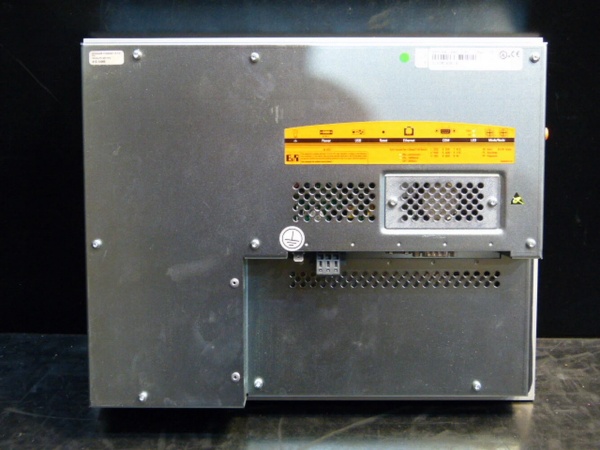
B&R 5PP120.1214-37A
Field Service Pitfalls: What Rookies Get Wrong
Windows Embedded End-of-Life IssuesMany Automation PC 1200 units shipped with Windows 7 Embedded, which reached end-of-life in January 2020. Rookie engineers restore from backups without considering OS support, then wonder why they can’t get security patches or new B&R Automation Studio versions to run properly.
- Field Rule: Check the installed Windows version during PMs. If it’s Windows 7 Embedded, plan a migration to Windows 10 IoT Enterprise. Verify that your B&R Automation Runtime version supports Windows 10 before upgrading.
SSD Wear Out in High-Logging ApplicationsThe SSD (or eMMC) has limited write cycles. If you’re logging data every second to a local file, the drive will fail prematurely. Rookie engineers configure aggressive local logging without thinking about flash wear leveling. I’ve seen SSDs brick in under 18 months.
- Field Rule: Log to external storage (USB or network drive) whenever possible. If local logging is required, rotate log files daily and monitor SSD health with S.M.A.R.T. tools. Replace SSDs preventively every 3–4 years in high-write applications.
Overlooking B&R Automation Runtime ConfigurationThis unit can act as a pure Windows PC, a PLC controller, or both. Rookie technicians reload Windows from scratch and forget to reinstall B&R Automation Runtime, losing PLC functionality. Or they configure it as a PLC when the customer only needed an HMI, causing confusion about what it’s actually doing.
- Quick Fix: Identify the intended role before touching anything. If it’s a controller, verify Automation Runtime is installed and the project loads. If it’s HMI-only, ensure B&R mapp View or similar HMI software is present. Document the configuration in the panel manual.
Failing to Backup Automation Runtime ProjectsThe B&R application project resides on the SSD alongside Windows. Technicians clone the drive or replace the SSD without exporting the Automation Runtime project to external storage. When the drive dies, the entire application is lost.
- Field Rule: Export the Automation Runtime project (.apj or .zip) to USB or network storage after every modification. Keep a copy in the engineering vault. Treat the Automation Runtime project like PLC program backup—don’t assume the Windows image backup alone is sufficient.
Thermal Issues in High-Ambient EnvironmentsThe Automation PC 1200 has internal fans and filters. In steel mills or foundries with ambient temps pushing 45–50°C, the fans run at max speed and still can’t keep the CPU within spec. Rookie engineers mount these in direct sunlight or near radiant heat sources without additional cooling.
- Field Rule: Monitor CPU temperature during summer months or high-load cycles. If temps exceed 75°C under load, add external cooling—install the panel in a shaded area, add cabinet exhaust fans, or use a NEMA-rated enclosure with active cooling. Clean intake filters quarterly.
POWERLINK Master ConflictsIf this Automation PC acts as a POWERLINK master, adding or removing slave nodes without proper reconfiguration can cause bus initialization failures. Rookie engineers swap out an I/O module and don’t update the Automation Runtime configuration, resulting in a “Management Node not found” error on boot.
- Quick Fix: Always back up the Automation Runtime project before modifying hardware. Use Automation Studio to update the hardware configuration after adding/removing nodes. Verify the MN (Management Node) ID and cyclic polling settings match the physical network.
Firmware Compatibility Between Windows and Automation RuntimeRookie technicians upgrade Windows to a new version without checking B&R Automation Runtime compatibility. B&R releases specific Runtime versions for each Windows OS version. Mismatched versions result in Runtime failing to start or instability.
- Field Rule: Check the B&R Compatibility Matrix before upgrading Windows. Only upgrade Runtime after verifying OS support. Perform upgrades in a controlled test environment before deploying to production.
Commercial Availability & Pricing Note
Please note: The listed price is for reference only and is not binding. Final pricing and terms are subject to negotiation based on current market conditions and availability.

