
Description
Hard-Numbers: Technical Specifications
- Power Supply: 24V DC ±20% (18–30V range)
- Power Draw: ~8W typical (max 12W)
- Operating Temperature: 0°C to +50°C
- Storage Temperature: -20°C to +70°C
- Humidity: 20–90% RH non-condensing
- Front Panel Rating: IP65 / NEMA 4/4X (washdown capable)
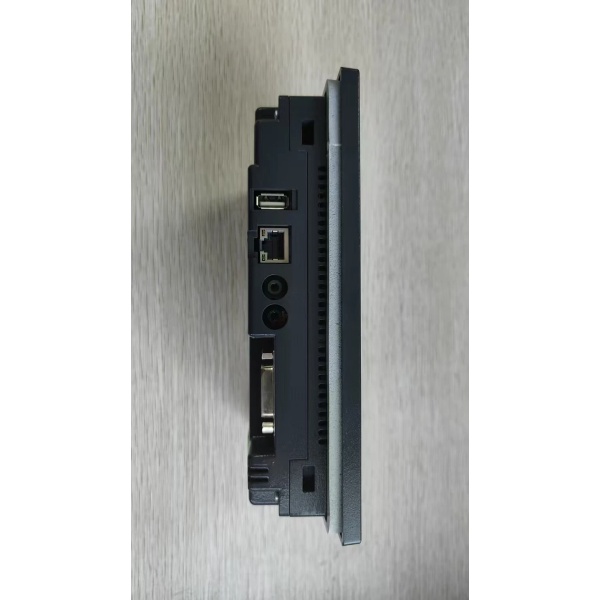
- Ethernet Port: 10/100 Mbps RJ45, auto MDI/MDX
- Serial Ports: 2 ports, each configurable as RS-232, RS-422, or RS-485
- USB Ports: 1× USB Mini-B (Device), 1× USB Type-A (Host)
- Supported PLC Protocols: Allen-Bradley DF1/Ethernet/IP, Modbus TCP/RTU, Siemens S7, Mitsubishi, Omron, Koyo/DirectLOGIC, GE Fanuc, and 300+ additional drivers
- Processor: 32-bit ARM-based microcontroller
- Flash Memory: 256MB for project storage
- RAM: 128MB runtime memory
- Panel Cutout: 5.87″ × 4.45″ (149 × 113 mm)
- Dimensions: 7.05″ × 5.47″ × 2.56″ (179 × 139 × 65 mm)
- Weight: 2.2 lbs (1.0 kg)
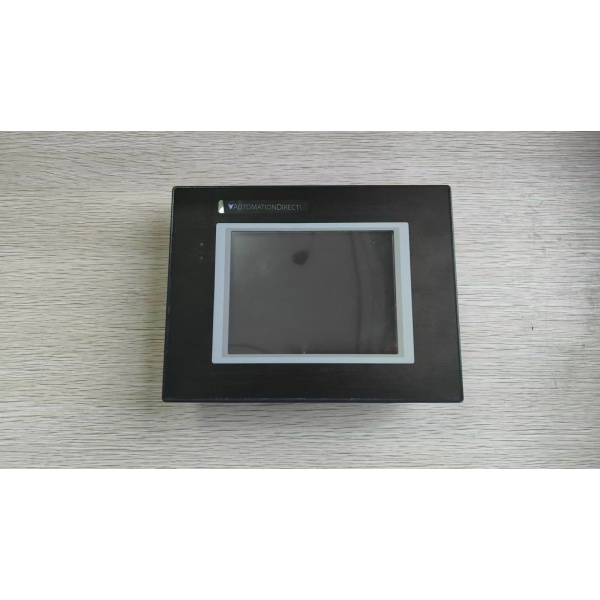
Automation Direct EA9-T6CL
The Real-World Problem It Solves
You don’t need a 15-inch monster to change a recipe or acknowledge an alarm on a mixer skid. The EA9-T6CL fits where big panels won’t—inside cabinet doors, on VFD bypass buckets, or strapped to a mobile equipment frame—while still giving you Ethernet straight to the PLC and enough screen real estate for basic control.
Where you’ll typically find it:
- Local operator stations on individual machine units (mixers, pumps, compressors)
- Cabinet door-mounted HMIs in tight control rooms where panel space is at a premium
- Mobile equipment displays (forklifts, AGVs, portable pumping stations)
Bottom line: It’s the go-to HMI when you need Ethernet and PLC connectivity but only have a 6-inch cutout to work with.
Hardware Architecture & Under-the-Hood Logic
The EA9-T6CL shares the same ARM-based architecture as its larger siblings in the EA9 series, just scaled down for the 6-inch form factor. It runs the full C-more firmware, so you get the same protocol drivers and project features as the 15-inch model—just less screen space. The microprocessor handles local tag polling, screen rendering, and communication stack independently from your PLC.
- Boot sequence: On power-up, the ARM core loads firmware, initializes the 800×480 display driver, and mounts the stored project file. The single USB Host port is detected during boot.
- Polling engine: Establishes simultaneous connections to configured PLC drivers. Ethernet PLCs connect via TCP/IP; serial ports use frame-by-frame request/response at configured baud rates (up to 115.2K for RS-232, up to 38.4K for RS-485).
- Screen rendering: Graphics engine draws objects on the 800×480 TFT frame buffer. Tag values refresh at the configured rate (100–500ms). You get fewer pixels than the 15-inch model, but the same tagging engine underneath.
- Touch event handling: The 4-wire resistive layer reports X/Y coordinates to the ADC. Firmware maps coordinates to screen objects and triggers programmed actions—tag writes, screen jumps, or function key macros.
- Data logging: Writes tag data to internal flash or USB storage at scheduled intervals. With only one USB Host port, you’re limited to single-stick operation for recipes or log transfers.
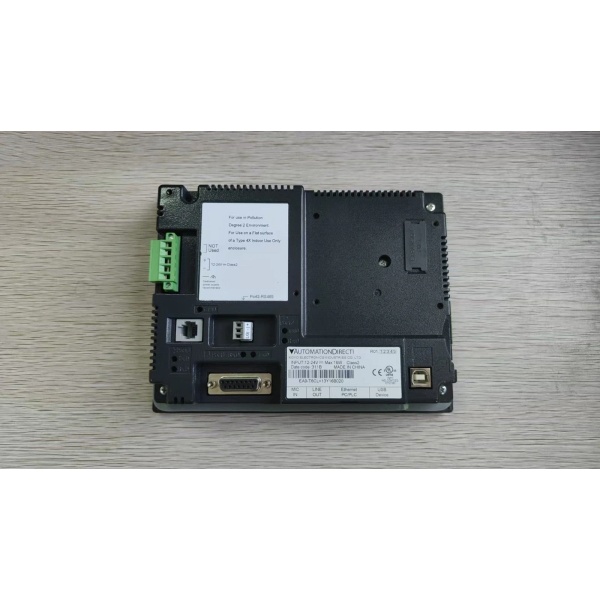
Automation Direct EA9-T6CL
Field Service Pitfalls: What Rookies Get Wrong
Touchscreen Precision on Small ScreenWith only 6 inches of display, you can’t pack 50 buttons onto one screen and expect operators to hit them accurately with gloved hands. I’ve seen rookie engineers cram entire plant overviews onto the T6CL, resulting in constant fat-finger errors and frustrated operators.
- Field Rule: Keep screens simple. Limit to 8–12 large buttons per screen. Use navigation trees rather than cramming everything onto one page. If you need complex data, spec the 10-inch or 15-inch model.
Cabinet Door Wiring StrainThe T6CL is popular for cabinet door mounting, but technicians often run the power and communication cables tight without service loops. When the door swings open 50 times a day, the copper work-hardens and snaps at the terminal blocks.
- Quick Fix: Leave a service loop of 4–6 inches inside the cabinet. Use flexible stranded wire (18-22 AWG) and strain relief clamps. Route cables through the door hinge side, not the latch side.
Single USB Host Port LimitationUnlike the larger EA9 models with two USB Type-A ports, the T6CL only has one. You can’t plug in both a keyboard for programming and a USB stick for data logging simultaneously. Rookie engineers design recipes around USB transfer without accounting for this limitation.
- Field Rule: Plan for one USB device at a time. Use the on-screen keyboard for setup if you need the USB stick for data logging. Or install a USB hub—just verify it works with the HMI’s USB Host current limit.
Ethernet Cable Pulling in Tight SpacesYou’ve got 3 inches of clearance behind a cabinet door to plug in an Ethernet cable. Technicians use standard straight-through patch cables and rip the RJ45 connector off the first time they slam the door. Right-angle connectors are rarely on the truck.
- Quick Fix: Keep right-angle Cat5e cables and Cat5e-to-USB Ethernet adapters in the toolkit. Or install a Cat5e jack inside the cabinet and use a short patch cable to the HMI. Protect the cable with conduit or spiral wrap near the hinge.
CCFL Backlight AgingEarly EA9-T6CL units shipped with CCFL backlights that dim after 20,000–30,000 hours. Operators report “it’s getting hard to read” but don’t mention it until the screen goes completely dark. By then, the plant is down.
- Field Rule: Check brightness during PM rounds. If you can’t read the screen from 3 feet away with normal ambient light, the backlight is fading. Order a replacement or verify that new stock uses LED backlights before you need one.
Serial Port Termination on RS-485The T6CL’s serial ports are configurable as RS-485, but technicians forget termination when daisy-chaining multiple devices. On a short 2-meter run to a single PLC, it’s fine. But when you’ve got 5 devices on a 50-meter bus, you get intermittent communication faults that look like PLC problems.
- Quick Fix: Install 120Ω termination at both ends of the RS-485 bus. Use bias resistors if the bus is long and idle. The T6CL doesn’t provide built-in termination—you’ve got to add it at the terminal block.
Commercial Availability & Pricing Note
Please note: The listed price is for reference only and is not binding. Final pricing and terms are subject to negotiation based on current market conditions and availability.



