
Description
Hard-Numbers: Technical Specifications
- Power Supply: 24V DC ±20% (18–30V range)
- Power Draw: ~15W typical (max 20W)
- Operating Temperature: 0°C to +50°C
- Storage Temperature: -20°C to +70°C
- Humidity: 20–90% RH non-condensing
- Front Panel Rating: IP65 / NEMA 4/4X (washdown capable)
- Ethernet Port: 10/100 Mbps RJ45, auto MDI/MDX
- Serial Ports: 2 ports, each configurable as RS-232, RS-422, or RS-485
- USB Ports: 1× USB Mini-B (Device), 2× USB Type-A (Host)
- Supported PLC Protocols: Allen-Bradley DF1/Ethernet/IP, Modbus TCP/RTU, Siemens S7, Mitsubishi, Omron, Koyo/DirectLOGIC, GE Fanuc, and 300+ additional drivers
- Processor: 32-bit ARM-based microcontroller
- Flash Memory: 256MB for project storage
- RAM: 128MB runtime memory
- Panel Cutout: 14.13″ × 10.63″ (359 × 270 mm)
- Dimensions: 15.2″ × 11.8″ × 3.3″ (386 × 300 × 84 mm)
- Weight: 6 lbs (2.7 kg)
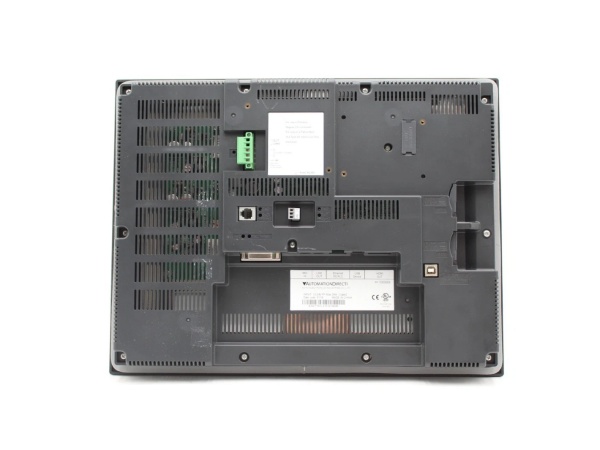
Automation Direct EA9-T15CL
The Real-World Problem It Solves
Machine operators need a big, clear window into the process without fumbling through 50 different screens. The EA9-T15CL gives you 15 inches of real estate and Ethernet straight to your PLC, so you can see alarms, trend data, and machine status at a glance without swapping memory cards.
Where you’ll typically find it:
- Packaging line operator stations monitoring multiple Allen-Bradley ControlLogix PLCs
- Water treatment plant control rooms talking to Modbus RTU PLCs over RS-485
- CNC machine panels displaying Siemens S7 parameters and G-code status
Bottom line: It’s a workhorse 15-inch HMI that connects to pretty much anything with a pulse and keeps your operators from walking the plant floor looking for a laptop.
Hardware Architecture & Under-the-Hood Logic
The EA9-T15CL runs on a 32-bit ARM processor executing Automation Direct’s C-more firmware. It’s not just a dumb display—it has its own runtime engine that polls PLCs, manages the project file, and handles all local I/O independently. The front panel is isolated from the backplane electronics via optical coupling on digital I/O paths, but analog and communication ports share common ground unless external isolation is added.
- Boot sequence: On power-up, the ARM processor loads firmware from flash, initializes the display driver, and mounts the stored project file. USB devices are detected during this phase.
- Polling engine: The HMI establishes simultaneous connections to all configured PLC drivers. Ethernet PLCs are polled via TCP/IP socket connections; serial ports use frame-by-frame request/response cycles at the configured baud rate.
- Screen rendering: The graphics engine draws objects on the 1024×768 TFT frame buffer. Tag values are fetched from the polling engine and pushed to screen objects every refresh cycle (typically 100–500ms configurable).
- Touch event handling: The 4-wire resistive layer reports X/Y coordinates to the ADC. The firmware maps these to screen object coordinates and triggers programmed actions (tag writes, screen jumps, function key macros).
- Data logging: If configured, the runtime writes tag data to internal flash or USB storage at scheduled intervals. USB Host ports can transfer recipes or log files without a PC.
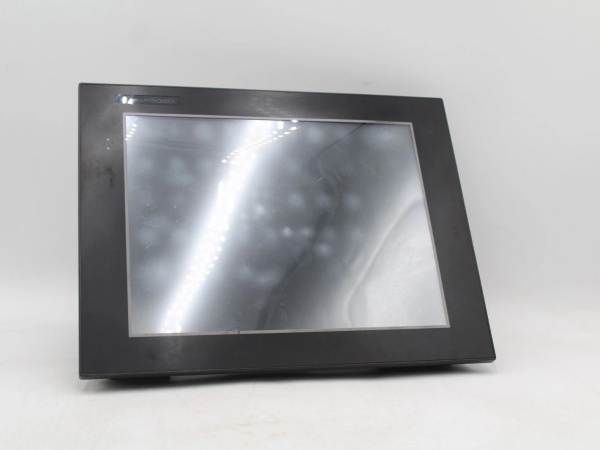
Automation Direct EA9-T15CL
Field Service Pitfalls: What Rookies Get Wrong
Wrong Serial Port ConfigurationYou can’t just wire RS-485 to an RS-232 port and expect it to work. The serial ports are configurable in software, but if the wiring doesn’t match the driver, you’ll see “Communication Error” on screen while the PLC blinks happily. I’ve seen technicians swap +/- on 485 and take down the whole bus.
- Field Rule: Verify the physical layer matches the C-more software driver. RS-232 needs TX/RX/GND; RS-485 needs +/- and termination. Check pinouts with a multimeter before applying power.
Ethernet IP Address CollisionsSlapping a static IP like 192.168.1.10 on the HMI because “that’s what we always use” guarantees a conflict with some printer or office laptop. Network collisions cause random dropouts that look like PLC problems but are actually IP wars.
- Quick Fix: Document your IP scheme. Use DHCP during commissioning, then lock it down. If you must use static, ping the address first from a laptop to verify it’s free.
Resistive Touch Calibration DriftResistive screens get out of calibration after years of abuse, especially in wet environments where operators push harder. The cursor lands 2 inches away from where they tap, and they end up opening wrong screens or triggering alarms.
- Quick Fix: Re-calibrate from the front panel: press and hold the bottom-left and top-right corners simultaneously during power-up, or navigate through System Settings. Do it quarterly in washdown areas.
Backlight Failure on Older UnitsEarly EA9-T15CL panels used CCFL backlights that dim after 30,000 hours. Operators complain the screen “looks dark” but assume it’s normal. Once it fails completely, you’re looking at a $1,500 replacement or a tricky backlight swap.
- Field Rule: Note the manufacturing date if you can access it. If the unit is pre-2016, budget for LED-backlit replacements. Check Automation Direct for service kits before you pull the panel.
USB Data Logging Without Error HandlingYou set up automatic data logging to a USB stick, then the stick fills up or gets yanked by an operator. The HMI logs an error but keeps running—except now you’ve lost critical process data for two shifts.
- Quick Fix: Enable “overwrite oldest file” or configure multiple USB drives in rotation. Check the alarm log screen for USB errors daily during startup rounds.
Commercial Availability & Pricing Note
Please note: The listed price is for reference only and is not binding. Final pricing and terms are subject to negotiation based on current market conditions and availability.



