
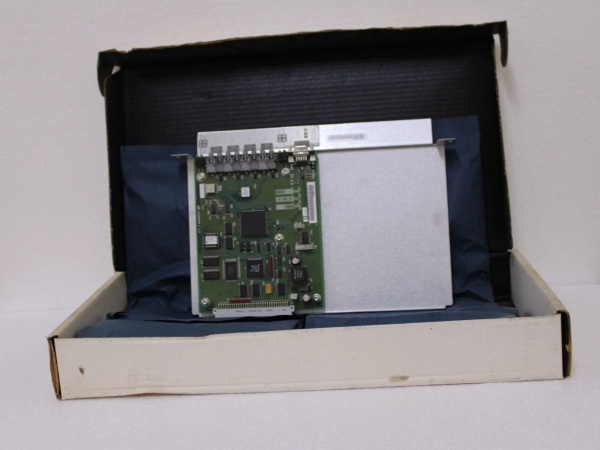
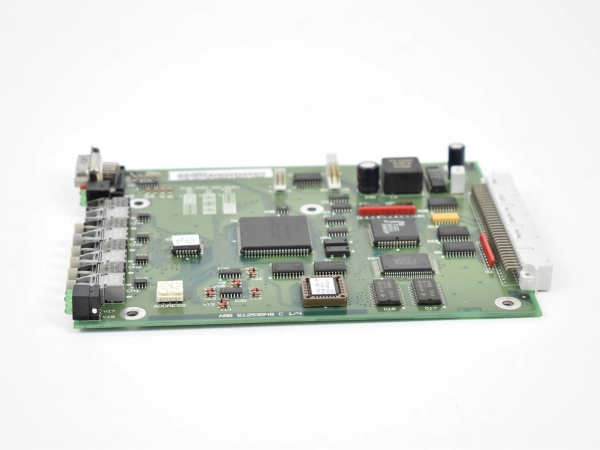
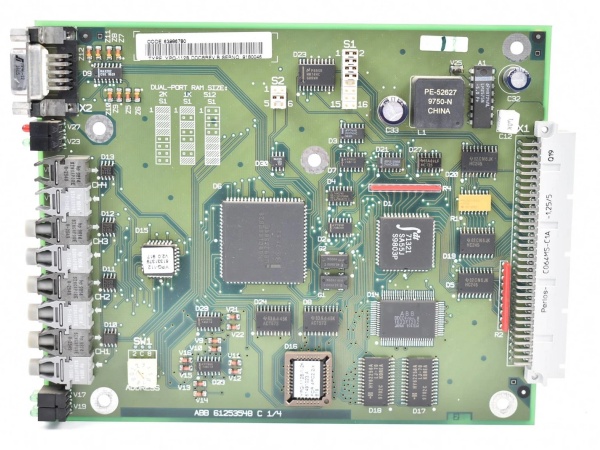
Description
Hard-Numbers: Technical Specifications
- Protocol Support: MasterBus 200, proprietary ABB serial protocols
- Port Count: Multi-port interface (exact port configuration varies by revision)
- Baud/Data Rate: Legacy serial speeds (consult drive manual for specific rates)
- Operating Temperature: -20°C to +60°C
- Isolation Rating: Standard industrial isolation (verify with system requirements)
- Power Supply: 12V DC (via system bus)
- Power Draw: 25mA input current, low power consumption under 10W
- Dimensions: 120mm x 100mm x 30mm (alt: 14.9cm x 7.4cm x 6.9cm)
- Weight: 0.18-0.25kg (varies by revision)
- Certifications: RoHS exempt per Article 2(4)(c) for industrial automation exemptions
- Compatibility: Asea MasterPiece 200, Advant Master controllers, DCS600 DC drives

ABB YPQ112B DCF3986771P0001
The Real-World Problem It Solves
Legacy controller communication dead-ends during drive upgrades. When you’re replacing aging DC drives with DCS600 units but the APC controller still speaks MasterBus 200, this adapter bridges the gap without rewriting control programs or replacing the entire PLC system.
Where you’ll typically find it:
- Paper mills and steel plants running legacy Asea MasterPiece 200/200/1 controllers from the mid-80s
- DC drive retrofits where DCS600 drives interface with existing Advant APC systems
- Brownfield modernization projects requiring compatibility with MasterBus 200 architecture
Bottom line: One adapter saves a complete control system rewrite, preserving decades of tuning and operational knowledge.
Hardware Architecture & Under-the-Hood Logic
The YPQ112B sits between the APC controller backplane and the DCS600 drive interface, translating MasterBus 200 commands to drive-compatible signals. It contains onboard memory that stores interface parameters and diagnostic data, acting as both protocol converter and communication buffer.
- Receives MasterBus 200 commands from the APC controller through the backplane interface
- Onboard memory board stores translation tables and diagnostic logs for fault tracking
- Signal processing converts proprietary ABB protocol to DCS600-compatible format
- Bidirectional data flow enables both control commands and status feedback
- Interface unit buffers communication to prevent timing mismatches between controller and drive
- Diagnostics monitor link integrity and report faults to the APC controller through standard error codes
- Voltage isolation protects the APC backplane from drive-side transients and ground loops
ABB YPQ112B DCF3986771P0001
Field Service Pitfalls: What Rookies Get Wrong
Skipping APC Control Program ModificationsInstalling the YPQ112B without adjusting the APC control program causes communication timeouts and random drive trips. The adapter isn’t plug-and-play—it requires specific configuration changes in the APC controller logic to recognize the new interface unit.Field Rule: Review the APC program modifications section of the installation manual before mounting the unit. Verify all interface parameters match the DCS600 drive firmware version, and test communication with the drive in manual mode before returning to automatic operation.
Mixing Up Memory Board RevisionsDifferent production runs of the YPQ112B have varying memory board configurations that aren’t cross-compatible without firmware updates. Using the wrong revision causes the unit to initialize but fail during data transfer, wasting hours of troubleshooting on a hardware fault that’s actually a software mismatch.Quick Fix: Check the memory board revision code against the APC controller firmware matrix before installation. If revisions don’t match, contact ABB technical support for firmware compatibility tables—never force a mismatched board into a live system.
Improper Grounding Between APC and Drive SystemsThe adapter bridges two ground reference points—the APC controller chassis and the DCS600 drive cabinet. Failing to establish proper ground isolation creates ground loops that manifest as intermittent communication faults or corrupted data packets during high-current drive operations.Field Rule: Verify both the APC backplane ground and drive cabinet ground reference the same earth point. Use isolated wiring for the adapter connections, and measure ground potential difference between systems with a multimeter before energizing—anything above 50mV requires ground equalization.
Not Accounting for MasterBus 200 Timing ConstraintsLegacy MasterBus 200 has specific timing windows that don’t align with DCS600 communication speeds. Overlooking these timing differences causes the adapter to drop packets during rapid command sequences, resulting in jerky motion or delayed response in the drive.Quick Fix: Configure the DCS600 communication parameters to match MasterBus 200 timing requirements. Reduce the drive’s response time setting to match the APC controller’s polling rate, and test the timing by sending rapid start-stop commands through the adapter during commissioning.
Using Standard Serial Cables Instead of Shielded PairRunning unshielded serial cables between the adapter and DCS600 drive introduces noise from nearby VFDs or high-voltage equipment, causing CRC errors that the APC controller interprets as drive faults. Rookies replace the adapter repeatedly when the real problem is cable shielding.Field Rule: Use twisted-pair shielded cable with a minimum 85% braid coverage for all interface connections. Ground the shield at the APC cabinet end only—never at both ends—and keep serial cables at least 12 inches away from power cables in the tray.
Commercial Availability & Pricing Note
Please note: The listed price is for reference only and is not binding. Final pricing and terms are subject to negotiation based on current market conditions and availability.


