Product Core Brief
- Model: 3500/22-07-GCN
- Brand: Bently Nevada (Baker Hughes)
- Series: 3500 Machinery Protection System
- Core Function: Transient Data Interface (TDI) module capturing high-resolution waveform and static data for machinery diagnostics and system communication.
- Product Type: Transient Data Interface / Communication Module
- Key Specs: Ethernet 10/100Base-TX | 4 Keyphasor Inputs | Slot 1 Required
- Condition: New Surplus / OEM Original
Key Technical Specifications
- Module Type: Transient Data Interface (TDI)
- Communication Protocols: BN Master Computer Protocol, Ethernet (10Base-T / 100Base-TX)
- Keyphasor Inputs: Supports up to 4 system keyphasor signals
- Max Speed Input: Up to 20 kHz (depending on enabled dynamic channels)
- Waveform Sampling: Up to 48 channels, synchronous and asynchronous
- Transient Capture: Pre- and post-alarm data (e.g., 2.5 mins pre-alarm, 1 min post-alarm)
- Static Value Capture: 100 ms intervals for 20s pre-event and 10s post-event
- Mandatory Rack Position: Slot 1 (adjacent to power supply)
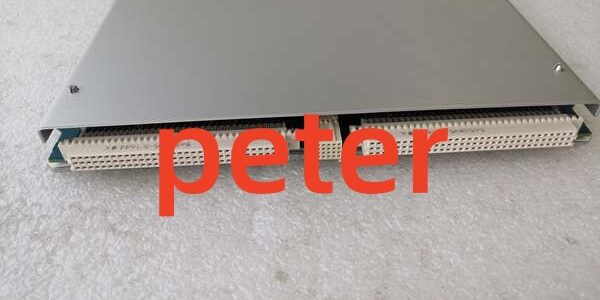
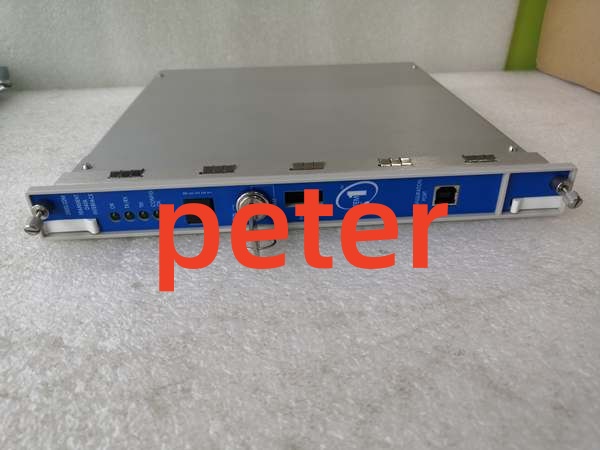
- Front Panel Interfaces: USB-B port, Ethernet RJ-45, Rack Reset Button
- Power Consumption: Approx. 0.5 Watts
- System Compatibility: 3500 M-Series Monitors (3500/40M, 3500/42M, etc.)
Product Introduction
Serving as the communication backbone for the 3500 Machinery Protection System, this Bently Nevada 3500/22-07-GCN continuously collects steady-state and transient dynamic waveform data. It acts as the bridge between the local monitoring rack and host diagnostic software, enabling advanced vibration analysis and remote monitoring.
Unlike standard relay modules, this Transient Data Interface (TDI) is critical for post-event forensics. By capturing high-resolution data before and after an alarm trigger, it allows reliability engineers to diagnose the exact mechanical failure without relying on real-time polling, all while operating at a highly efficient 0.5-watt power draw.
QA & Testing SOP
Communication modules are the nervous system of a protection rack. We verify both data integrity and physical connectivity before shipping.
- Anti-Counterfeit & Visual Audit: We inspect the Bently Nevada silkscreen, verify the GCN regional suffix, and check the front panel Ethernet and USB-B ports for physical damage or bent pins.
- Backplane Enumeration Test: We install the module in an OEM 3500 test rack to verify it correctly enumerates on the backplane and establishes communication with M-Series monitors.
- Ethernet Link Validation: We connect a 10/100Base-TX tester to verify the physical layer link lights illuminate and the module responds to network pings without packet loss.
- Memory & Capture Verification: We trigger a simulated transient event via the configuration software to verify the module’s internal memory correctly captures and stores pre-alarm waveform data.
- ESD Safe Packaging: High-speed communication ICs are sensitive to electrostatic discharge. We pack these modules in anti-static shielding bags with desiccant to prevent latent semiconductor damage.
Installation Pitfalls & Guide
❗ Mandatory Slot 1 Placement: This TDI module must be installed in Slot 1, directly adjacent to the power supply. Placing it in any other slot will prevent backplane communication and halt all waveform capture and diagnostic functions.
❗ Grounding Isolation Switch: The I/O module features a 2-pin connector for signal common. When connecting this to the rack’s single-point instrument ground, you must slide the selector switch on the Power Input Module (PIM) toward the “HP” arrow. Failing to isolate the signal common from chassis ground can introduce severe noise into your vibration readings.
❗ Non-Critical Protection Path: While essential for diagnostics, the TDI is not part of the critical hardware protection path. If this module fails, the 3500 monitors will still trip relays to protect the machine, but you will lose remote visibility and waveform capture. Always keep a spare on-site for critical assets.
Replacement SOP:
- Pre-Install: Document the current rack configuration and IP settings; schedule a maintenance window as module replacement requires a rack reset.
- Removal: Power down the 3500 rack completely; remove the mounting screws and carefully extract the module from Slot 1.
- Install: Slide the 3500/22-07-GCN into Slot 1, ensuring firm backplane seating; secure the mounting screws.
- Power-On Test: Power up the rack, press the front panel reset button if necessary, and verify communication with System 1 or 3500 Configuration Software.
Technical FAQ
What does the “GCN” suffix in the part number mean?
The “GCN” suffix typically denotes a specific regional configuration, firmware revision, or compliance standard (often related to Greater China or specific OEM builds). While the core TDI functionality remains identical, always match the exact suffix when replacing a failed unit to ensure seamless integration with your existing System 1 software configuration.
Can I hot-swap this module while the 3500 rack is powered?
No. While the TDI does not affect the hardware protection relays, hot-swapping communication modules on the 3500 backplane can cause transient bus errors. Always power down the rack, replace the module, and perform a clean boot to ensure proper backplane initialization.
Does this module require an optional license for waveform capture?
Static data capture is standard. However, capturing dynamic and high-resolution transient waveform data often requires an optional channel-enable key (license disk). If your host software shows the module but refuses to pull waveform data, verify your license configuration.
Is this compatible with Modbus TCP?
The 3500/22M TDI primarily uses the Bently Nevada Master Computer Protocol for System 1 software. If you specifically require Modbus RTU or TCP/IP for a third-party DCS/PLC, you typically need to add a dedicated 3500/92 Communication Gateway module to the rack.
Why is this sold as new surplus?
This unit was pulled from sealed OEM overstock or an unfulfilled project before installation. We test it on our OEM 3500 test racks to verify functionality, but we aren’t replacing internal components. You are getting unused factory silicon with original manufacturing tolerances at a fraction of the active OEM list price.